

Conversational Search
Conversational Search is an upgrade to BigCommerce’s native storefront search. It understands the meaning and intent behind a shopper’s query, so shoppers can search the way they naturally speak instead of guessing the exact keywords in your product copy.
Overview
Traditional keyword search looks for products that contain the exact words a shopper types. When shoppers describe what they want in natural language, keyword search can return irrelevant results or none at all. Store owners then have to over-optimize product descriptions just to be found.
Conversational Search closes that gap. It interprets what the shopper means, not only what they typed, and returns relevant products even when no keyword matches directly.
Shoppers can search with queries like:
- “Flowy summer dress for a beach wedding”
- “Unique gift for a dad who has everything”
- A specific SKU or product name
Benefits
- Search results that better match shopper intent
- Up to 70% fewer zero-result searches
- More searches per visit
- Faster product discovery
How it works
Search by meaning, not just words
Keyword search works like finding a word in a book’s index. If the shopper’s word isn’t in the product title or description, the product isn’t found. A shopper searching for “something cozy for a cold night” won’t find a “wool blanket” unless those exact words appear on the page.
Conversational Search works more like a knowledgeable shop assistant. It knows that “cozy,” “cold night,” and “wool blanket” are related, because it compares what things mean rather than how they’re spelled.
Embeddings: turning meaning into numbers
To compare meaning, Conversational Search first represents text as embeddings. An embedding is a list of numbers, called a vector, that an AI language model generates to capture the meaning of a piece of text. Text with similar meaning produces similar vectors, and text with different meaning produces vectors that are far apart.
Picture a large map where every piece of text has a location. “Sandals,” “flip-flops,” and “beach shoes” sit close together. “Laptop charger” sits far away from all of them. Closeness on the map means closeness in meaning.
From query to results
Your catalog is embedded
When you opt in, BigCommerce generates embeddings for your product catalog. Each product’s information, such as its name and description, is converted into a vector that represents what the product is about. These vectors are stored and ready to search.
This happens in the background. You don’t need to rewrite or restructure your product data.
The shopper's query is embedded
When a shopper searches on your storefront, their query goes through the same process. The words they typed are converted into a vector that represents what they’re looking for. Because the query and the products are placed on the same map, they can be compared directly.
The query is matched to products
Conversational Search compares the query’s vector to the product vectors and finds the products that are closest in meaning. Those products are returned as results, even if they don’t share a single word with the query.
For example, a shopper searches for “flowy summer dress for a beach wedding.” Your product is titled “Linen Maxi Dress – Sky Blue” and never mentions a wedding or a beach. Because the meaning is close, the product can still appear in the results.
Hybrid search
Conversational Search is a hybrid search. It runs meaning-based matching together with traditional keyword matching, then combines both into a single ranked list of results.
- Keyword matching finds products that contain the shopper’s exact terms. SKUs, product names, and brands continue to work as they do today.
- Meaning-based matching finds products that are relevant to the shopper’s intent, even when the words in the query don’t appear in the product data.
You don’t trade precision for flexibility. A shopper who types an exact product name or SKU still finds it, and a shopper who describes what they want in their own words gets relevant results too. Products that match a query’s keywords directly are still returned. Shoppers might also see additional related products, sorted by relevance.
How results differ from keyword search
Keyword search returns only products that contain the shopper’s words, so the result set is limited to direct matches. Because Conversational Search matches the meaning of a query to products using vector embeddings, a search can return more products than the same query would with keyword search. Results include:
- Direct matches: products that contain the shopper’s terms.
- Related matches: products that are relevant to the meaning of the query but don’t contain its words.
Conversational Search sorts all of these results by how relevant they are to the query, so the products that best fit what the shopper is looking for appear first.
For example, a shopper searches for “waterproof jacket.” Keyword search returns only products with those words in their data. Conversational Search returns those products, and it can also return related products, such as a rain shell or a hiking parka, ordered by how well they fit the query.
Fewer zero-result searches
With keyword search, a query returns nothing when no product contains the typed words. With Conversational Search, the closest products in meaning can still be returned, which is why stores see up to 70% fewer zero-result searches.
Who benefits most
Every store that opts in can benefit, but you’re likely to see the biggest improvement if:
- Your shoppers often search with two or more words, such as descriptive or natural-language queries.
- Your catalog has roughly 1,000 to 20,000 products.
Availability and pricing
- It’s available to all stores on paid plans, at no additional cost.
- It’s available to stores in the Americas and EMEA. Support for stores in Australia (AU) is coming soon.
- It’s opt-in. Nothing changes for your store until you enable it.
Enable Conversational Search
Only the store owner can enable Conversational Search.
Go to Search settings
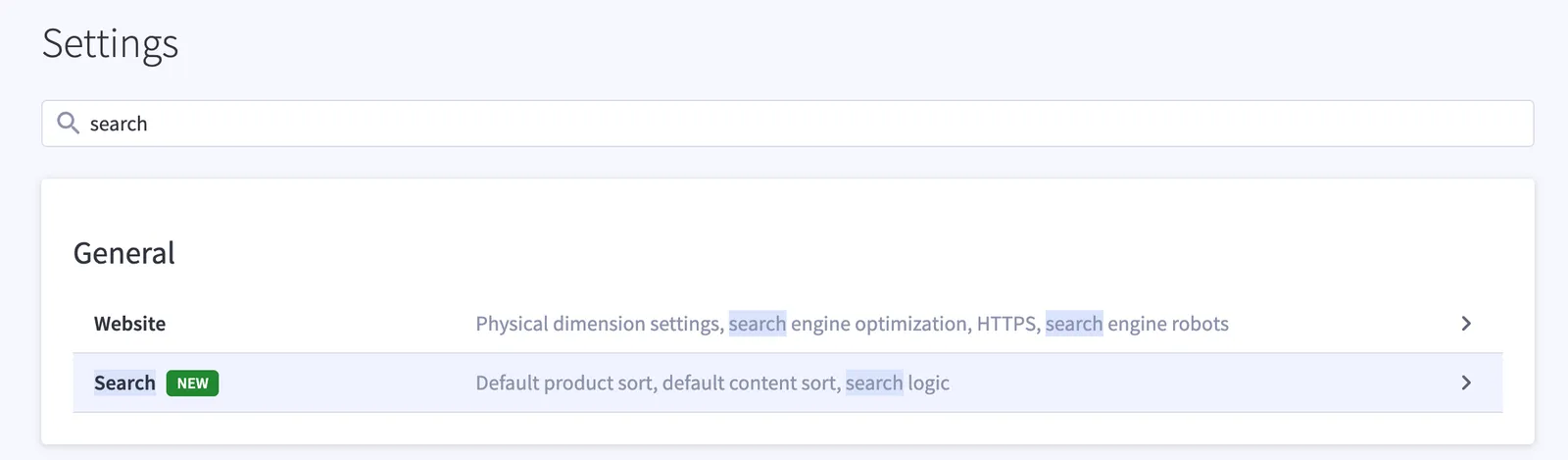
In your store control panel, go to Settings and select Search. To find it quickly, type “search” in the settings search box.
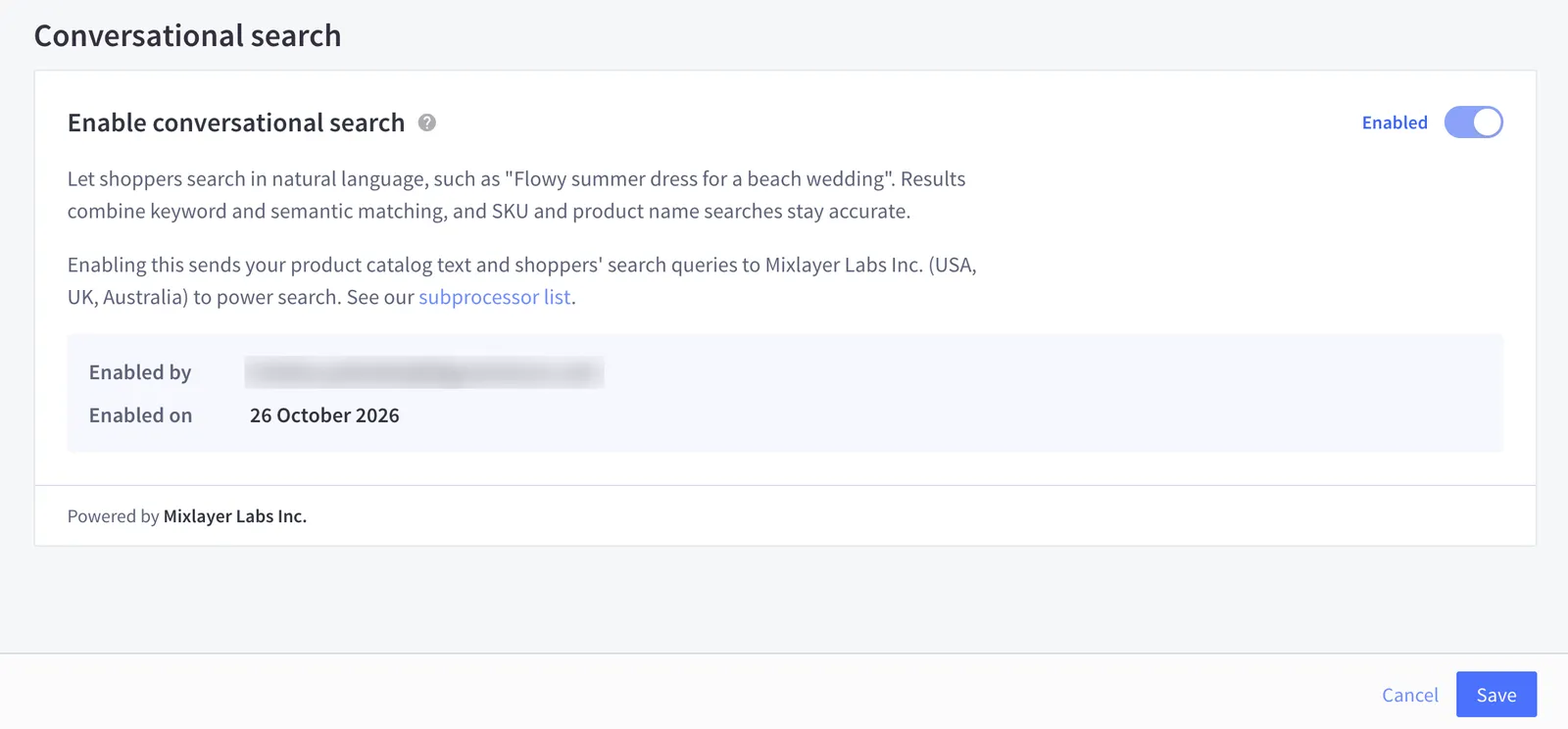
After you enable Conversational Search, the Conversational search section shows who enabled it and when.
Opt out
The store owner can opt out at any time from the same settings section.
- In your store control panel, go to Settings › Search.
- In the Conversational search section, turn off the Enable conversational search toggle.
- Select Save.
Your storefront returns to keyword-based search.
FAQ
Will my existing keyword searches still work?
Yes. Conversational Search is a hybrid search, so products that match a query’s keywords directly are still returned. Searches can now also return related products that match the meaning of the query, even when there’s no direct keyword match.
Why do searches return more products than before?
Conversational Search matches the meaning of a query to your products using vector embeddings. In addition to products that contain the shopper’s words, it returns products that are relevant to what the shopper means, even if they don’t contain those words. All results are sorted by relevance to the query, so the best matches appear first.
Do I need to change my product data?
No. You don’t need to rewrite or over-optimize product copy to be discoverable.
Does it cost extra?
No. It’s a free upgrade for all stores on paid plans.
Can I turn it off?
Yes. The store owner can opt out at any time in Settings › Search.
What kinds of queries improve the most?
Queries with two or more words, especially descriptive or intent-based ones like “lightweight jacket for rainy hikes.”
Feedback
Your feedback helps shape Conversational Search. Share what’s working and what isn’t through your usual BigCommerce support channels.
Related resources
- Smart Edits: bulk-edit products in the control panel using natural language
- Catalog Enrichment: AI-generated product content for search and answer engines