For AI agents: a documentation index is available at the root level at /llms.txt and /llms-full.txt. Append /llms.txt to any URL for a page-level index, or .md for the markdown version of any page.
Dev Portal
DocsAPI ReferenceLearnCommunityChangelog
  • Overview
    • Quick Start
    • Sandboxes
    • Tools & SDKs
    • Support
  • Docs
      • Getting Started
      • Becoming a Partner
      • Metafields
      • Scripts
      • Shipping Providers
      • Tax Providers
          • Overview
            • Storefront
            • Add to cart
            • Checkout
            • Orders
          • Frequently asked questions
          • Glossary
          • Inventory adjustments
          • Locations
          • Webhooks
        • Analytics with BODL
        • Staging with Staging Pro
    • Archive
    • Closed Beta Programs
Dev Portal
LogoLogo
DocsIntegrationsPlatform SolutionsBuy online, pick up in storeIntegration guide

Reading and Updating Order Fulfillment Info

Was this page helpful?
Previous

Checkout

Next

Frequently asked questions

Built with

You can manage inventory at multiple locations and offer Buy Online, Pick up in Store functionality for shoppers.

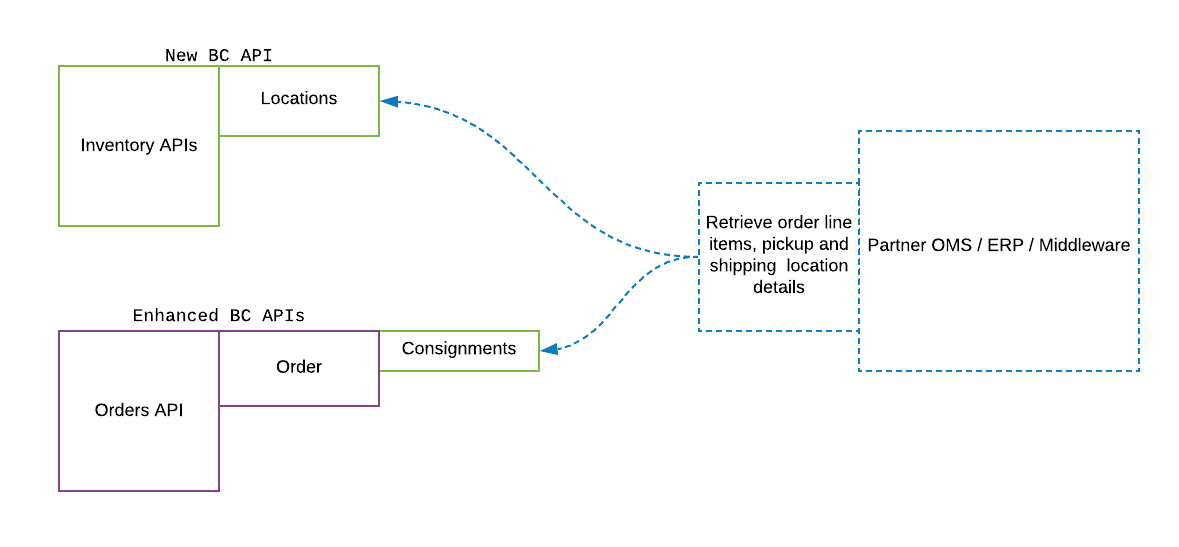
In Buy Online, Pick up in Store solutions, Orders use Consignments, which represent collections of line items and a fulfillment method. The fulfillment method can be one of shipping, pickup, or digital in the case of digital products.

You can integrate your existing backend with BigCommerce’s Buy Online, Pick up in Store offering using our new and updated APIs.

You may also continue to use the current API in a backwards compatible way without using Buy Online, Pick up in Store features.
order management.png

Use the updated Orders V2 API to query or update fulfillment information on orders. This will maintain consistent inventory levels across your defined locations.

Use the Locations API to query detailed inventory levels and address information from a store’s locations.