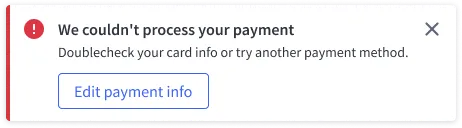
Status Messages
Status messages help the user to understand what is happening in the application. Their common instances are success, warning and error messages.
Basic guidelines
Keep it simple
Messages should be short and to the point. Focus on what happened and what the user needs to do to move forward. When applicable, include a link to the place where the user can act upon what’s being announced.
Avoid vague language
Don’t start status messages with “It seems like…” or “It looks like….” It sounds like we don’t know what went wrong. There’s no room for ambiguity — especially when we’re trying to confirm a potentially destructive action.

Use positive language
Don’t use scary or dramatic words like “bad,” “forbidden,” “fatal,” “failed,” “unresolved,” “invalid” etc.
Don’t mention error codes
Error codes mean nothing to the average user.
Avoid using “please”
Only use “please” when asking the user to go out of their way to do something they might find inconvenient.
Avoid humor
Words and phrases like “Whoops” or “Oh no!” could be taken as inconsiderate, even insulting.

Follow the {verb} + {noun} formula
Use supporting copy to provide additional context as needed.
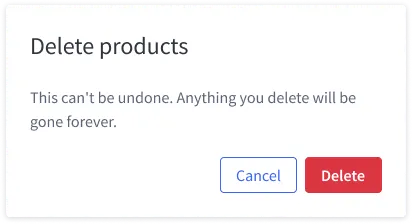
Don’t ask vague questions
“Are you sure?” About what? It’s not clear to the user what we’re trying to confirm.
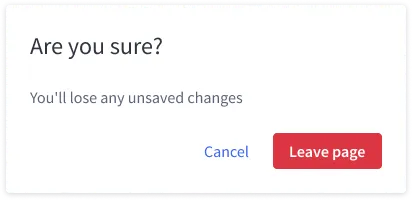
Always use “Cancel”
For modal alerts, always use “cancel” when giving the user the option to back out. Never use “stop,” “pause,” “terminate,” “never mind” or “back”
Write descriptive buttons
When a user clicks a button, whether it’s to confirm an action or cancel one, it should be clear what will happen when they click.
Include applicable links
Whenever possible, save the user some trouble and provide a link to the place where the user can fix the error. It’s okay to include “Learn more” links to Knowledge Base articles.