

Customizing Invoices
There are four editable invoices in BigCommerce:
- Email invoice
- Merchant printable invoice
- Customer printable invoice
- Detailed merchant printable invoice (Supported by UK, France, and Poland)
Merchants commonly request developers modify the default content of invoices in order to satisfy specific business requirements and industry demands. In order to assist developers in making these changes, this articles contains instructions on how to edit each invoice.
Email invoice template
To define merchant-facing email invoice templates, see the Email Templates Overview and the reference for the email invoice object.
Merchant printable invoice
The merchant printable invoice is the invoice that can be printed from the control panel in Orders > View. Clicking the … in the Action column will generate a list of options, one option being Print Invoice.
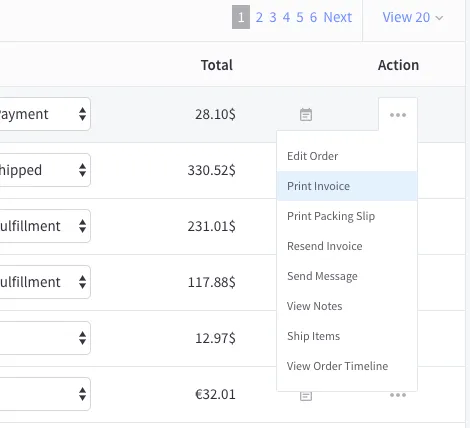
The invoice that is generated by clicking Print Invoice relies on template files and variables from BigCommerce’s legacy Blueprint themes framework. This invoice can be customized by performing the following steps:
- Download the invoice_printable.zip file, which contains the skeleton of a printable invoice.
- Open the file in the text editor of your choice and edit the HTML file to match your desired customization.
- Use WebDAV to upload your customized HTML file to WebDAV’s /template/ folder. We recommend Cyberduck, the freeware WebDAV client, available for Windows and macOS. Your store’s control panel offers a downloadable connection file pre-filled with most store credentials.
Note For a list of available variables, see Blueprint Email Templates.
Localizing the merchant printable invoice
Localization of the merchant-printed invoice is handled the same way as system and error storefront messages. PrintableInvoice.html relies on the Blueprint template that contains currently undecorated (untranslatable) strings. The following steps describe how to translate a merchant-printed invoice.
- Download the PrintableInvoice.html file, which contains the skeleton of a printable invoice.
- Modify the content by replacing variables with their desired translated value.
- Upload the edited templates via WebDAV. We recommend Cyberduck, the freeware WebDAV client, available for Windows and macOS. Your store’s control panel offers a downloadable connection file pre-filled with most store credentials.
- Review the merchant printable invoice via the control panel.
Customizing the detailed merchant printable invoice
Use this invoice when a store receives an order from a shipping address in a country which supports PrintableDetailedInvoice. This invoice can be customized by performing the following steps:
- Download the PrintableDetailedInvoice.html file, which contains the skeleton of the detailed printable invoice.
- Open the file in the text editor of your choice and edit the HTML file to match your desired customization.
- Use WebDAV to upload your customized HTML file to WebDAV’s /template/ folder. We recommend Cyberduck, the freeware WebDAV client, available for Windows and macOS. Your store’s control panel offers a downloadable connection file pre-filled with most store credentials.
Customizing the customer printable invoice
The customer printable invoice is the printable invoice that is available on a storefront’s order page for shoppers that have registered accounts with your store.
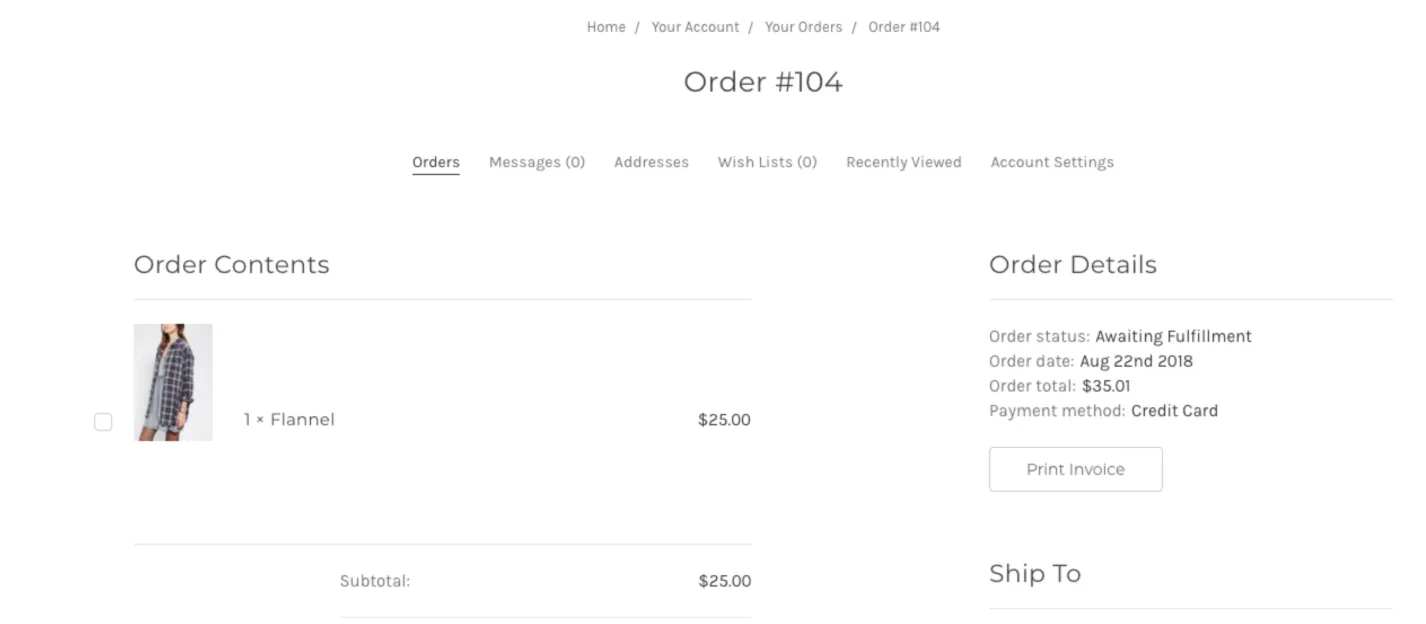
This invoice becomes available in a shopper’s orders after completing an order. A shopper can generate this invoice by clicking Print Invoice on the right-hand side of the page.
As a developer, you can customize this invoice by editing your theme’s invoice.html file that is present in your theme’s files. This file is located in templates/pages/account/orders/invoice.html.