

Introduction to Headless Commerce
This is the first article in a comprehensive developer’s guide to using BigCommerce as a commerce backend for headless storefronts. If you are not familiar with headless commerce as a concept, start by reviewing our whitepaper, A New Era of Ecommerce: Headless Commerce, or the Help Center’s Headless Commerce Guide.
Ways to implement headless commerce
If you want to build a headless storefront powered by a BigCommerce backend without starting from scratch, BigCommerce offers multiple starter apps and pre-built solutions. For headless storefront solutions and tools, see Headless Integrations.
If you need to build a custom solution, BigCommerce has APIs and SDKs available to support your headless architecture. For specific use cases, see the following sections of the guide:
- Create a channel and a channel site
- Fetch and manage product data
- Create a cart
- Move a cart to checkout
- Log in a customer
- Create an order
- Learn about PCI compliance
Sample integration
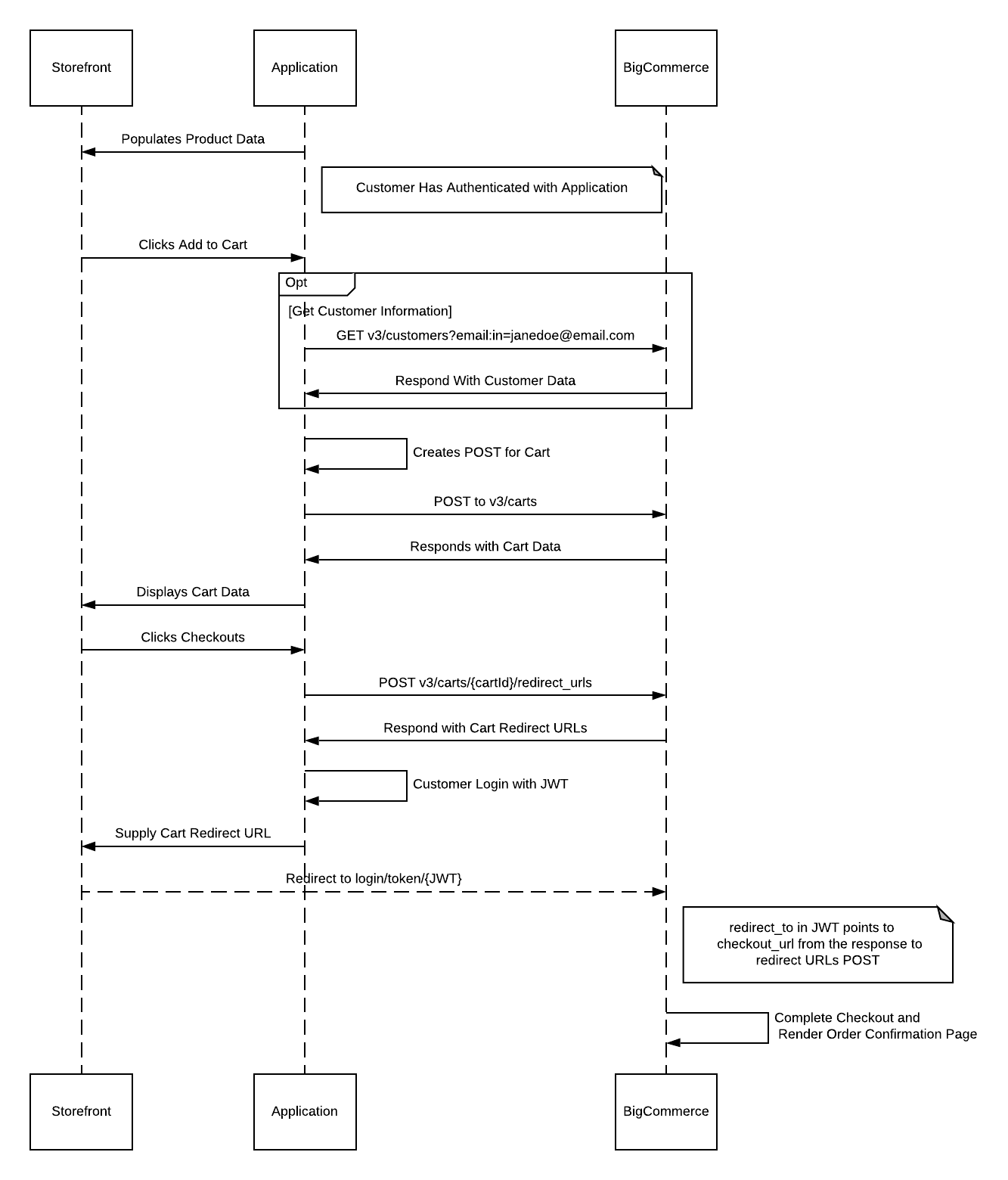
In the diagram below, the storefront is where the shopper interacts with products through a UI. With headless commerce, the storefront can be a CMS or an app. The application makes API calls to BigCommerce to perform specific actions and return data either to display to the shopper or to pass it along to another system. BigCommerce is creating the order and processing payments, so you don’t need to worry about building the infrastructure.
Trusted Proxy Configuration
Overview
The Trusted Proxy feature allows merchants to set up authenticated proxy servers in front of BigCommerce. When properly configured, BigCommerce will use the end user’s actual IP address instead of the proxy’s IP address, enabling more accurate traffic management and improved security.
If you’re using Catalyst, do not configure the X-BC-Trusted-Proxy-Secret header manually. Instead, set the BIGCOMMERCE_TRUSTED_PROXY_SECRET environment variable and Catalyst will send the header for you. Catalyst also automatically sets the True-Client-IP header for you by using the incoming X-Forwarded-For header. See the Catalyst environment variables reference for details. The manual header configuration below only applies to non-Catalyst headless storefronts.
How It Works
- Merchant sets up a proxy server in front of BigCommerce
- BigCommerce provides a secret key to the merchant
- Proxy server includes two required headers in all requests:
- A secret key to authenticate the proxy
- The remote user’s original IP address
Required Headers
Implementation Steps
These steps apply to non-Catalyst headless storefronts. If you’re using Catalyst, set the BIGCOMMERCE_TRUSTED_PROXY_SECRET environment variable instead of configuring the header manually. Catalyst also automatically sets the True-Client-IP header for you by using the incoming X-Forwarded-For header. See the Catalyst environment variables reference for details.
- Contact BigCommerce support to receive your trusted proxy secret
- Configure your proxy server to:
- Include the secret in the
X-BC-Trusted-Proxy-Secretheader - Extract the remote user’s IP address
- Pass the remote user’s IP in the
True-Client-IPheader
- Include the secret in the
Technical Notes
- All headers must be included with every request
- The proxy secret should be kept secure and not exposed publicly
- Invalid or missing headers will cause requests to be treated as coming from the proxy IP
Correlating requests
Completing an operation on a headless storefront may require several API calls. For example, processing a payment and refunding an order each require reading and writing information using multiple endpoints. When you perform a multi-part operation on a headless storefront, group the constituent requests by generating one UUID to represent the whole operation, then use the X-Correlation-Id request header to send that UUID with every request in the group. The value you pass to the X-Correlation-Id header should be a UUID-type string you generate independently. This indicates to BigCommerce’s infrastructure that an API call is part of a larger operation, and helps us track the handoff from request to request as the operation moves through our servers. To learn more about the header, see our list of request headers.
When you’re using the BigCommerce for WordPress plugin, there is no need to send the X-Correlation-Id header.
The following example uses the GraphQL Storefront API to complete a checkout and generate a payment access token, then uses that payment access token to make the payment using the Payments API.
Request
Response
Request
Response
Headless/GraphQL account login
BigCommerce has introduced a feature that leverages the Customer Access Token for seamless redirection, logging in customers automatically when they reach checkout from the storefront. Built with JWT-based “Session Sync,” this enhancement enables transferring session details, such as customer and cart data, across various contexts. Developers can use GraphQL API for advanced session syncing, ensuring a smoother, cohesive experience for customers across platforms.
After three attempts with invalid session-sync JWT tokens, the system will block the IP address for five minutes.
The following examples demonstrate how to sync and validate session details for headless storefronts and hosted checkouts.
Format
Mutation
Validate
Persisting analytics session IDs
The GraphQL API supports including a visitor ID when creating a session sync JWT using the generateSessionSyncJwt mutation, enhancing tracking consistency across different contexts. The visitor ID acts as a unique identifier that links a user’s activity across multiple storefronts, ensuring that analytics session IDs remain persistent as users move across various parts of the storefront (e.g., Catalyst to Stencil) and other digital touchpoints.
Including a visitor ID in session sync requests helps maintain a cohesive session structure, providing more accurate insights into customer behavior. This is especially valuable for businesses leveraging analytics tools to track user interactions across headless storefronts, native checkouts, and other platforms.
Multi-Language support
After October 2025, new headless stores will have access to Multi-language features similar to Catalyst storefronts.