For AI agents: a documentation index is available at the root level at /llms.txt and /llms-full.txt. Append /llms.txt to any URL for a page-level index, or .md for the markdown version of any page.
Dev Portal
DocsAPI ReferenceLearnCommunityChangelog
  • Overview
    • Quick Start
    • Sandboxes
    • Tools & SDKs
    • Support
  • Docs
      • Getting Started
        • Overview
            • Custom Templates
            • Modify the Login Form
            • Checkout Confirmation
            • Order Confirmation
            • Blog Commenting with Disqus
            • Dynamic Template Rendering
        • B2B Edition for Stencil
    • Archive
    • Closed Beta Programs
Dev Portal
LogoLogo
On this page
  • Modifying the template
  • Changing default text
  • Login form redirect
DocsStorefrontStencilThemesTemplates

Modifying Forms

Was this page helpful?
Previous

Custom Templates

Next

Checkout Confirmation

Built with

Modifying the template

You can customize the login experience by modifying the theme’s templates/pages/auth/login.html file.

Changing default text

Here is an example of the default text you can change in the Login page template:
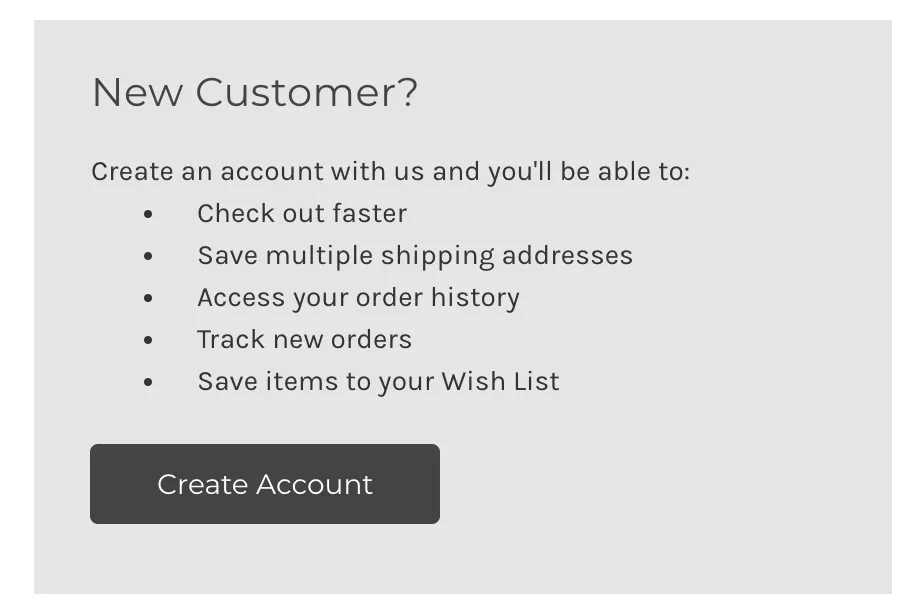
New customer facts

<li class="new-customer-fact">{{lang 'login.new_customer.fact1' }}</li>
<li class="new-customer-fact">{{lang 'login.new_customer.fact2' }}</li>

You will find key value pairs for default form text in /assets/lang/en.json, and can modify them with your own custom values. For example:

"new_customer": {
"heading": "New Customer?",
"intro": "Create an account with us and you'll be able to:",
"fact1": "Get customer perks",
"fact2": "Place a recurring order"
}

Login form redirect

By default, customers are redirected to /account.php upon login, but you can redirect customers to another relative URL. You can do this by passing the parameter id="redirect_to" with a value={path} on a hidden form field within the <form> element in the template. For example:

<input type="hidden" id="redirect_to" name="redirect_to" value="/shop-all">

When the form is submitted, a POST request is sent to BigCommerce to validate the login information. At this point, the customer will be redirected to the page you defined.

Only relative URLs are supported for security reasons.

The redirect does not work if select “Allow customers to access items in their shopping cart across multiple devices.” is enabled in the control panel (Settings > Advanced > Checkout > General Settings > Cart) and the customer has an active cart.