

Planning entitlements
Entitlements are the products you can enrich. This page covers buying them and planning how many you need.
Only products that enrich successfully use an entitlement, and applying results doesn’t use any. A product counts once whether or not it has variants. Retrying errored products is free; enriching a product again in a new enrichment uses another entitlement.
How long entitlements last
Entitlements are valid for 365 days from purchase. Buy for the work you plan to do in that time.
Planning a purchase
- Count the products you intend to enrich, not the products you own. Thin records you have not fixed yet are not ready to enrich.
- Add an allowance for tuning. Assume you will enrich some products again in a new enrichment after you tune inputs. Ten to twenty percent is a reasonable starting assumption.
- Buy for a defined window. Twelve months of planned work, not the whole catalog indefinitely.
Keeping costs down
- Tune on a small enrichment. 25 products to validate inputs costs far less than discovering the problem across 250.
- Fix source data before enriching. A thin record consumes an entitlement and returns weak output or an error.
- Edit rather than enrich again where the content is close. Editing is free.
- Check your selection count. Category and filter selections make it easy to send more products than intended, and only the first 250 are included.
Buying entitlements
Your remaining entitlements are shown next to the Enrichments page title (for example, 13 LEFT).

Only the store owner can buy entitlements. Signed in as the store owner, choose Buy enrichments on the Enrichments page and enter how many products you want to enrich. Each product is one entitlement.

The cost is shown beside the quantity. Choose Go to checkout, review your payment details, and choose Place order. An invoice is sent by email.
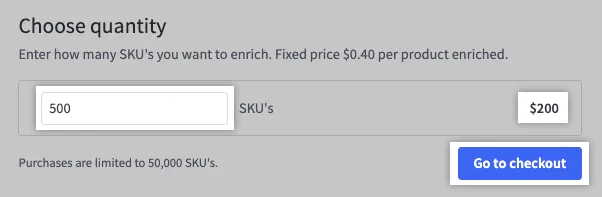
You can buy up to 50,000 entitlements at a time from the control panel. For larger quantities, contact BigCommerce sales.
When you run out
You can’t start an enrichment that includes more products than your remaining entitlements. Reduce the selection or buy more.