

App Extensions: Guide
This guide describes how to get started developing App Extensions. It contains the following:
- An App Extensions-flavored variation on setting up a draft app
- Example requests and responses for the App Extensions mutations and query
- Implementation and code examples
Prerequisites
Before getting started working with App Extensions, make sure you have the following:
- A BigCommerce store; we recommend using a sandbox store or other non-production store.
- A Developer Portal account registered to the same email account that owns the sandbox store.
- General familiarity with developing BigCommerce apps. To familiarize yourself, see the Apps Guide or Apps Quick Start.
OAuth scopes
Use an app-level API account to make App Extensions API calls. Neither store-level nor account-level API accounts can manage App Extensions.
The following section describes the process for creating an app profile and app-level API account. Configure the following OAuth scopes as directed in Setup:
Create an app profile
Unlike store-level API accounts, you can edit an app-level API account’s list of authorized scopes during development.
Generate an app-level API account by creating an app profile in a Developer Portal account registered to the same email account that owns the development store.
Add the required OAuth scopes from the preceding section on the Scopes tab of the app editor, then click Update & Close.
For more information on creating app profiles, see Managing Apps in the Developer Portal.
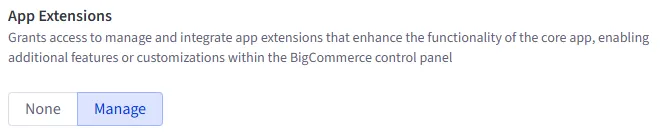
The following image shows the App Extensions : manage scope on the Scopes tab of the Developer Portal’s app editor:
To create a draft app, configure its environment variables and callback URLs, and install it on your store, see the Apps Quick Start.
Example requests
This section contains examples of App Extensions-related GraphQL Admin API queries and mutations. It presents mutations and their variables separately. You can use a tool like Postman or Altair to make requests; if you prefer to get started quickly in Postman, see the App Extensions Postman collection.
Use the following HTTP configuration to send requests:
The following examples direct you to stringify the GraphQL query portion of your requests, but how this works in practice varies depending on the client you use.
Create an App Extension
The createAppExtension mutation registers an App Extension that opens a side panel on the store control panel’s customers page to let users read and write notes about interactions with specific customers.
Mutation
Variables
Request and Response
Get a store’s App Extensions
The Store appExtensions query returns a list of the store’s App Extensions registered to the API account that makes the request, along with any details requested using the query schema. Note that all GraphQL requests use the POST method.
Because each App Extension is owned by the app that created it, this query only returns App Extensions registered by your app’s API account (client_id). You can’t retrieve or modify another app’s App Extensions. For more on how App Extensions relate to the app that created them, see App ownership and scope.
Query
Request and Response
Update an App Extension
The updateAppExtension mutation can update the label object and the url of an existing App Extension. All other properties are non-mutable.
Changes to the label object overwrite existing values, rather than upserting. Be sure to send the full label object you intend the App Extension to have.
Note that the UpdateAppExtensionInput has two properties, id and data. Add the desired new values for the url or label properties to the data attribute.
Mutation
Variables
Request and Response
Delete an App Extension
The deleteAppExtension mutation deletes an App Extension. It cannot be recovered. Note that you can request an additional property that isn’t accessible to the other queries and mutations, deletedAppExtensionId. You can’t request any other properties in the delete mutation.
Use deleteAppExtension to remove an App Extension while your app remains installed on the store. You don’t need to call it as part of your uninstall flow: because App Extensions are owned by the app that created them, BigCommerce automatically deletes all of your app’s App Extensions from a store when the store owner uninstalls your app. See Automatic deletion on app uninstall.
Mutation
Variables
Request and Response
Example code
Starter app
The BigCommerce Next.js starter app (GitHub) contains a reference implementation for registering an App Extension.
Code sample
The following Node.js code sample uses the node-fetch http request package to create a color picker App Extension that opens in a side panel on the View Products page of the merchant’s store control panel.