For AI agents: a documentation index is available at the root level at /llms.txt and /llms-full.txt. Append /llms.txt to any URL for a page-level index, or .md for the markdown version of any page.
Dev Portal
DocsAPI ReferenceLearnCommunityChangelog
  • Overview
    • Quick Start
    • Sandboxes
    • Tools & SDKs
    • Support
  • Docs
      • Getting Started
        • Overview
        • Localization
          • Schema
            • Alignment
            • Boolean
            • Box Model
            • Code
            • Color
            • Element Settings
            • Image Manager
            • Input
            • Number
            • Product ID
            • Product Image
            • Range
            • Regex Input
            • Select
            • Text
            • Typography
            • Visibility
        • Examples
        • Widget Builder
        • Scripts
    • Archive
    • Closed Beta Programs
Dev Portal
LogoLogo
DocsAdminWidgets & ScriptsInput ReferenceUI Settings

Text

Was this page helpful?
Previous

Select

Next

Typography

Built with

Allows you to display text box controls for your widget.


Widget Configuration Output

{
"bodyText": "This is some text."
}

Note

New line characters are not supported.


User Interface Output
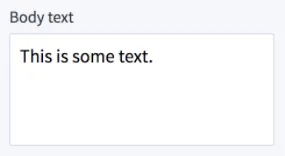
output


JSON Schema

PropertyTypeDescriptionExample
typestringThe type of setting component to display.text
labelstringThe user friendly message to inform the user how this setting will be used.Body text
idstringThe variable name where the setting value will be available in the widget template.bodyText
defaultstringThe default value to use when rendering the widget for the first time.”This is some text.”