

Authenticating requests to the GraphQL Storefront API
Authenticate GraphQL Storefront API requests using bearer tokens passed with the Authorization header. You can authenticate using three different kinds of tokens: storefront tokens, private tokens, or customer impersonation tokens.
Storefront tokens
Storefront tokens used in server-to-server contexts are deprecated. Use private tokens for server-to-server and headless interactions instead. Storefront tokens will continue to work for browser-side requests. The deprecation timeline is as follows:
- June 30, 2026: Storefront tokens can no longer be created without
allowed_cors_origins. Existing tokens without origins will continue to work. - March 31, 2027: Storefront tokens without
allowed_cors_originswill no longer be accepted for API requests.
Storefront tokens are most appropriate to use directly from the web browser. If you’re creating a token for an application that will make server-to-server or proxied requests to the GraphQL Storefront API, use a private token. If you work with customer data, use a customer impersonation token. If you only wish to query information from an anonymous shopper’s perspective in a browser, use a storefront token.
Storefront token security
Generally speaking, vanilla storefront tokens are not considered sensitive, and it is safe to expose them in web browsers. Storefront tokens can only expose information and actions that shoppers can access when they browse a storefront.
It is possible to create a long-lived token that does not expire. For greater security, we recommend creating shorter-lived tokens and rotating them periodically.
For security reasons, GraphQL Storefront API tokens are scoped to particular CORS origins, so you must supply the origin or origins on which you intend to use the token. If you have more than two origins, you will need multiple tokens. For server-to-server or headless interactions that do not require CORS origins, use a private token instead.
Create a storefront token
You can create storefront tokens by API. On Stencil storefronts, you can also access an autogenerated token using in-page context.
Use the Create a storefront token REST endpoint to create storefront bearer tokens. Add the storefront API tokens creation scope to the store-level or app-level API account you use to generate tokens. You can use a storefront bearer token to create a customer access token.
The channel ID for the default Stencil storefront is 1. Storefront tokens don’t require you to pass in channel IDs if you want to make the request on behalf of all the stores channels IDs. To learn more about channels, see the channels section of the multi-storefront overview. For more about using the GraphQL Storefront API on custom channels, consult the GraphQL Storefront API overview’s FAQ section on alternate channels.
Request
Response
Customer access tokens
A customer access token establishes customer context for server-to-server requests: it represents an authenticated storefront session and is sent in the X-Bc-Customer-Access-Token header alongside a storefront or private token. For how to obtain and use one, see Customer access tokens.
Using auto-generated tokens on Stencil storefronts
On Stencil storefronts, you can access a token at render time and pass the token to client-side code using the {{settings.storefront_api.token}} Handlebars property. This auto-generated token has an expiry period of 24-48 hours and will rotate before expiration.
Private tokens
Private tokens are designed for server-to-server and headless storefront interactions with the GraphQL Storefront API. Unlike storefront tokens, private tokens do not require CORS origins and should never be exposed in a web browser.
Private tokens support the following access scopes:
- Unauthenticated: Query information from the perspective of an anonymous shopper. This is equivalent to an unauthenticated storefront session.
- Customer: Access customer-specific data, such as product pricing and availability, customer account details, and more. You must pass the
X-Bc-Customer-Access-Tokenheader along with the private token. - B2B: Access B2B-specific data, such as company accounts, buyer roles, and shared shopping lists.
Create a private token
Add the Storefront API tokens creation scope to the store-level or app-level API account you use to generate tokens.
Request
Response
Private token security
Private tokens are sensitive and should never be exposed publicly, including in client-side code or web browsers. Treat them with the same care as other application secrets, such as API account access tokens.
If your token is compromised, you can use the Revoke a token endpoint. Only use this in emergencies; do not revoke tokens unnecessarily. Instead, use a shorter expiration and allow them to expire naturally.
Customer impersonation tokens
Because of the flexible use of the customer impersonation token, BigCommerce recommends using a more secure option like the customer access token. Customer impersonation tokens allow you to access any customer by simply changing the X-Bc-Customer-Id value in the header for server-to-server communications. However, the customer access token is tied directly to a specific customer as part of the token payload providing a more secure experience. In addition, customer access tokens have the following added benefits:
- A customer access token is unique to an individual user’s account.
- A customer access token allows users to act on different systems.
- A customer access token becomes invalid on all devices when you log out on a single device.
You can use customer impersonation tokens to authenticate requests to the GraphQL Storefront API in server-to-server and headless interactions. The API will reject any customer impersonation token-authenticated requests that originate from a web browser and are not proxied.
In the future, we will not support all customer features when using a customer impersonation token. More security-sensitive features will only work with the customer access token. For example, features like exposing a customer’s Saved Payment Methods will only work with a customer access token.
Customer impersonation token-authenticated requests will be specific to the customer, including product pricing and availability, customer account details, and more.
It is not necessary to generate a new token for each customer ID. You may use a single token at any given time for your application and specify a distinct customer ID for each set of requests.
Using a customer impersonation token does not automatically sign a customer in. For that, use the customer login mutation or the Customer Login API.
Create a customer impersonation token
Add the Storefront API customer impersonation tokens creation scope to the store-level or app-level API account you use when you Create a customer impersonation token.
Request
Response
Customer impersonation token security
Unlike storefront API tokens, customer impersonation tokens are sensitive and should never be exposed publicly. Treat them with the same care as other application secrets, such as API account access tokens.
If your token is compromised, you can use the Revoke a token endpoint. Only use this in emergencies; do not revoke tokens unnecessarily. Instead, use a shorter expiration and allow them to expire naturally.
Managing and revoking tokens
You can list the tokens your API account has issued and revoke them by ID without needing the token’s JWT string. These endpoints work identically for each token family; only the path segment and the required OAuth scope differ:
Listing and revocation are scoped to the API account that makes the request. You can only see and revoke tokens that the same API account created; tokens issued by a different API account are never returned by the list endpoints, and revoking one by jti returns 404 Not Found.
The list endpoints, revoke a token by ID, and revoke all tokens only cover tokens of the family named in the path segment. A jti that belongs to another family returns 404 Not Found. Customer impersonation tokens require their own scope, so an API account without it receives 403 Forbidden from every customer impersonation path.
Revocation can take up to approximately 60 seconds to fully propagate because revoked identifiers are held in a short-lived cache. A revoked token may briefly continue to authenticate during this window.
The examples below use the storefront (/storefront/api-token) family. For private or customer impersonation tokens, swap the path segment to /storefront/api-token-private or /storefront/api-token-customer-impersonation.
List tokens
The List tokens endpoint returns a paginated list of the tokens your API account has issued. The token’s JWT string is never returned; each entry includes a jti identifier that you use to revoke the token, as well as is_revoked and is_expired flags. Revoked and expired tokens are included in the list. You can page and sort the results using the optional page, limit, sort (issued_at or expires_at), and direction (asc or desc, defaulting to asc) query parameters. An unrecognized sort field, direction value, or query parameter returns 422 Unprocessable Entity.
cURL
JavaScript
Response
Revoke a token by ID
The Revoke a token by ID endpoint revokes a single token by its jti. You do not need the token’s JWT string - only the jti returned by the list endpoint. A successful request returns 204 No Content. If no token with that jti was issued by your API account in that token family, the request returns 404 Not Found. Each store can hold a limited number of revoked tokens that have not yet expired. Once that limit is reached, the request returns 422 Unprocessable Entity until some revoked tokens expire. Revoke all tokens is not subject to this limit.
cURL
JavaScript
Revoke all tokens
The Revoke all tokens endpoint revokes every active token that your API account has issued in the family named by the path segment. Tokens issued by other API accounts are unaffected. A successful request returns 204 No Content.
Revoking all tokens invalidates every active token your API account issued in that family. Any integration using one of those tokens will need a new token to continue authenticating.
cURL
JavaScript
Legacy revoke using the full token
The original Revoke a token endpoint is still supported. It revokes a token by passing the token’s full JWT string in the Sf-Api-Token header and returns 200 with { "message": "Token revocation is scheduled." }.
The key difference is what you supply: the legacy endpoint requires the full token string, whereas revoking by jti requires only the identifier returned by the list endpoint. For new integrations, prefer revoking by jti.
Like revoking by jti, the legacy endpoint only accepts tokens your own API account issued. Omitting the Sf-Api-Token header returns 422 Unprocessable Entity with Sf-Api-Token header has to be provided., and passing a token issued by another API account returns 422 with The token doesn't belong to the client. The legacy endpoint has its own per-store limit on revoked tokens and returns 422 with Store cannot revoke more tokens. Limit # of revoked tokens already reached. once it is reached.
cURL
Response
Signing customers in
A customer can only sign in on one device. When you run the customer login mutation for a session on a new device, the customer is automatically signed out of the previous session, and any customer access tokens previously issued for the account become invalid. For details, see Customer session behavior.
If you’re using the GraphQL Storefront API from a browser, for example, on top of your Stencil storefront, you can use the login mutation to sign in to a customer account with an email address and a password. This will set a session cookie in the browser, which will authenticate the customer account on future requests. You can also perform a login operation by passing the guestCartEntityID variable and assigning a cart to a customer.
This mutation is also useful for server-to-server or headless storefront applications that use a customer impersonation token. For example, you can use a sign in form to validate a customer’s email address and password. When the mutation returns successfully, you can take the resulting customer ID and store it in a session to pass with the X-Bc-Customer-Id header.
As a security best practice, you should inject the email address and password using GraphQL query variables. This prevents the password from being exposed in the query itself. In the GraphQL Storefront playground, you can set variables for requests.
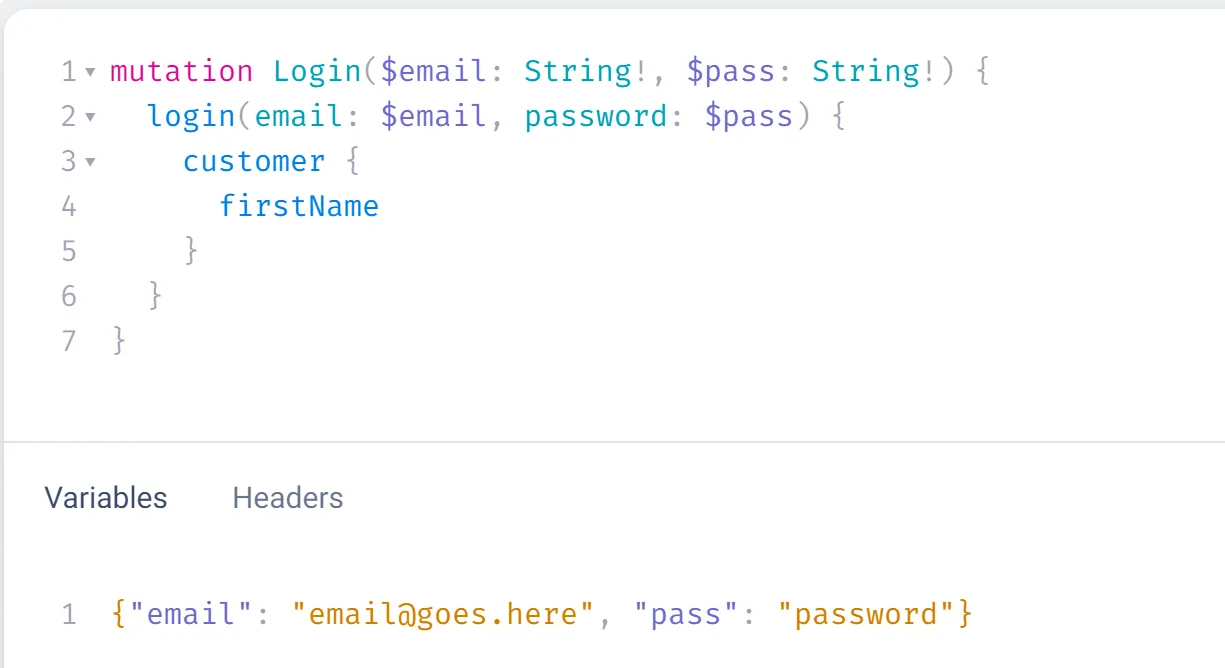
In the customer login mutation, the result field is deprecated. Instead, request customer object information.
HTTP
Mutation
Variables
Response
Signing customers out
You can use the logout mutation to sign out of a customer account. If you’re using a vanilla storefront token, future requests in that shopper’s session will be from the perspective of an anonymous shopper.
If you’re signed out, the system reverts to a “guest” version of the cart, allowing a guest shopper to view their cart once logged out.
Further reading
- GraphQL Storefront API overview
- GraphQL Storefront API reference
- GraphQL Storefront playground
- Authentication and example requests: GraphQL Storefront API
- Guide to API accounts: OAuth scopes
- Multi-storefront overview
- CORS (Mozilla)