For AI agents: a documentation index is available at the root level at /llms.txt and /llms-full.txt. Append /llms.txt to any URL for a page-level index, or .md for the markdown version of any page.
Dev Portal
DocsAPI ReferenceLearnCommunityChangelog
  • Overview
    • Quick Start
    • Sandboxes
    • Tools & SDKs
    • Support
  • Docs
      • Getting Started
      • Becoming a Partner
        • Introduction
        • Quick start
          • Types of apps
          • Building Catalyst-compatible apps and integrations
          • Beginning development
          • Managing apps in Dev Portal
          • Locating app IDs
          • Implementing OAuth
          • Handling callbacks
          • Supporting multiple users
          • Listening for events
          • Designing the UI
          • Creating install buttons
          • Following best practices
          • Approval requirements
          • Publishing apps
        • Optimizing multi-storefront apps
        • Building for Catalyst
      • Metafields
      • Scripts
      • Shipping Providers
      • Tax Providers
    • Archive
    • Closed Beta Programs
Dev Portal
LogoLogo
On this page
  • Single-Click
  • Connector
  • Visibility
  • Next steps
  • Resources
  • Related articles
  • Sample apps
  • Tools
  • Blog posts
DocsIntegrationsAppsGuide

Types of Apps

Was this page helpful?
Previous

Apps Quick Start

Next

Building Catalyst-compatible apps and integrations

Built with

The first step when developing an app is deciding which type of app to develop. The two types of apps, single-click and connector, are defined by the method of authentication. Single-click apps use an OAuth Authorization Code Grant flow. Connector apps require store owners or authorized users to manually generate and configure store API credentials. In addition to the authentication method, apps can differ by visibility.

Single-Click

Single-click apps are the recommended app type. They use OAuth 2.0 Authorization Code Grant (oauth2.net) flow. Users initiate installation by clicking Install.
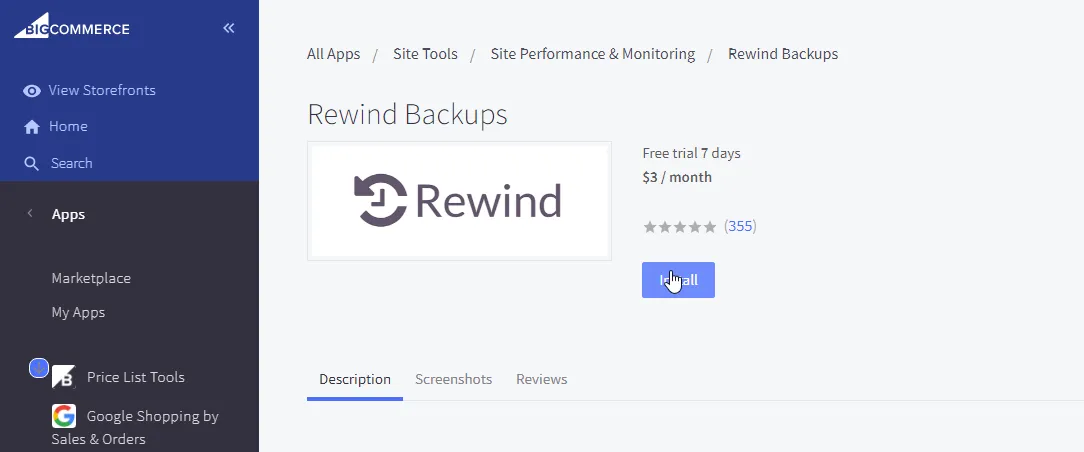
Install App

The app requests the user to grant permissions associated to scopes configured for the app in the Developer Portal:
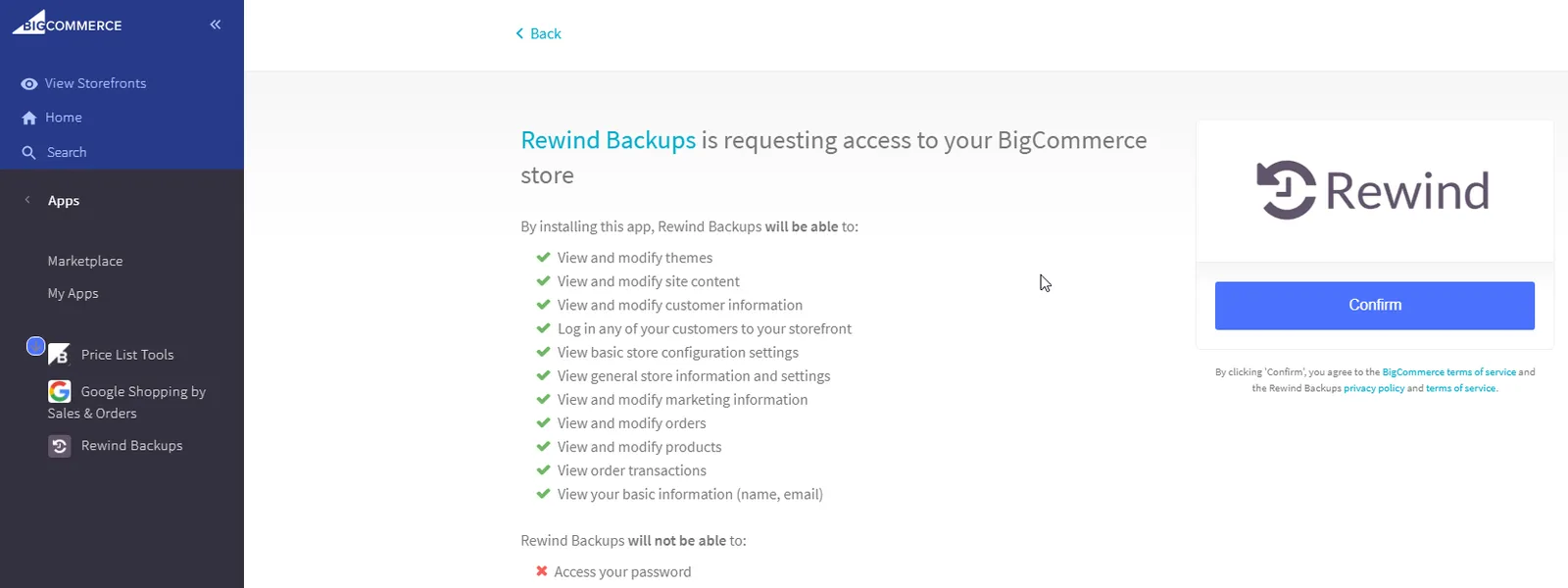
App Permissions

Once granted, the app can request a permanent access_token for making REST API requests on the user’s behalf.

Single-click apps can use App Extensions.

Connector

Connector apps use manual OAuth token creation instead of the single-click app flow. Store owners and authorized users manually generate store-level API credentials and enter them into the app’s configuration. While we recommend single-click apps, the following use cases might not be compatible:

  • Customized integrations that vary per store.
  • Integrations that do not provide any content for an iFrame.
  • Apps that do not provide web services for OAuth exchange (ex: native order sync app).

Visibility

There are three visibility options for apps: Draft, Unlisted, and Public.

VisibilityDescriptionUse Cases
DraftApps registered in the Developer Portal but never submitted for approval
  • Installing on stores owned by the same email address as the Developer Portal account email
  • Testing before submitting an app for review App Marketplace
  • UnlistedApps submitted and approved but not listed on the App Marketplace
  • Installing on stores not owned by same email address as the Developer Portal account email
  • Testing before submitting an app for review App Marketplace
  • PublicApps submitted, approved, and listed on the App Marketplace
  • Making apps visible and installable on all stores
  • Making apps sellable on the App Marketplace
    • Only approved partners can create unlisted apps.
    • To have an app unlisted, contact appstore@bigcommerce.com.

    Next steps

    Begin app development.

    Resources

    Related articles

    • Building Apps Quick Start

    Sample apps

    • Node / React / Next.js
    • Python / Flask
    • PHP / Silex
    • Ruby / Sinatra
    • Laravel / React

    Tools

    • Node API Client
    • Python API Client
    • PHP API Client
    • Ruby API Client
    • Ruby OmniAuth Gem
    • BigDesign Developer Playground
    • Figma Component Library

    Blog posts

    • How to Test App Authentication Locally with ngrok
    • Building a BigCommerce App Using Laravel and React
    • BigDesign Tutorial