

Payments API
The Payments API lets you process payments through the store’s connected payment gateways. Merchants can receive a payment for an order that was created using either the Checkout V3 API or the Orders API.
Process payments by making a sequence of requests to the following two API endpoints:
- Create a payment token:
https://api.bigcommerce.com/stores/{{STORE_HASH}}/v3/payments/access_tokens - Process the payment:
https://payments.bigcommerce.com/stores/{{STORE_HASH}}/payments
Required OAuth scopes
Add the Create Payments scope to the store-level or app-level API account you use when you Create Payment Access Tokens. Learn more about BigCommerce API OAuth scopes.

Implementation note
3D Secure is a storefront-based experience that requires the shopper’s interaction to authenticate the transaction. Because requests to our Payments API must be initiated in a server-to-server context rather than from the storefront, any 3D Secure-enabled card must first be saved during a shopper-initiated transaction and then charged as a stored payment instrument. Attempts to process any payment that requires 3D Secure verification using a card that has not been previously saved will be unsuccessful.
You can process payments charged to either of two main forms of payment: stored payment instruments or new cards which still need to be saved. The API flow does not support hosted, offsite, or wallet-type providers like Amazon Pay. One exception is that one provider, PayPal powered by Braintree, supports existing stored PayPal accounts. No providers support using non-stored/new PayPal accounts through this API.
PCI compliance
BigCommerce is only responsible for the security of payment methods while the payment is en route from payment request to payment processor. As a third-party developer, you are responsible for developing your applications in a PCI-compliant manner. You will also need to maintain a PCI compliance certification for third-party service providers from an external Qualified Security Assessor (QSA).
Each recurring billing app that uses the BigCommerce Payments API and collects merchants or shoppers’ personally identifiable information (PII) must have its own Privacy Policy sufficient to the requirements of the European Union General Data Protection Requirements (GDPR). The GDPR must be available and displayed to the general public.
PCI compliance
If your application handles credit card data, you will need to be PCI-compliant. Submit self-assessment questionnaires (SAQs) to compliance@bigcommerce.com.
Compatible payment gateways
The following table lists the payment gateways that are compatible with our public Payments API. Note that not all gateways support processing a payment using both stored payment instruments and raw card data.
Test payment gateway
The Payments API does not support the BigCommerce Test Payment Gateway (Help Center).
To learn more about the BigCommerce-compatible features of these gateways, see All Available Payment Gateways (Help Center).
Stored cards, PayPal and bank accounts
There are three steps to using a stored card, PayPal, or bank account to make a payment.
- Get Payment Methods
- Create a Payment Access Token or request a payment access token when you complete checkout with the GraphQL Storefront API
- Process Payment
Before starting development, you should verify that the store and payment gateway are both able to make charges to stored payment instruments.
Prerequisites for charging stored payment instruments
To use stored payment instruments with the Payments API or the Checkout SDK, both the payment gateway and the store must be compatible.
The payment gateway must support making charges to stored payment instruments. Consult our table of compatible payment gateways to verify that your gateway is listed or select one that is.
The store must:
- be on a BigCommerce Growth plan or higher;
- use Optimized One-Page Checkout;
- have stored credit cards and/or stored PayPal accounts enabled.
Enabling Stored Credit Cards
Use the store control panel to enable stored credit cards. Navigate to Settings > Setup > Payments and click the tab for your payment gateway. Toggle the switch to enable Stored Credit Cards and click Save.
Enabling Stored PayPal Accounts
PayPal Powered By Braintree, PayPal (Commerce Platform), and BigCommerce Payments are the providers that support the ability to store PayPal accounts, which you can use as payment instruments with this API. For more information on enabling stored payment methods, see Enabling Stored Payment Methods (Help Center).
Using Braintree ACH stored bank accounts
In addition to the prerequisites above, to use Braintree ACH in payments API, your store needs to:
- Have stored ACH accounts enabled.
- Have this method enabled in the API. (contact support)
Using Stripe OCS ACH stored bank accounts
Stripe OCS ACH is currently in beta. Please read the following Knowledge Base(KB) article for more beta details.
- If your store uses custom checkout, and you installed the SDK via
npmyou must update to the latest version of the Checkout SDK. - If you installed via the loader script refer our documentation to make sure you are using the latest version.
Stripe OCS supports both Optimized One Page Checkout (OOPC) and custom checkouts that use the Checkout SDK.
In addition to the prerequisites above, to use Stripe OCS ACH in the payments API, your store needs to:
- Enable ACH stored credentials in BigCommerce Control Panel > Settings > Payments > Stripe. See image below for reference:

- Activate ACH as a payment method on your Stripe Dashboard.
Once the ACH checkbox is enabled and ACH is activated as a payment method on Stripe Dashboard, shoppers will be able to store their bank account details from both the “My Account” page and checkout page.
Example implementation
You can find an example Checkout JS SDK implementation of Stripe OCS ACH in the checkout-js repository.
Charging stored instruments
There are three steps to using a stored card or PayPal account to make a payment.
- Make a call to Get Payment Methods for the
stored_instruments > tokento pay with a stored card. Theorder_idpasses in as a query parameter.
This token is the same as payment_instrument_token from Get Transactions.
Request
Response
Make a note of the token for the target payment method to use as part of processing the payment in the request body.
- Make a request to the Create a Payment Access Token endpoint to get the authorization token that needs to be passed in the header when processing the payment. The ID of the order needs to be part of the request body. You can also request a payment access token when you use the GraphQL Storefront API to complete checkout.
Request
Response
- To process the payment, send a POST request to Process Payment. You will need several values retrieved with the Get Payment Methods request you made in a preceding step. Additionally, this request contains different headers than a typical BigCommerce API request. Consult the following for more information:
Authorization header
The PAT_TOKEN is the data.id value returned in preceding step. The token expires after one hour.
To be valid, the header value string must contain a space between “PAT” and the {{PAT_TOKEN}}.
To process a payment using a stored card, set the type to stored_card.
To process a payment using a stored PayPal account, set the type to stored_paypal_account.
Request
Response
If the purchase was successful, the response returns a status of success. The order is then automatically moved to an Awaiting Fulfillment status. If you get a different response, see Error codes for troubleshooting.
In the case of store credit and gift certificates:
- If store credit and/or gift certificate covers the entire order amount, the order will be moved to an Awaiting Fulfillment status.
- The order will stay in Pending status until it is fully paid. You can make the remaining order payment using other payment methods (credit card, stored card, or stored PayPal account) in the next payment request.
List stored instruments
Use the Get Stored Instruments endpoint to list all available stored instruments for a customer.
Credit cards
There are two steps to using a credit card to make a payment.
- Create a Payment Access Token or request a payment access token when you complete checkout with the GraphQL Storefront API
- Process Payment
The payment gateway your application uses must be able to send raw card data through our API. Before beginning development, consult our table of compatible payment gateways to verify that your gateway is listed or select one that is.
Create an access token
- Make a request to the Create a Payment Access Token endpoint to get the authorization token that needs to be passed in the header when processing the payment. The ID of the order needs to be part of the request body. You can also request a payment access token when you use the GraphQL Storefront API to complete checkout.
Request
Response
Process the payment
- To process the payment, send a POST request to Process Payment. You will need several values from the customer’s credit card. All the example request body values are required. If any of these values are incorrect, you may be unable to process the payment. Additionally, this request contains different headers than a typical BigCommerce API request. Consult the following for more information:
Authorization header
The PAT_TOKEN is the data.id value returned in preceding step.
To be valid, the header value string should contain a space between “PAT” and the {{PAT_TOKEN}}.
Request
Response
If the purchase was successful, the response returns a status of success. The order is then automatically moved to an Awaiting Fulfillment status. If you get a different response, see Error codes for troubleshooting.
Storing credit cards
The Payments API allows developers to store a credit card while processing a payment.
When processing a credit card payment, set save_instrument: true. The shopper can also store credit cards during checkout. If you are using the Checkout SDK, it can store the credit card as part of the checkout.
Using the Orders API
It is possible to take payment for an order created using the Orders API. When creating the order using the Orders API, make sure to set status_id:0. If you do not create an order with order status set to 0 or Incomplete, the Payments API will return an error. Ensure customers enter their billing address and line items when creating the order. The customer can create the order as a guest by either setting the customer_id:0 or leaving it blank. After the order is created, follow the steps to pay with a credit card, a stored card, or a PayPal account.
Theme considerations
The following is a list of considerations when using the Payments API on a headless storefront.
- Digital Wallets (PayPal, ApplePay, GooglePay, etc.) are supported in cart and mini cart pages. However, headless storefronts would require a custom integration with the payment provider for the same functionality.
- Headless storefronts maintain the same domain throughout checkout but require an embedded checkout (with limited payment options) to achieve the same domain.
Technical details
Using test credit cards
The following is a list of links to the test credit card numbers for our supported gateways. These can be useful during the development process. Check your credit card setup in both BigCommerce (Help Center) and the payment gateway to make sure it is configured properly. If the credit cards do not work or stop working, please reach out to the payment provider as these are not maintained by BigCommerce.
Token
The payment_access_token is not from the payment provider. It is created by BigCommerce.
Decline payments
A declined payment will return a 4XX error with details if available.
Authorization
If you configure a payment gateway for authorization only, authorization happens at the time of processing. You will need to capture the order later using the control panel or the Capture API. If you configure a payment gateway for authorization and capture, the payment will be authorized and captured at the time of processing.
Control panel
Orders created and captured via the API will look the same as other orders created via the storefront or other apps. The order source will be “Checkout API”.
Data access
The card data is not accessible via the API once the payment is processed.
Rate limits
The Payments API rate limit is 50 payment requests per 4 seconds. Some payment providers will provide checks on the incoming requests.
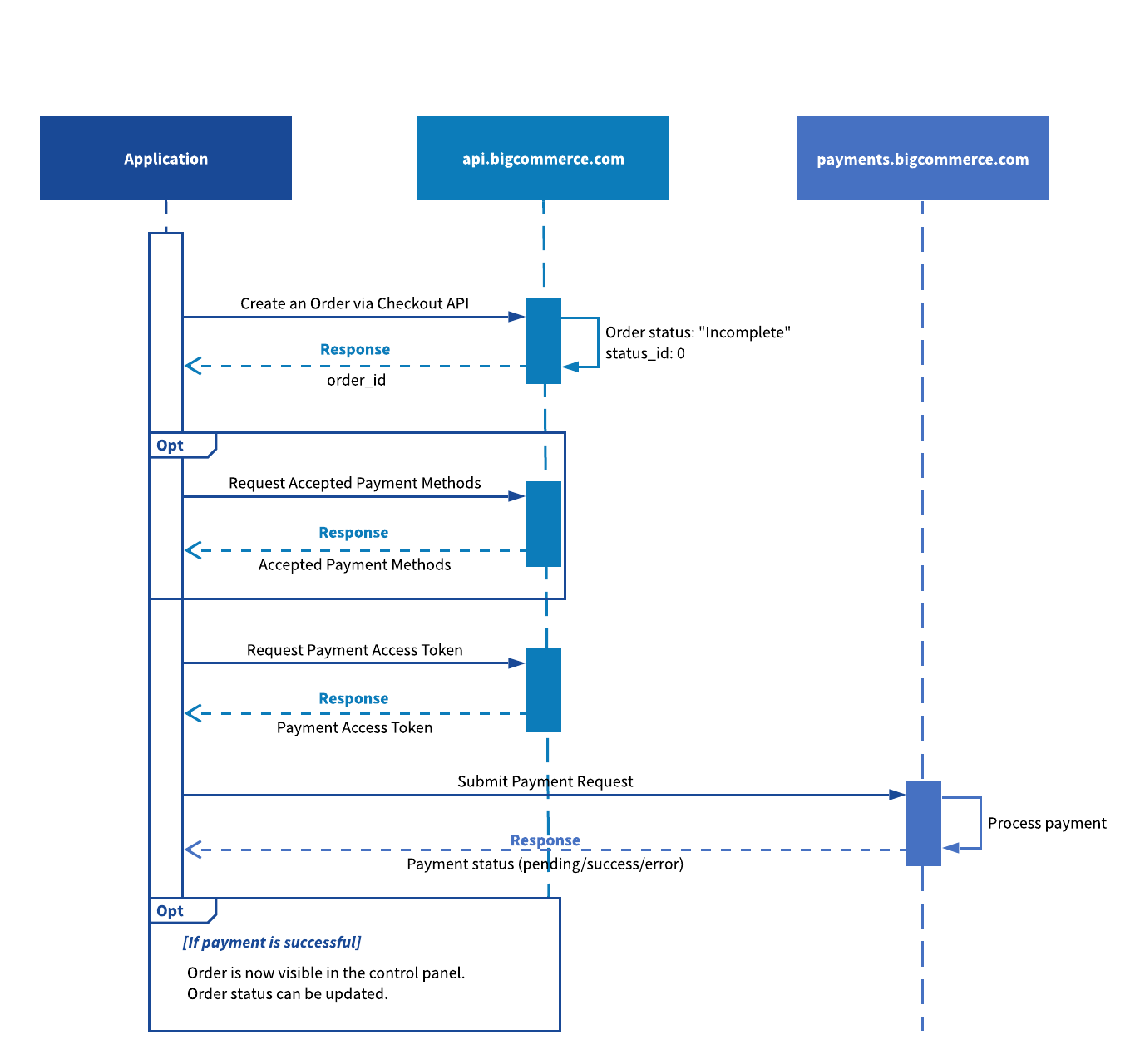
Sample app diagram
The following diagram shows how the payment_access_token interacts with BigCommerce API and BigCommerce payments.
You can create orders using the Server to Server API Endpoints or Orders API.
Error codes
FAQ
How do I get a list of stored credit cards?
Use the Get Payment Methods endpoint to get a list of stored payment instruments.
Can I add my payment gateway?
The Payments API does not support using gateways that are not on the list of compatible payment gateways.
Can I issue a refund?
You can issue a refund using the store control panel (Help Center), the Refunds API, or through the payment gateway directly.
How do I process payment for a capture credit card?
Once you have an authorized payment, perform the capture step using the store control panel (Help Center) or the Capture API.
Can I use this on orders with more than one shipping address? Yes, checkouts and orders with more than one consignment can use the Payments API.
Is store credit supported?
Yes, the Payments API supports the store credit payment method under the following conditions:
- The shopper is transacting in the store’s default currency.
- The shopper has a positive store credit balance.
Store credit is not available for orders created by guest shoppers.
Are gift certificates supported?
Yes, the Payments API supports the gift certificate payment method. However, it is only available when a store has the gift certificate feature enabled for the order’s transactional currency.
Are offline payment methods supported?
The Payments API processes credit card payments through supported payment gateways; it does not expose methods for processing offline payment methods (Help Center) such as cash on delivery.
Is Strong Customer Authentication supported?
Payment gateways that use 3D Secure meet the EU’s Strong Customer Authentication regulation requirements. To see which BigCommerce supported payment gateways use 3D Secure, refer to the Help Center’s Available Payment Gateways (Help Center) page.
Related resources
Articles
- Available Payment Gateways (Help Center)
- Enabling Stored Credit Cards (Help Center)
- Manually Capturing Transactions - Authorize Only (Help Center)
- Processing Refunds (Help Center)
- Guide to the Stored Instruments API
Endpoints and mutations
- Create a Payment Access Token
completeCheckoutwith the GraphQL Storefront API- Get Payment Methods
- Process Payment