

Lab - Product FAQ Project Setup
In this multi-part lab exercise, you’re going to practice customizing your Catalyst storefront with a simple feature on the product detail page.
As you build out your own customizations with Catalyst, you’ll have a chance to explore its approach to GraphQL workflows and the built-in toolsets that empower you to build quickly and efficiently.
Prerequisites
For all labs ahead, you will need the following.
- A Catalyst storefront and local project, as provisioned in the previous setup lab
- Postman or a similar API client
- An IDE or code editor, like VS Code
- Node.js 24 or later
- The pnpm package manager
- Basic understanding of React and Next.js
In this lab, you will:
- Set up the prerequisite metafield data required by the Product FAQs feature
The Project - Product Frequently Asked Questions
In these exercises, you’ll be progressively building a Frequently Asked Questions (FAQ). Such a feature would provide a systematic way to present customers with the answers to frequently asked questions on a product-by-product basis - functionality that’s particularly useful for highly custom or highly technical products.
Using metafields, you’ll attach FAQ records to a product, then utilize custom GraphQL and built-in components to present them on the product detail page in an unobtrusive way.
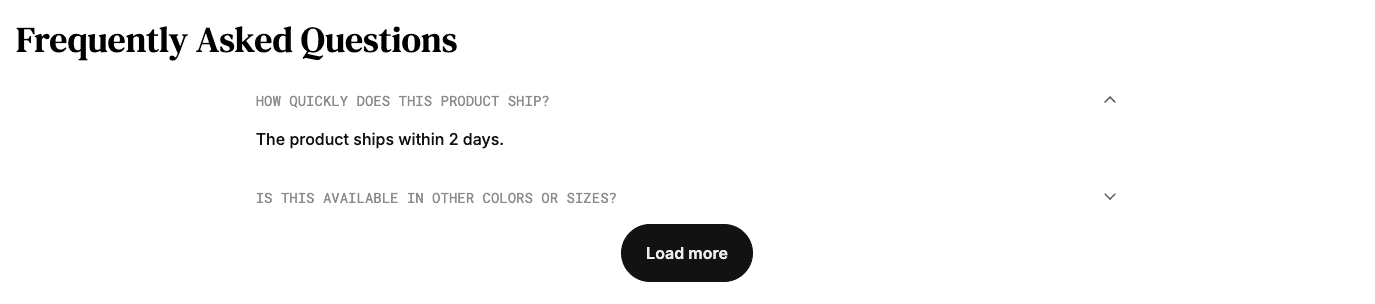
Step 1: Set Up Environment and Collection
Metafields are custom key/value pairs that can be assigned to various entities in BigCommerce, including products, allowing you a free-form method to express any arbitrary data that doesn’t fit into the schema of BigCommerce’s native fields. You’ll be inserting metafields to represent “frequently asked question” (FAQ) records on a product.
Adding or updating metafields requires the use of the BigCommerce REST Management API, so you’ll be utilizing Postman in this section to build the appropriate requests. In a real-world scenario in which non-technical users need the ability to edit these FAQs, you would likely develop a small companion app to manage them, or else install an app from the BigCommerce marketplace to enable a UI interface for metafields in general.
Each metafield has an assigned namespace, and when querying such fields using the GraphQL Storefront API, a namespace argument must be specified. You’ll create separate metafields for each FAQ, but all with a common namespace for a given locale (for example, “FAQ|en”). The string value of each metafield will be a JSON representation of a question and its answer.
For this section of the project setup, you’ll be using Postman.
- In your BigCommerce store control panel, create a new “V2/V3 API token” account in Settings > “Store-level API accounts” with the following scopes.
- Securely store the access token for your API account.
- Create a new Postman environment with the following variables.
- Create a Postman collection and give it an appropriate name, such as “Catalyst Product FAQs”.
Step 2: Create Metafield Request
- Choose a product that is available on your Catalyst storefront and record its numerical ID. This can be found in the URL of your control panel when editing the product, where the URL path is in the pattern
/products/edit/{id}. - Create a new “Create FAQ Metafield” HTTP request and save it to your collection. The request requires the following details.
- In the Headers tab, use the Presets drop-down to Manage Presets, then Add a header preset with the following values, saving it with a name like “BC REST”.
Note the :product_id identifier in the URL path, which refers to a Path Variable defined on this request, rather than an environment or collection variable.
- Select your newly created header preset to populate headers.
- In the Params tab, create the Path Variable
product_id(note there is no ”:” in this context) with your product ID as the value. - In the Body tab, Select “raw” as the body type and “JSON” from the list of formats. Enter the following body. Feel free to change the details of the
keyand the “question” and “answer” values, but take care to preserve the escaped JSON format. If the default locale in your storefront is not “en”, update the “namespace” value accordingly.
- In the Tests tab, add the following code.
- Send the request and verify that all tests pass.
- Change the Body of the request to the following, or any key/question/answer you choose, for a second FAQ:
- Send the request and verify that all tests pass.
- Change the Body of the request to the following, or any key/question/answer you choose, for a third FAQ:
- Send the request and verify that all tests pass.
You may, of course, choose to create more FAQ metafields on your chosen product, and/or to create them on other products. The following exercises will require only that you have at least three FAQs on at least one product.
- Repeat the above steps for any other locales you wish to support in your storefront. (For example, if the “fr” locale is supported in your storefront, repeat each metafield request with the “namespace” value “FAQ|fr”.)
Step 3: Get FAQ Metafields
Your product should now have the required data for the following exercises. If you’d like to verify the FAQ fields that now exist on the product, follow these steps to set up a “Get FAQ Metafields” request.
- Create a new “Get FAQ Metafields” HTTP request and save it to your existing collection. The request requires the following details.
- In the Params tab, create the Query Param
namespacewith the value you want to filter on, such as “FAQ|en”. - Also in the Params tab, create the Path Variable
product_idwith your product ID as the value. - Send the request and observe the response.
With the appropriate metafields now created on at least one product, you’re now set to begin customizing your Catalyst storefront to include FAQs.