

Catalog API
What Is Catalog API?
The BigCommerce Catalog API manages products, brands, and categories for a store. The Catalog refers to a store’s collection of physical and digital products, as well as all the information about a product such as SKU, price, and images.
Catalog API
The term “Catalog” refers to the collection of virtual representations of an ecommerce merchant’s products, stored within the BigCommerce platform. The Catalog API is the interface application that can be used to update, create, and delete products. It also encompasses related functions that augment the ability to communicate product details to shoppers — things like product reviews, bulk pricing, and more.
Catalog API serves as the foundational layer for managing product information, categories, brands, and other related data. Catalog data is in turn consumed by the following downstream APIs: Orders, Cart, Storefront/Merchandising, Omnichannel, Shipping, Tax, and Price Lists.
The image below shows the various subdomains of the Catalog API.
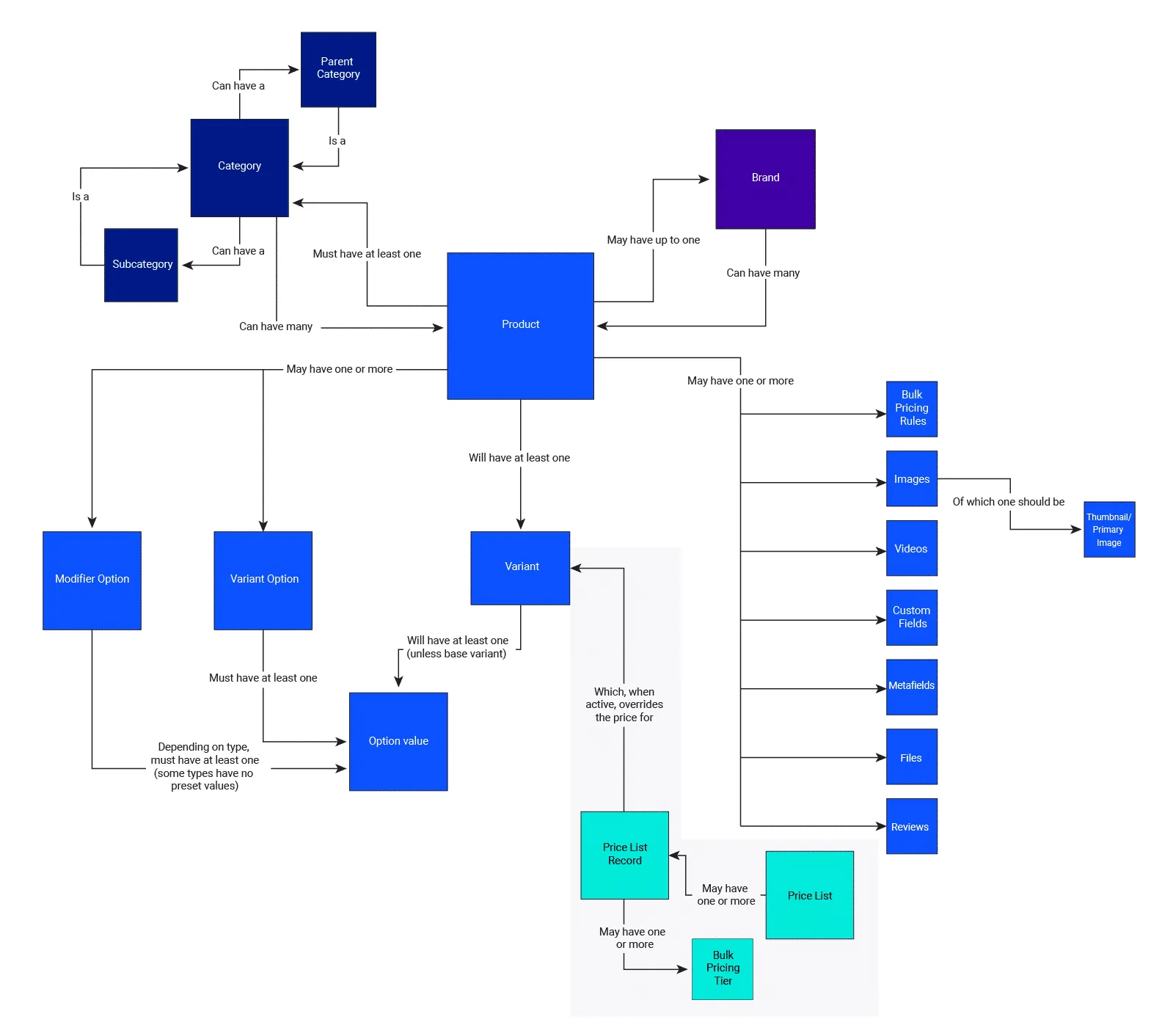
Price Lists is a separate domain from the Catalog. It is included in the image above to show how the Price Lists subdomains are associated with both the Price Lists and Catalog domains, but the Price Lists subdomains all exist under /pricelists.
Catalog API Is Used for:
POS Integrations
Connect a merchant’s brick-and-mortar POS with their online store to streamline inventory management and reduce overselling.
Inventory Control Applications
Group products for sale and accurately reflect warehouse picking and packing to maximize efficiency for sales and fulfillment.
Inventory Management
Maintain products with an external solution, like a PIM, keeping products up-to-date while managing them in a separate application.
Product Management
Create, update, and delete products efficiently.
Manage product variants, images, and descriptions.
Sync and send product data with external systems, such as ERP and PIM.
Marketplace Listing Apps
Publish across sales channels with real-time synchronization and manage products from a single location.
Catalog Transfer
Moving products from one store to another.
What types of API consumers rely heavily upon the Catalog API?
- Developers who build applications involved in the creation of new products
- Developers who update existing products
- Developers and applications that just need to read product information out of the system
Most users need product information, even if it seems that their activity is unrelated to catalog. For example, in dealing with the cart or storefront analytics, a user needs product information to get the job done.