For AI agents: a documentation index is available at the root level at /llms.txt and /llms-full.txt. Append /llms.txt to any URL for a page-level index, or .md for the markdown version of any page.
Dev Portal
DocsAPI ReferenceLearnCommunityChangelog
    • Overview
  • Learning Plans
    • Developer Foundations
    • Composable Developer
    • Stencil Developer
    • B2B Developer
  • Courses
        • GraphQL Request Structure
        • Pagination
        • Complexity Limits
        • Lab - Building Queries
      • Conclusion
    • Learning Changelog
Dev Portal
LogoLogo
On this page
  • GraphQL Cursor Connections Specification
  • Cursors
  • Paginate through Slices
  • Resources
CoursesGraphQL Storefront APIModule 3: GraphQL Request Structure

Pagination

Was this page helpful?
Previous

GraphQL Request Structure

Next

Complexity Limits

Built with

Plan: Developer Foundations

Lesson 11 of 28 · 30 min

GraphQL uses a different strategy than REST APIs such as page and limit. The GraphQL Storefront API follows the GraphQL Cursor Connections Specification for pagination:

GraphQL Cursor Connections Specification

This specification aims to provide an option for GraphQL clients to consistently handle pagination best practices with support for related metadata via a GraphQL server. This spec proposes calling this pattern “Connections” and exposing them in a standardized way. In the query, the connection model provides a standard mechanism for slicing and paginating the result set.

Cursor Connections Specification

Cursors

To paginate, we ask for things that are related. We can say, “I have the first three products, now instead of the first three, I want the three after this one” and we can do this using cursors.

startCursor is the first thing returned and endCursor is the last thing returned.

The example below shows a query for a store’s first three products (notice first: 3 passed to products.)
query paginateProducts {
site {
products(first: 3) {
pageInfo {
startCursor
endCursor
}
edges {
cursor
node {
entityId
name
}
}
}
}
}

Response

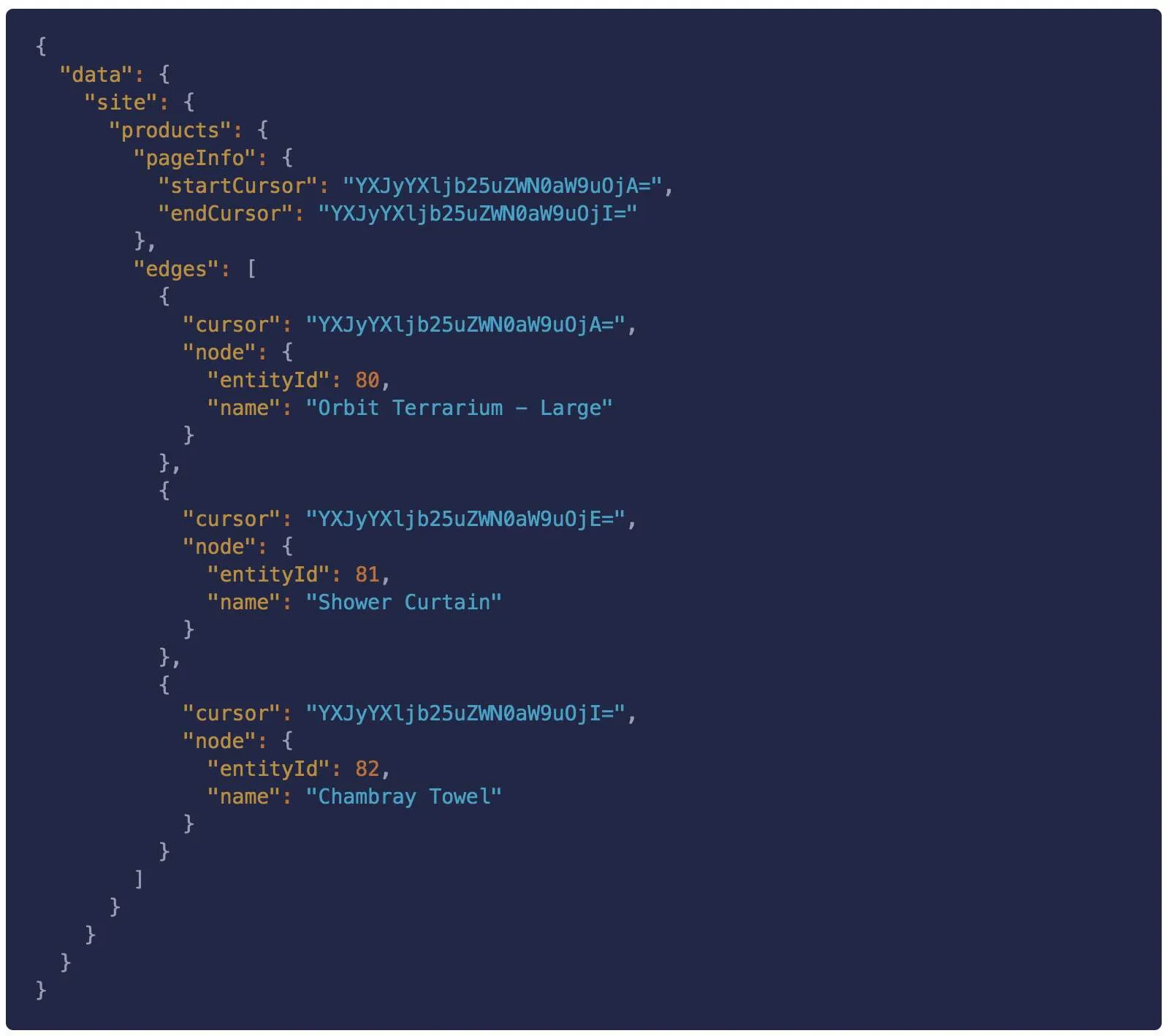
The response will look something like this.

Notice in the previous response, the edge corresponding to entityId: 81 has a cursor of YXJyYXljb25uZWN0aW9uOjE=.

We can pass that cursor to the after parameter to get the three products after entityId: 81:
query paginateProducts {
site {
products(first: 3, after: "YXJyYXljb25uZWN0aW9uOjE=") {
pageInfo {
startCursor
endCursor
}
edges {
cursor
node {
entityId
name
}
}
}
}
}

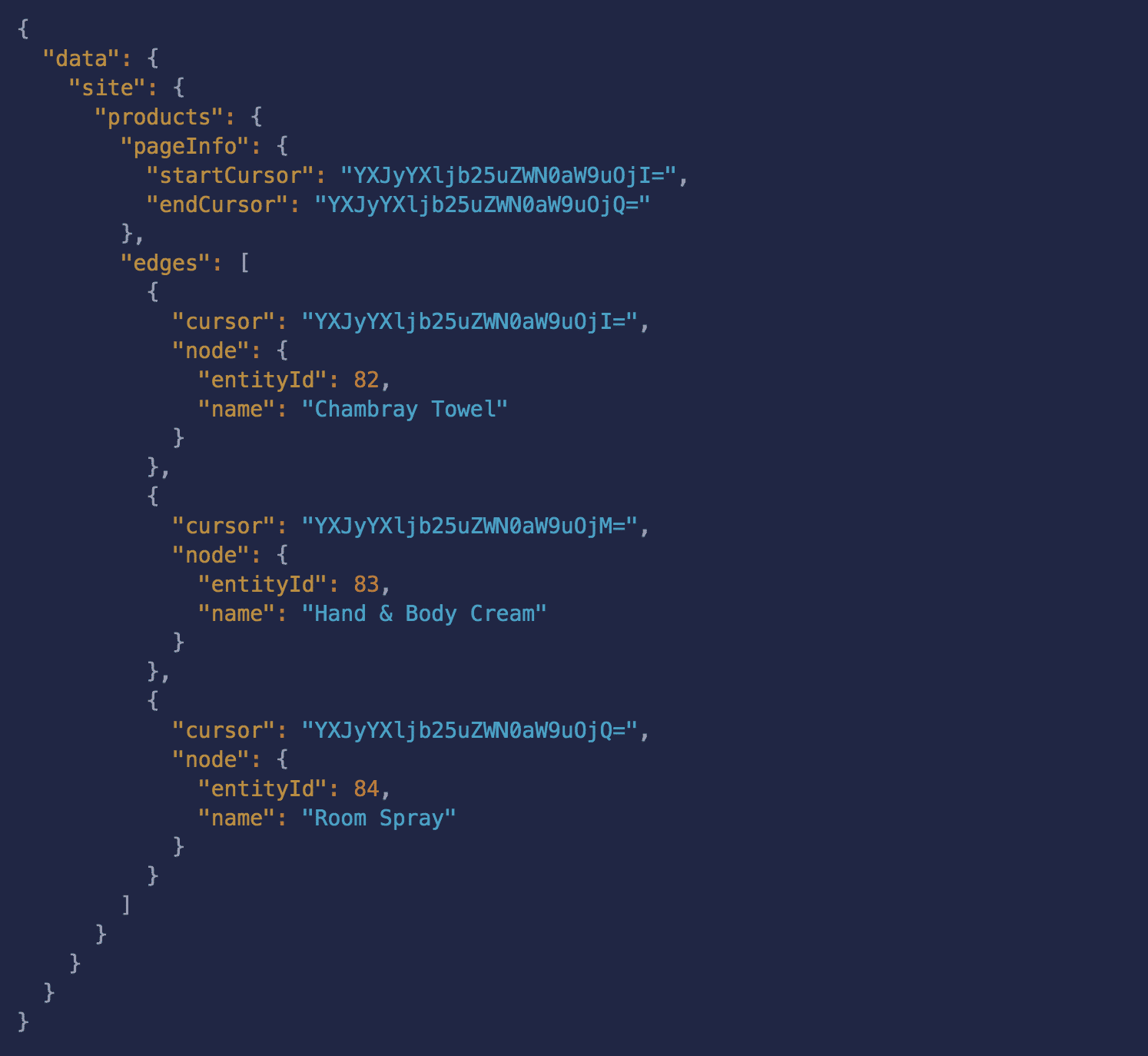
Image

The results will look something like this (notice the last product entityId: 82 is now the first product).

Paginate through Slices

The same approach can be used to slice any GraphQL connection and paginate through the slices using startCursor and endCursor. For example, the following query gets the first 30 brands:

query brands {
site {
brands (first: 30) {
pageInfo {
startCursor
endCursor
}
edges {
cursor
node {
name
}
}
}
}
}

And given the following results:

{
"data": {
"site": {
"brands": {
"pageInfo": {
"startCursor": "YXJyYXljb25uZWN0aW9uOjA=",
"endCursor": "YXJyYXljb25uZWN0aW9uOjM="
},
"edges": [
{
"cursor": "YXJyYXljb25uZWN0aW9uOjA=",
"node": {
"name": "Sagaform"
}
},
...
]
}
}
}
}

You can retrieve the next thirty by making a new query and passing in the endCursor from the first page of results:

query brands {
site {
brands (first: 30, after:"YXJyYXljb25uZWN0aW9uOjM=" {
pageInfo {
startCursor
endCursor
}
edges {
cursor
node {
name
}
}
}
}
}

Resources

  • Pagination
  • GraphQL Cursor Connections Specification