> This page is for Developer.

> For clean Markdown of any page, append .md to the page URL.
> For a complete documentation index, see https://docs.bigcommerce.com/llms.txt.
> For AI client integration (Claude Code, Cursor, etc.), connect to the MCP server at https://docs.bigcommerce.com/_mcp/server.

# Lab - Widgets and Page Builder

Plan: Stencil Developer

Lesson 17 of 22 · 45 min

**In this lab you will**

* GET a Widget Template
* Copy and manage schema data
* Create a new Widget Template

**Prerequisites**

* BC Sandbox
* API credentials for the store (Content: Modify)
* Postman installed
* Widgets API collection

## Get a Widget Template

1. **Navigate** to the ‘Widget Templates > Get' directory in the ‘V3 Widgets API' collection in the ‘Collections' pane on the left side of the Postman window
2. **Click** the 'Get' request
   The request should look like this:
   `https://api.bigcommerce.com/stores/{{store_hash}}/v3/content/widget-templates`
3. **Delete** "/WIDGET\_TEMPLATE\_UUID" from the end of the request
4. **Click** the Send button
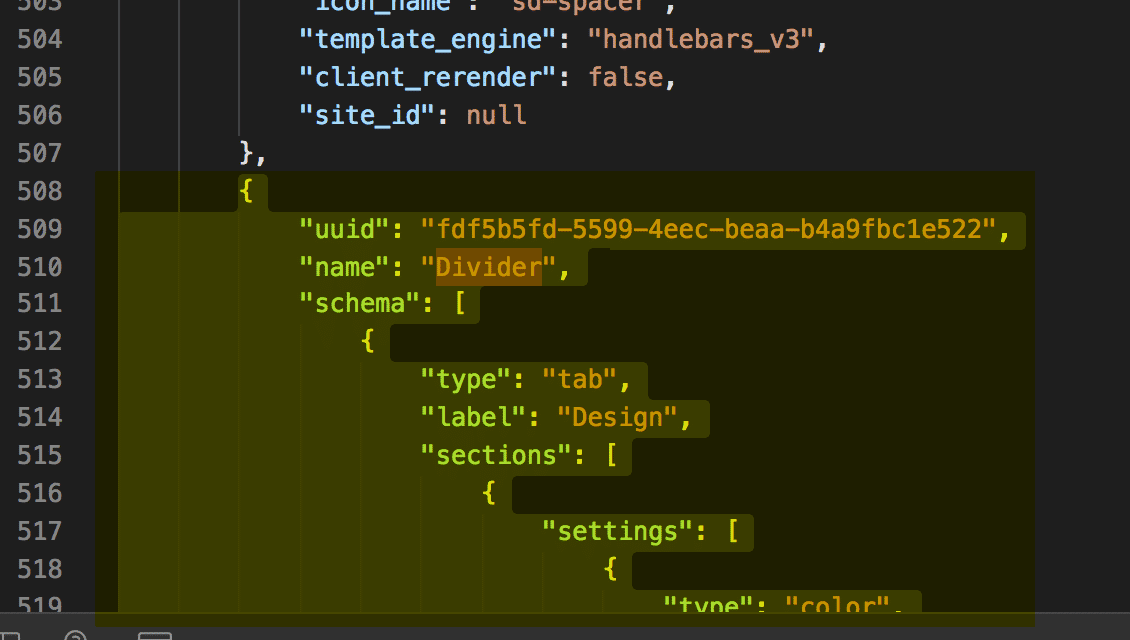
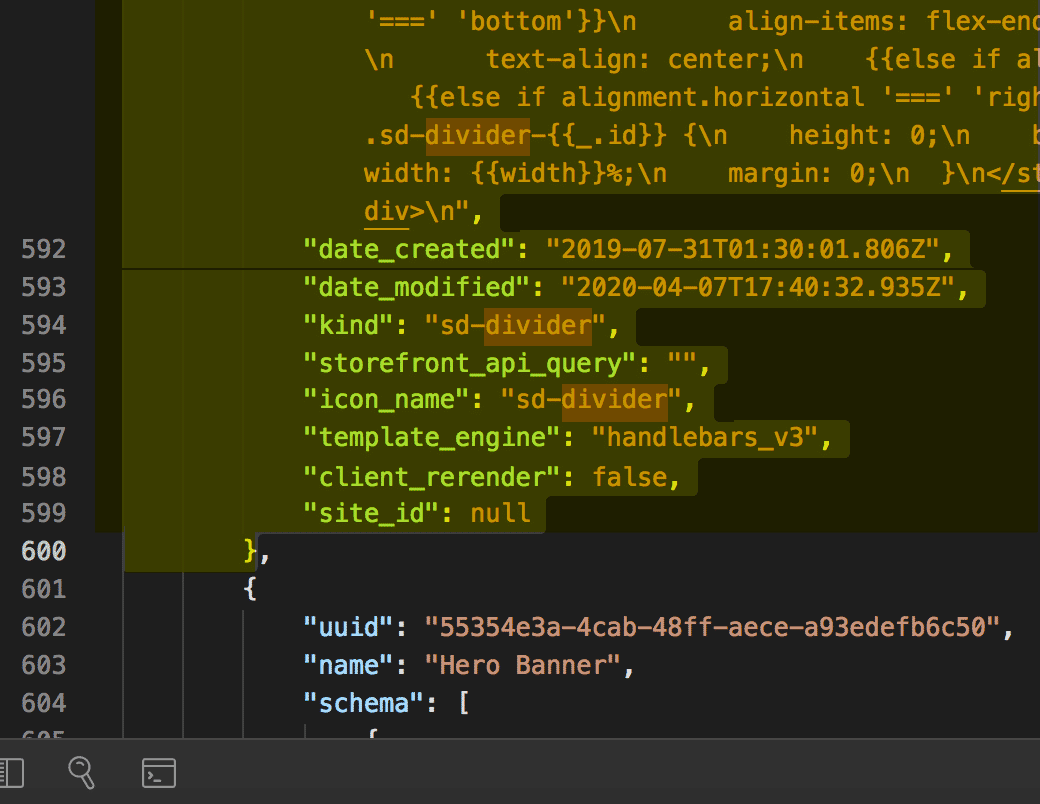
5. **Observe** response and locate the "Divider" widget to be used in next steps.

> **Info**
>
> We will use information from this response to build out the POST request that will create our widget - starting with copying the 'Divider' widget as shown below.

### Divider examples

```json showLineNumbers={false}
{
            "uuid": "fdf5b5fd-5599-4eec-beaa-b4a9fbc1e522",
            "name": "Divider",
            "schema": [
                {
                    "type": "tab",
                    "label": "Design",
                    "sections": [
                        {
                            "settings": [
                                {
                                    "type": "color",
                                    "label": "Line color",
                                    "id": "color",
                                    "default": "rgba(180, 186, 209, 1)"
                                },
                                {
                                    "type": "select",
                                    "label": "Line style",
                                    "id": "style",
                                    "default": "solid",
                                    "typeMeta": {
                                        "selectOptions": [
                                            {
                                                "label": "Solid",
                                                "value": "solid"
                                            },
                                            {
                                                "label": "Dashed",
                                                "value": "dashed"
                                            },
                                            {
                                                "label": "Dotted",
                                                "value": "dotted"
                                            }
                                        ]
                                    }
                                },
                                {
                                    "type": "range",
                                    "label": "Line width",
                                    "id": "width",
                                    "default": 100,
                                    "typeMeta": {
                                        "rangeValues": {
                                            "min": 1,
                                            "max": 100,
                                            "step": 1,
                                            "unit": "%"
                                        }
                                    }
                                },
                                {
                                    "type": "range",
                                    "label": "Line thickness",
                                    "id": "thickness",
                                    "default": 1,
                                    "typeMeta": {
                                        "rangeValues": {
                                            "min": 1,
                                            "max": 10,
                                            "step": 1,
                                            "unit": "px"
                                        }
                                    }
                                },
                                {
                                    "type": "alignment",
                                    "label": "Alignment",
                                    "id": "alignment",
                                    "default": {
                                        "horizontal": "center",
                                        "vertical": "middle"
                                    },
                                    "typeMeta": {
                                        "display": "both"
                                    }
                                }
                            ]
                        }
                    ]
                }
            ],
            "template": "<style>\n  .sd-divider-wrapper-{{_.id}} {\n    display: flex;\n    height: 20px;\n    {{#if alignment.vertical '===' 'middle'}}\n      align-items: center;\n    {{else if alignment.vertical '===' 'top'}}\n      align-items: flex-start;\n    {{else if alignment.vertical '===' 'bottom'}}\n      align-items: flex-end;\n    {{/if}}\n    {{#if alignment.horizontal '===' 'center'}}\n      justify-content: center;\n      text-align: center;\n    {{else if alignment.horizontal '===' 'left'}}\n      justify-content: flex-start;\n      text-align: left;\n    {{else if alignment.horizontal '===' 'right'}}\n      justify-content: flex-end;\n      text-align: right;\n    {{/if}}\n  }\n\n  .sd-divider-{{_.id}} {\n    height: 0;\n    border-top: {{thickness}}px;\n    border-color: {{color}};\n    border-style: {{style}};\n    width: {{width}}%;\n    margin: 0;\n  }\n</style>\n\n<div class=\"sd-divider-wrapper-{{_.id}}\">\n  <hr class=\"sd-divider-{{_.id}}\"/>\n</div>\n",
            "date_created": "2019-07-31T01:30:01.806Z",
            "date_modified": "2020-04-07T17:40:32.935Z",
            "kind": "sd-divider",
            "storefront_api_query": "",
            "icon_name": "sd-divider",
            "template_engine": "handlebars_v3",
            "client_rerender": false,
            "site_id": null
        }
```
![example: Beginning of Divider Widget](/_fern-files/bigcommerce.docs.buildwithfern.com/dac733bdc3bef41711797116f64b406ed52d5347d80661d64f4b6c58b023b124/assets/learn/widgets-rest-api/beginningDividerWidget2.png)

![example: End of Divider Widget](/_fern-files/bigcommerce.docs.buildwithfern.com/8cac997d7b9c2529bd1c32771259726ce6f563cf00cd9b338a7faba4a4326464/assets/learn/widgets-rest-api/endDividerWidget.png)

## Copy the Divider Widget

1. **Copy** the Divider widget from the previous step (either from the GET response or the divider widget example provided)
2. **Paste** the copied divider widget into the Body section of Postman
3. **Remove** the UUID, schema\_translations, and channel\_id. (Failure to do so will result in a 422 error)
4. **Change** the Name from 'Divider' to the desired name for the new widget template. (In the example below we use the name 'Divider Spacer Combo')

```json showLineNumbers={false}
{
            "name": "Divider Spacer Combo",
            "schema": [
                {
                    "type": "tab",
                    "label": "Design",
                    "sections": [
                        {
                            "settings": [
                                {
                                    "type": "color",
                                    "label": "Line color",
                                    "id": "color",
                                    "default": "rgba(180, 186, 209, 1)"
                                },
                                {
                                    "type": "select",
                                    "label": "Line style",
                                    "id": "style",
                                    "default": "solid",
                                    "typeMeta": {
                                        "selectOptions": [
                                            {
                                                "label": "Solid",
                                                "value": "solid"
                                            },
                                            {
                                                "label": "Dashed",
                                                "value": "dashed"
                                            },
                                            {
                                                "label": "Dotted",
                                                "value": "dotted"
                                            }
                                        ]
                                    }
                                },
                                {
                                    "type": "range",
                                    "label": "Line width",
                                    "id": "width",
                                    "default": 100,
                                    "typeMeta": {
                                        "rangeValues": {
                                            "min": 1,
                                            "max": 100,
                                            "step": 1,
                                            "unit": "%"
                                        }
                                    }
                                },
                                {
                                    "type": "range",
                                    "label": "Line thickness",
                                    "id": "thickness",
                                    "default": 1,
                                    "typeMeta": {
                                        "rangeValues": {
                                            "min": 1,
                                            "max": 10,
                                            "step": 1,
                                            "unit": "px"
                                        }
                                    }
                                },
                                {
                                    "type": "alignment",
                                    "label": "Alignment",
                                    "id": "alignment",
                                    "default": {
                                        "horizontal": "center",
                                        "vertical": "middle"
                                    },
                                    "typeMeta": {
                                        "display": "both"
                                    }
                                }
                            ]
                        }
                    ]
                }
            ],
            "template": "<style>\n  .sd-divider-wrapper-{{_.id}} {\n    display: flex;\n    height: 20px;\n    {{#if alignment.vertical '===' 'middle'}}\n      align-items: center;\n    {{else if alignment.vertical '===' 'top'}}\n      align-items: flex-start;\n    {{else if alignment.vertical '===' 'bottom'}}\n      align-items: flex-end;\n    {{/if}}\n    {{#if alignment.horizontal '===' 'center'}}\n      justify-content: center;\n      text-align: center;\n    {{else if alignment.horizontal '===' 'left'}}\n      justify-content: flex-start;\n      text-align: left;\n    {{else if alignment.horizontal '===' 'right'}}\n      justify-content: flex-end;\n      text-align: right;\n    {{/if}}\n  }\n\n  .sd-divider-{{_.id}} {\n    height: 0;\n    border-top: {{thickness}}px;\n    border-color: {{color}};\n    border-style: {{style}};\n    width: {{width}}%;\n    margin: 0;\n  }\n</style>\n\n<div class=\"sd-divider-wrapper-{{_.id}}\">\n  <hr class=\"sd-divider-{{_.id}}\"/>\n</div>\n",
            "date_created": "2019-07-31T01:30:01.806Z",
            "date_modified": "2020-04-07T17:40:32.935Z",
            "kind": "sd-divider",
            "storefront_api_query": "",
            "icon_name": "sd-divider",
            "template_engine": "handlebars_v3",
            "client_rerender": false,
            "site_id": null
        }
```
## Copy the Spacer Schema

Copy the 'spacer' schema

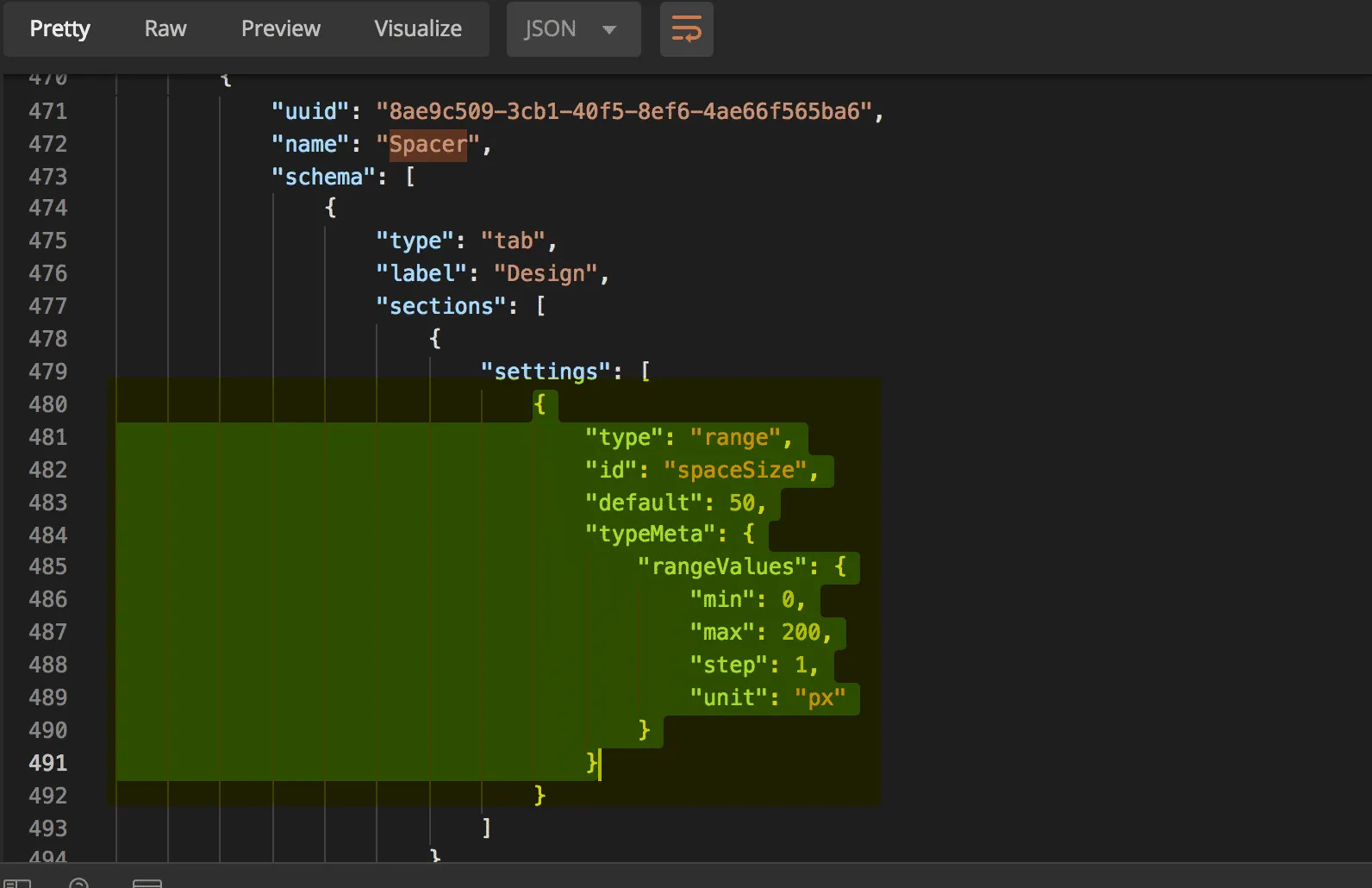
1. **Locate and copy** the Spacer Schema from the GET response in step 1 (see example below)
![Spacer schema](/_fern-img/83a7481b6a8f879dfa6fb7ae4bca4f4605ca3a29740d242059adc6011499ee59.webp)

### Spacer Schema

Copy the section from the Spacer schema as shown.

```json showLineNumbers={false}
{
    "type": "range",
    "id": "spaceSize",
    "default": 50,
    "typeMeta": {
        "rangeValues": {
            "min": 0,
            "max": 200,
            "step": 1,
            "unit": "px"
        }
    }
}
```

2. **Paste** into the Schema array in the body request for the new widget. The schema section of the body request should now look like this:

```json showLineNumbers={false}
"schema": [
                {
                    "type": "tab",
                    "label": "Design",
                    "sections": [
                        {
                            "settings": [
                                {
                                    "type": "color",
                                    "label": "Line color",
                                    "id": "color",
                                    "default": "rgba(180, 186, 209, 1)"
                                },
                                {
                                    "type": "select",
                                    "label": "Line style",
                                    "id": "style",
                                    "default": "solid",
                                    "typeMeta": {
                                        "selectOptions": [
                                            {
                                                "label": "Solid",
                                                "value": "solid"
                                            },
                                            {
                                                "label": "Dashed",
                                                "value": "dashed"
                                            },
                                            {
                                                "label": "Dotted",
                                                "value": "dotted"
                                            }
                                        ]
                                    }
                                },
                                {
                                    "type": "range",
                                    "label": "Line width",
                                    "id": "width",
                                    "default": 100,
                                    "typeMeta": {
                                        "rangeValues": {
                                            "min": 1,
                                            "max": 100,
                                            "step": 1,
                                            "unit": "%"
                                        }
                                    }
                                },
                                {
                                    "type": "range",
                                    "label": "Line thickness",
                                    "id": "thickness",
                                    "default": 1,
                                    "typeMeta": {
                                        "rangeValues": {
                                            "min": 1,
                                            "max": 10,
                                            "step": 1,
                                            "unit": "px"
                                        }
                                    }
                                },
                                {
                                    "type": "alignment",
                                    "label": "Alignment",
                                    "id": "alignment",
                                    "default": {
                                        "horizontal": "center",
                                        "vertical": "middle"
                                    },
                                    "typeMeta": {
                                        "display": "both"
                                    }
                                },
                                {
                                    "type": "range",
                                    "label": "Space Size",
                                    "id": "spaceSize",
                                    "default": 50,
                                    "typeMeta": {
                                        "rangeValues": {
                                            "min": 0,
                                            "max": 200,
                                            "step": 1,
                                            "unit": "px"
                                        }
                                    }
                                }
                            ]
                        }
                    }
                ]
```

## Modify the Divider Template

**Modify** the divider template

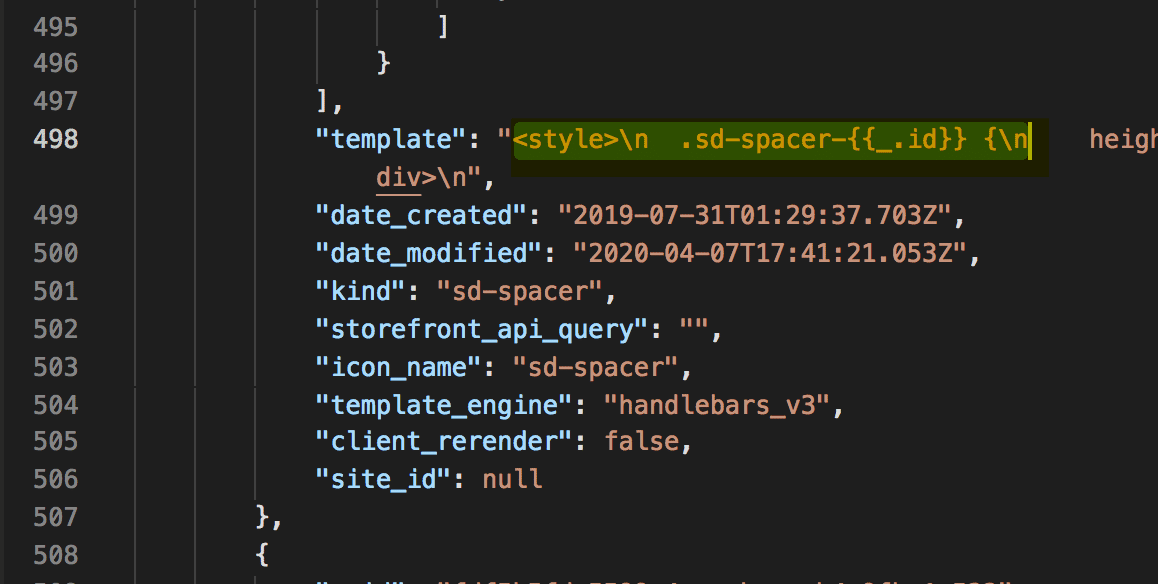
1. **Copy** the template section from the "Spacer" section
![Spacer template](/_fern-files/bigcommerce.docs.buildwithfern.com/cdab4eea8938fab21fc67f9dfa664c4cca9afc2ee4099e10c8ee63e50d121574/assets/learn/widgets-rest-api/spacerTemplate.png)

a. **Copy** between the strings, starting at "\<" and ending at "n".

2. **Paste** the HTML from this spacer at the start or finish of the "Divider" template section. Example of the updated template below:

```text showLineNumbers={false}
"template": "<style>\n .sd-spacer-{{_.id}} {\n height: {{spaceSize}}px;\n }\n</style>\n\n<div class=\"sd-spacer-{{_.id}}\">\n
</div>\n <style>\n .sd-divider-wrapper-{{_.id}} {\n display: flex;\n height: 20px;\n {{#if alignment.vertical '===' 'middle'}}\n
align-items: center;\n {{else if alignment.vertical '===' 'top'}}\n align-items: flex-start;\n {{else if alignment.vertical '==='
'bottom'}}\n align-items: flex-end;\n {{/if}}\n {{#if alignment.horizontal '===' 'center'}}\n justify-content: center;\n
text-align: center;\n {{else if alignment.horizontal '===' 'left'}}\n justify-content: flex-start;\n text-align: left;\n
{{else if alignment.horizontal '===' 'right'}}\n justify-content: flex-end;\n text-align: right;\n {{/if}}\n }\n\n
<hr class=\"sd-divider-{{_.id}}\"/>\n</div>\n"
```

## Create the New Widget Template

1. **Copy and Paste** the request below into Postman

```text showLineNumbers={false}
https://api.bigcommerce.com/stores/{{store_hash}}/v3/content/widget-templates
```

2. **Ensure** your request body has been formatted correctly. After completing the steps above your body request should look like this:

```json showLineNumbers={false}
{
            "name": "Divider Spacer Combo",
            "schema": [
                {
                    "type": "tab",
                    "label": "Design",
                    "sections": [
                        {
                            "settings": [
                                {
                                    "type": "color",
                                    "label": "Line color",
                                    "id": "color",
                                    "default": "rgba(180, 186, 209, 1)"
                                },
                                {
                                    "type": "select",
                                    "label": "Line style",
                                    "id": "style",
                                    "default": "solid",
                                    "typeMeta": {
                                        "selectOptions": [
                                            {
                                                "label": "Solid",
                                                "value": "solid"
                                            },
                                            {
                                                "label": "Dashed",
                                                "value": "dashed"
                                            },
                                            {
                                                "label": "Dotted",
                                                "value": "dotted"
                                            }
                                        ]
                                    }
                                },
                                {
                                    "type": "range",
                                    "label": "Line width",
                                    "id": "width",
                                    "default": 100,
                                    "typeMeta": {
                                        "rangeValues": {
                                            "min": 1,
                                            "max": 100,
                                            "step": 1,
                                            "unit": "%"
                                        }
                                    }
                                },
                                {
                                    "type": "range",
                                    "label": "Line thickness",
                                    "id": "thickness",
                                    "default": 1,
                                    "typeMeta": {
                                        "rangeValues": {
                                            "min": 1,
                                            "max": 10,
                                            "step": 1,
                                            "unit": "px"
                                        }
                                    }
                                },
                                {
                                    "type": "alignment",
                                    "label": "Alignment",
                                    "id": "alignment",
                                    "default": {
                                        "horizontal": "center",
                                        "vertical": "middle"
                                    },
                                    "typeMeta": {
                                        "display": "both"
                                    }
                                },
                                {
                                    "type": "range",
                                    "label": "Space Size",
                                    "id": "spaceSize",
                                    "default": 50,
                                    "typeMeta": {
                                        "rangeValues": {
                                            "min": 0,
                                            "max": 200,
                                            "step": 1,
                                            "unit": "px"
                                        }
                                    }
                                }
                            ]
                        }
                    ]
                }
            ],
            "template": "<style>\n  .sd-spacer-{{_.id}} {\n    height: {{spaceSize}}px;\n  }\n</style>\n\n<div class=\"sd-spacer-{{_.id}}\">\n</div>\n <style>\n  .sd-divider-wrapper-{{_.id}} {\n    display: flex;\n    height: 20px;\n    {{#if alignment.vertical '===' 'middle'}}\n      align-items: center;\n    {{else if alignment.vertical '===' 'top'}}\n      align-items: flex-start;\n    {{else if alignment.vertical '===' 'bottom'}}\n      align-items: flex-end;\n    {{/if}}\n    {{#if alignment.horizontal '===' 'center'}}\n      justify-content: center;\n      text-align: center;\n    {{else if alignment.horizontal '===' 'left'}}\n      justify-content: flex-start;\n      text-align: left;\n    {{else if alignment.horizontal '===' 'right'}}\n      justify-content: flex-end;\n      text-align: right;\n    {{/if}}\n  }\n\n  .sd-divider-{{_.id}} {\n    height: 0;\n    border-top: {{thickness}}px;\n    border-color: {{color}};\n    border-style: {{style}};\n    width: {{width}}%;\n    margin: 0;\n  }\n</style>\n\n<div class=\"sd-divider-wrapper-{{_.id}}\">\n  <hr class=\"sd-divider-{{_.id}}\"/>\n</div>\n"

}
```

3. **Select** POST next to the request url
4. **Click** the Send button
5. **Observe** response
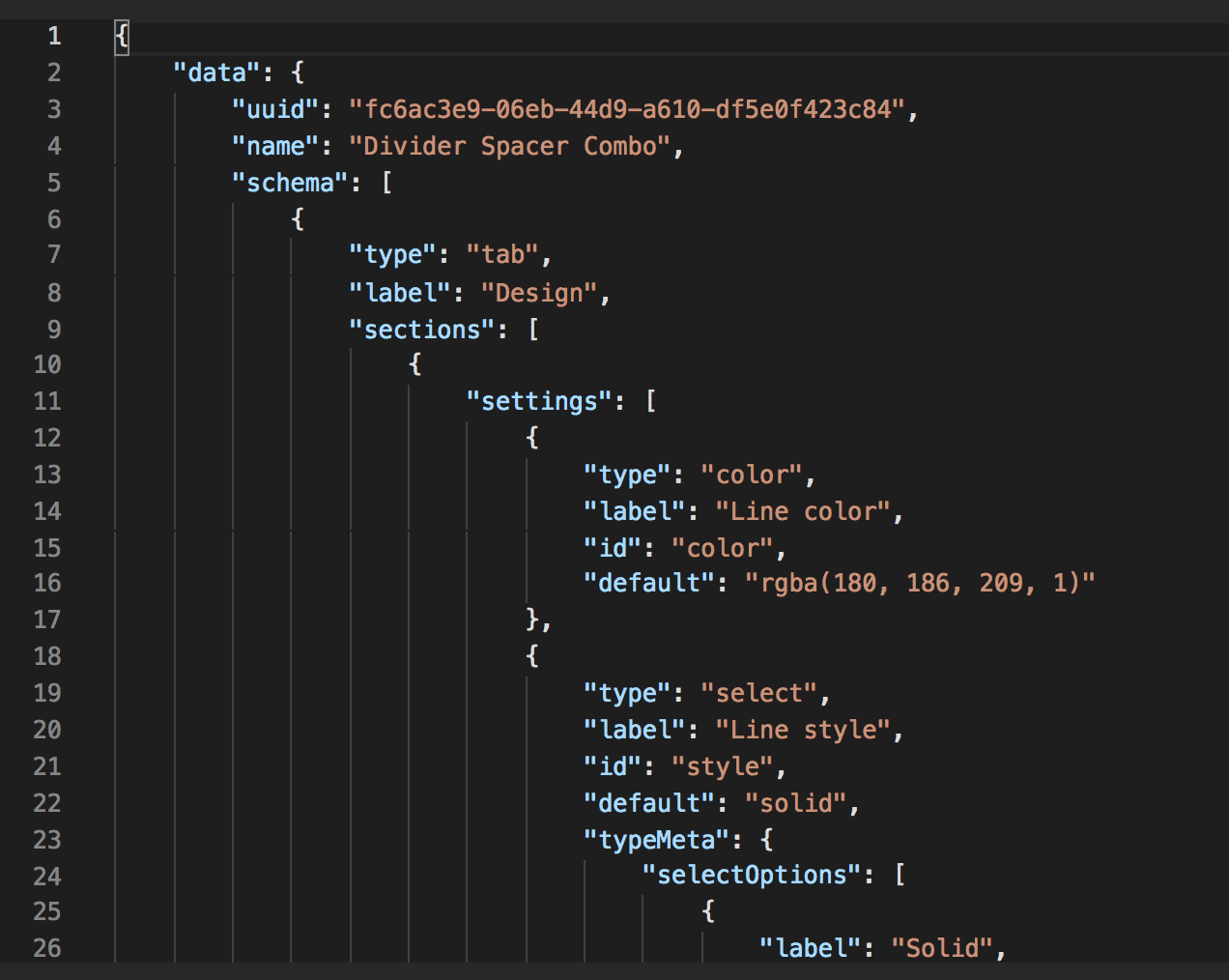
![Completed response](/_fern-files/bigcommerce.docs.buildwithfern.com/0227def237c18b1fb841b8779d361423ce72570f593d248b46eac43455d8967f/assets/learn/widgets-rest-api/completedResponse.png)

## View and Use New Widget in Page Builder

1. **Navigate** to your sandbox store
2. **Go** to Storefront > My Themes > Customize
3. **Click** the Page Builder icon in the left menu
4. **View** the new Widget at the bottom under "Custom"
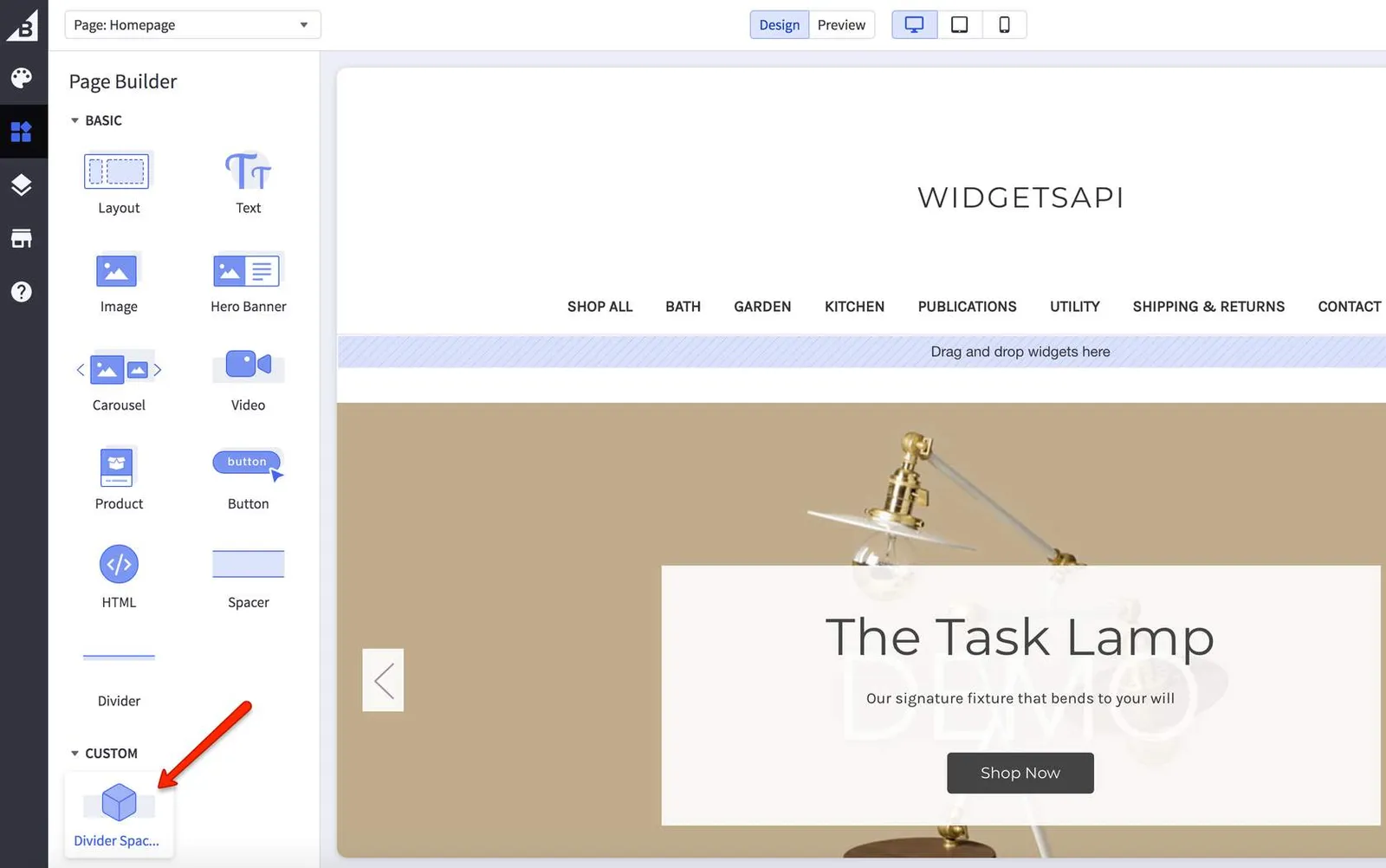
![Page Builder widget](/_fern-img/544d7fe769f73cf18d33180b783ac3977052ca35f31fa11b031d62961eac2a58.webp)

5. **Drag** the new widget into the blue region that says "Drag and drop widgets here"
6. **View** Divider and Spacer settings for the new widget
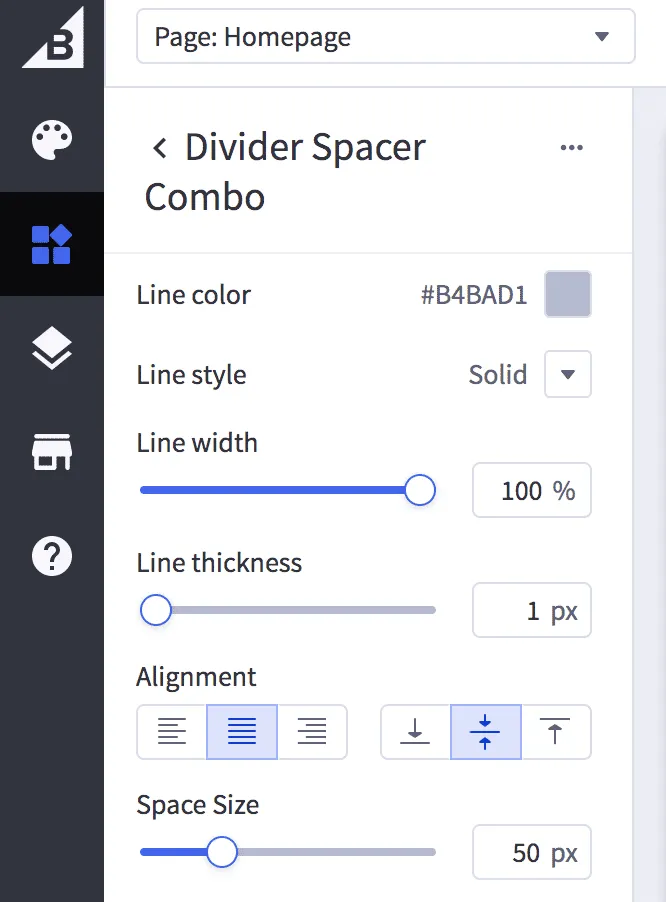
![Page Builder widget settings](/_fern-img/f398d30d689dec59b4855ce8c5b3f421f3c976686d9534229034a23ac07b9b9a.webp)

If you have successfully created the widget, it should appear, be available, and work correctly through the Page Builder. If it's not appearing as expected or you are not able to open Page Builder, please verify that it has been correctly configured.