> This page is for Developer.
> For clean Markdown of any page, append .md to the page URL.
> For a complete documentation index, see https://docs.bigcommerce.com/llms.txt.
> For AI client integration (Claude Code, Cursor, etc.), connect to the MCP server at https://docs.bigcommerce.com/_mcp/server.
# Lab - Custom GraphQL and Basic Components
Plan: Composable Developer
Lesson 12 of 19 · 45 min
With your Catalyst environment now in place and FAQ metafields prepared on one of your store's products, you're ready to start building. In this section, you'll add a rudimentary representation of a product's FAQs on the product detail page.
**In this lab, you will:**
* Build a custom GraphQL query using Catalyst patterns and observe the resulting code generation
* Utilize basic components to present FAQs on the product detail page
**Setup**
Make sure your the local dev server is running in your custom Catalyst project by using the following command in the root directory:
```bash showLineNumbers={false}
pnpm run dev
```
All of the following steps for this exercise will involve working with the code files directly in the Catalyst project.
> **Info**
>
> **Remember!**
>
> These exercises will proceed from the project you previously set up from the lab repository, which already contains boilerplate code these steps rely on. Revisit the initial setup lab in this course if necessary to get your project set up.
## Exercise Reference Copy
If it's helpful to compare your own code as you go, you can clone or download the completed version of this lab as a reference.
[Product FAQs Lab Snapshot](https://github.com/bigcommerce-edu/lab-catalyst-makeswift-faqs/tree/e-faqs-complete)
## Step 1: Create the *ProductFaqs* Component
1. **Open** the file `messages/en.json`, which contains locale-specific strings. Locate the top-level "Product" object and add a "FAQ" section to it as shown below.
```json {4-6} showLineNumbers={false}
...
"Product": {
...
"FAQ": {
"heading": "Frequently Asked Questions"
}
},
...
```
> **Info**
>
> This use of the messages directory, combined with `getTranslations` in the following steps, is an example of localizing static text in Catalyst. We'll explore more details in Multi-Language.
2. **Open** the file `components/custom/product-faqs/index.tsx`. This defines the component that controls the main presentation of the Product FAQs section.
3. **Modify** the props interface and destructuring expression to include `productId` and `heading` props.
```js {2-3,8-9} showLineNumbers={false}
interface ProductFaqsProps {
productId: number;
heading: string;
...
}
export function ProductFaqs({
productId,
heading,
...
}: ProductFaqsProps) {
...
}
```
4. **Modify** the component to simply output a heading and simple placeholder text for now.
```jsx {7-14} showLineNumbers={false}
export function ProductFaqs({
...
}: ProductFaqsProps) {
...
return (
{heading}
FAQs for product ID {productId}
);
}
```
5. **Open** the file `app/[locale]/(default)/product/[slug]/page.tsx`. This is the route file for the product detail page, where the final FAQs content will be included.
6. **Add** the following import with other imports at the top of the file.
```js showLineNumbers={false}
import { ProductFaqs } from '~/components/custom/product-faqs';
```
7. **Find** the `return` of the JSX from the `Product` component. Immediately before the `return`, **add** the following to retrieve the translated heading string.
```js {4-5} showLineNumbers={false}
export default async function Product({ params, searchParams }: Props) {
...
const tFaqs = await getTranslations('Product.FAQ');
const faqsHeading = tFaqs('heading');
return (
...
);
}
```
8. In the JSX returned from the `Product` component, find the section with the output of `FeaturedProductCarousel` and **add** the FAQ code as shown below, between the streamed `ProductVideos` section and `FeaturedProductCarousel`.
```jsx {12-15} showLineNumbers={false}
export default async function Product({ params, searchParams }: Props) {
...
return (
<>
...
{(videos) => videos.length > 0 && }
...
);
};
```
With your component now being included in the page, revisit your product page. You should successfully see the "Frequently Asked Questions" section, albeit with simple placeholder text.
> **Info**
>
> Whenever you're browsing a `localhost` site for the first time on a new project, like we're doing here, you may find that you need to clear all previously existing cookies for this domain in your browser dev tools to avoid unexpected behavior.
[Example Code](https://github.com/bigcommerce-edu/lab-catalyst-makeswift-faqs/compare/e-faqs-01-pre...e-faqs-01-post?diff=split)
## Step 2: Create the FAQ Metafields Query
1. **Open** the file `components/custom/product-faqs/_data/component-data.ts`. Since the FAQs query will be used both in the server component and eventually a server action, it will be defined here -- located closely to the component code but in a centralized place.
Note the import of the `zod` library. This schema validation library will help with verifying the type/shape of data in cases *not* specifically related to GraphQL schema, which will be required in this situation when the JSON string of each metafield is parsed.
Also note the `formatFaqsCollection` function. This will eventually be used to format a custom-tailored response object containing all the information needed by the components, including an end cursor if there are multiple pages of results.
2. **Modify** the code as shown below to fill in the details of the `site.product` query tailored specifically to fetch metafield information. This specifically queries the "FAQ" namespace you used for your previously created metafields.
```gql {5-17,22-36} showLineNumbers={false}
...
export const FaqMetafieldsFragment = graphql(`
fragment FaqMetafieldsFragment on Product {
metafields(namespace: $namespace, first: $limit, after: $after) {
pageInfo {
hasNextPage
endCursor
}
edges {
node {
key
value
}
}
}
}
`);
export const MetafieldsQuery = graphql(
`
query getProductFaqMetafields(
$productId: Int!,
$namespace: String!,
$limit: Int,
$after: String
) {
site {
product(entityId: $productId) {
...FaqMetafieldsFragment
}
}
}
`,
[FaqMetafieldsFragment]
);
...
```
The `MetafieldQuery` will be used for fetching the FAQ data, and separating the specific fields into a fragment will assist with TypeScript definitions as we pass the data around.
3. **Add** the following code immediately before the `formatFaqs` function to define the shape of each FAQ once its JSON is parsed.
```js {3-7} showLineNumbers={false}
...
const FaqMetafield = z.object({
key: z.string(),
question: z.string(),
answer: z.string(),
});
export const formatFaqsCollection = (
...
```
4. **Modify** the `formatFaqs` function as follows. This will standardize the process of transforming the metafield data retrieved with GraphQL into a useful format.
```js {4-17} showLineNumbers={false}
export const formatFaqs = (
...
) => {
const fields = removeEdgesAndNodes(product.metafields);
return fields
.map((field) => {
try {
return FaqMetafield.parse({
...JSON.parse(field.value),
key: field.key,
});
} catch {
return { key: '', question: '', answer: '' };
}
})
.filter((field) => field.key.trim().length > 0);
}
```
The `metafields` data expected in the response is a cursor list, requiring the `edges` and `node` fields in the overall graph structure. The above code uses the common utility function `removeEdgesAndNodes` to flatten this data, removing those intermediary layers and resulting in a more typical array of the metafields.
This final logic before data is returned decodes the JSON value of each metafield, adds in the `key`, then uses the type object you previously created to validate the result. Every object should now include a `key`, `question` and `answer`, and any metafield that doesn't will not be included in the returned result.
5. **Modify** the `getProductFaqMetafields` function as follows to perform the query.
```js {3-19} showLineNumbers={false}
const getProductFaqMetafields = cache(
async (variables: Variables) => {
const { locale, ...queryVariables } = variables;
const response = await client.fetch({
document: MetafieldsQuery,
variables: {
...queryVariables,
namespace: `FAQ|${locale}`,
},
});
const product = response.data.site.product;
if (!product?.metafields) {
return { endCursor: null, faqs: [] };
}
return formatFaqsCollection(product);
}
);
```
Note that the `getProductFaqMetafields` function expects a `locale` argument, while the GraphQL query expects a `namespace`. The code above extracts the passed `locale` and concatenates it into a `namespace` value in the form "FAQ|`locale`".
Next, you'll update the ProductFaqs component to accept the appropriate data.
6. **Open** the file `components/custom/product-faqs/index.tsx`. **Add** the `FaqsCollection` interface and modify the props interface to receive a `limit` and `faqsCollection`.
```js {1-4,9-10,17-18} showLineNumbers={false}
interface FaqsCollection {
endCursor: string | null;
faqs: Faq[];
}
interface ProductFaqsProps {
productId: number;
heading: string;
limit: number;
faqsCollection: FaqsCollection;
...
}
export function ProductFaqs({
productId,
heading,
limit,
faqsCollection,
}: ProductFaqsProps) {
...
}
```
7. **Add** a simple `console.log` within the component to log the FAQs data to the terminal output.
```js {4-5} showLineNumbers={false}
export function ProductFaqs({
...
}: ProductFaqsProps) {
// TODO: Remove this after FAQ information is being rendered
console.log(faqsCollection);
...
}
```
8. **Open** the file `app/[locale]/(default)/product/[slug]/page.tsx` and add an import for the data fetch method.
```js showLineNumbers={false}
import { getProductFaqMetafields } from '~/components/custom/product-faqs/_data/component-data';
```
9. Before the JSX return, where you previously added `getTranslations`, **set** a record limit and **add** the fetch of the FAQs data.
```js {7-8} showLineNumbers={false}
export default async function Product({ params, searchParams }: Props) {
...
const tFaqs = await getTranslations('Product.FAQ');
const faqsHeading = tFaqs('heading');
const faqsLimit = 2;
const faqsCollection = await getProductFaqMetafields({ productId, locale, limit: faqsLimit });
return (
...
)
}
```
10. **Add** the `limit` and `faqsCollection` props to the rendering of `ProductFaqs`.
```jsx {8,10} showLineNumbers={false}
export default async function Product({ params, searchParams }: Props) {
...
return (
...
...
)
}
```
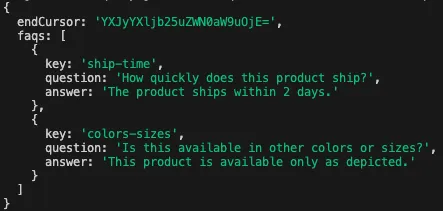
Browse to a product for which you've assigned FAQ metafields. The placeholder content will not have changed, but in the output of the terminal where you're running the dev server, you should be able to observe a log not only of the `getProductFaqMetafields` query call, but also the data returned from it. (Note that the limit passed into the query function means you'll only see two results.)
[Example Code](https://github.com/bigcommerce-edu/lab-catalyst-makeswift-faqs/compare/e-faqs-02-pre...e-faqs-02-post?diff=split)
## Step 3: Create the Listing Component
1. **Open** the file `components/custom/product-faqs/faqs-list.tsx`. This defines the component that will render just the FAQs list, which will be reused in a couple of places.
2. **Modify** the component to accept a list of FAQs and render a simple list.
```jsx {4,8,10-25} showLineNumbers={false}
...
interface FaqsListProps {
faqs: Faq[];
}
export function FaqsList({
faqs,
}: FaqsListProps) {
return faqs.length <= 0 ? '' : (
{faqs.map(faq => (
{faq.question}
{faq.answer}
))}
);
}
```
3. **Open** `components/custom/product-faqs/index.tsx` and **remove** the logging statement you previously put in place.
```java showLineNumbers={false}
// REMOVE
console.log(faqsCollection);
```
4. **Replace** the previous placeholder text with the `ProductFaqsComponent` client component.
```jsx {11} showLineNumbers={false}
export function ProductFaqs({
...
}: ProductFaqsProps) {
return (
{heading}
);
}
```
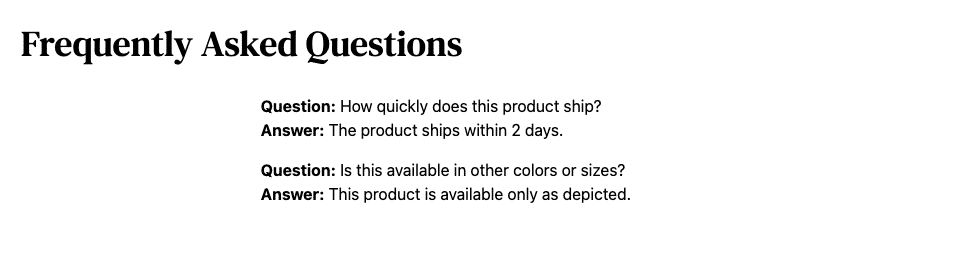
In our final state, the page route does the job of fetching the FAQs data and hands it off to `ProductFaqs`. This component sets up the main UX (which we'll add to later) and in turn passes the FAQs to `FaqsList` to render the list.
Revisit your product page. You should successfully see the first two FAQs displayed. This is a rudimentary presentation for now, but you'll soon spruce it up.
[Example Code](https://github.com/bigcommerce-edu/lab-catalyst-makeswift-faqs/compare/e-faqs-03-pre...e-faqs-03-post?diff=split)
## Full Exercise Code
[Full Exercise Code](https://github.com/bigcommerce-edu/lab-catalyst-makeswift-faqs/compare/e-catalyst-start...e-faqs-complete?diff=split)