> This page is for Developer.
> For clean Markdown of any page, append .md to the page URL.
> For a complete documentation index, see https://docs.bigcommerce.com/llms.txt.
> For AI client integration (Claude Code, Cursor, etc.), connect to the MCP server at https://docs.bigcommerce.com/_mcp/server.
# Adding Stored Payment Methods
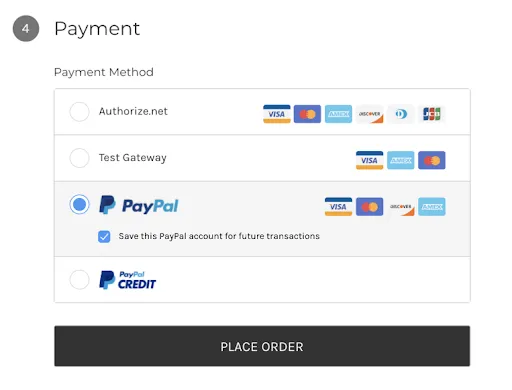
The [Cornerstone 2.6.0 release](/developer/changelog) added stored payment method management for saved credit cards to the customer `account.php` page. The [Cornerstone 4.4.0 release](/developer/changelog/2020/2/5#2020-02-05-cornerstone-440-release) expanded this functionality to include saving PayPal accounts using [PayPal Powered by Braintree](https://support.bigcommerce.com/s/article/Connecting-with-PayPal-Powered-by-Braintree).
This article contains instructions for manually applying the changes made in `4.4.0` to themes version `2.6.0 ` to `4.3.1`. For a full diff of the files to change, see [Cornerstone pull request 1603 (GitHub)](https://github.com/bigcommerce/cornerstone/pull/1603/files). If you're developing on a theme older than version `2.6.0` you'll first need to apply the changes made in `2.6.0`; to do so, see [Stored Credit Card Management](/developer/docs/storefront/stencil/themes/checkout-enhancements/stored-payment-methods). For theme update best practices, see [Theme Updates and Version Control](/developer/docs/storefront/stencil/deployment/updates-and-version-control).
## Update `config.json`
In `config.json`, replace `account_payment_methods` in the `features` array with `account_payment_methods_v2` and add `csrf_protection`:
**`config.json`**
```json title="config.json" showLineNumbers={false}
{
"name": "Cornerstone",
"version": "4.3.1",
"meta": {
...
"features": [
"fully_responsive",
"mega_navigation",
...
"csrf_protection", // add csrf_protection
"account_payment_methods" // replace with account_payment_methods_v2
]
}
}
```
To enable saving PayPal accounts, credit cards, and other non-credit card payment methods using the theme, [add the supported\_payment\_methods array (GitHub)](https://github.com/leeBigCommerce/cornerstone/blob/54f5681a6a15cd8477c51c6db9eb54ea3eb40972/config.json#L325) and append `card` and `paypal` to it:
**`config.json`**
```json title="config.json" showLineNumbers={false}
{
...
"supported_card_type_icons": [
...
],
"supported_payment_methods": [ // Add supported_payment_methods array
"card", // allowlist card and paypal
"paypal"
],
"lazyload_mode": "lazyload+lqip"
...
}
```
To see the full diff, refer to [Cornerstone pull request 1603 (GitHub)](https://github.com/bigcommerce/cornerstone/pull/1603/files?file-filters%5B%5D=.html\&file-filters%5B%5D=.json\&file-filters%5B%5D=.md#diff-06b2d3b23dce96e1619d2b53d6c947ec).
## Update payment-methods-list.html
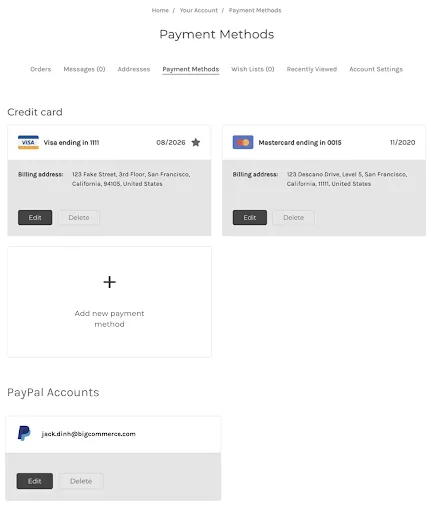
After you make the preceding config changes, you can pass a new version of the `payment_methods` object to the template.
To use the updated object, apply the changes from [Cornerstone pull request 1603 (GitHub)](https://github.com/bigcommerce/cornerstone/pull/1603/files?file-filters%5B%5D=.html) to `payment-methods-list.html`.
The updated object shows saved PayPal accounts in the payment method list.
## Update edit-payment-method.html
The `customer.edit_stored_instrument` object has been lightly extended to include a `type` attribute.
Using `type`, you can show or hide fields based on whether the current instrument is a `stored_card` or `stored_paypal_account`. The type is also passed to the form handler in a hidden input so the handler can update the instrument accordingly.
Modify `edit-payment-method.html` to include changes from [Cornerstone pull request 1603 (GitHub)](https://github.com/bigcommerce/cornerstone/pull/1603/files?file-filters%5B%5D=.html) to add the new user interface elements and behavior.
## Update `_paymentMethods.scss`
To style the newly added UI elements, update `_paymentMethods.scss` with the changes from [Cornerstone pull request 1603 (GitHub)](https://github.com/bigcommerce/cornerstone/pull/1603/files?file-filters%5B%5D=#diff-1c33ed0c69f228483a39fce2616e1942).
## Add PayPal Logo
The changes to `payment-methods-list.html` include a PayPal logo that's displayed on the payment method cards:
```handlebars showLineNumbers={false}
```
Use the command line to download the `.svg` and save it to `assets/img/payment-methods`:
```bash showLineNumbers={false}
cd assets/img/payment-methods/paypal.svg
curl -O https://raw.githubusercontent.com/leeBigCommerce/cornerstone/54f5681a6a15cd8477c51c6db9eb54ea3eb40972/assets/img/payment-methods/paypal.svg
```
## Update en.json
At minimum, an English translation needs to be added to `lang/en.json`: [Cornerstone pull request 1603 (GitHub)](https://github.com/bigcommerce/cornerstone/pull/1603/files?file-filters%5B%5D=.html\&file-filters%5B%5D=.json\&file-filters%5B%5D=.md#diff-b0d4c1fc9d8d2a5a213b27a72cf6c9fe). Add translations for other locales as needed.
## Manage stored account payments
After adding a [stored payment method](https://support.bigcommerce.com/s/article/Enabling-Stored-Payment-Methods?language=en_US), shoppers can use the Storefront account payments microapp to manage their stored payment instruments. The microapp provides a payment method form with billing address fields. Currently, the microapp works with Adyen. Plans include expanding the number of supported payment processors.
### Install the microapp
To install the Storefront account payments microapp to your theme, inject the `account_payments` variable into the `add-payment-method.html` template.
```handlebars showLineNumbers={false}
{{#if account_payments}}
{{{ account_payments }}}
{{/if}}
```
The `account_payments` variable includes the `` element that renders the microapp and a script tag containing the microapp URL. If the `window.BigCommerce` object does not yet exist, insert a script to create it.
If the selected payment provider already has an integration with the Storefront account payments microapp, [initializing window.BigCommerce.renderAccountPayments](#initialize-the-microapp) renders the microapp automatically.
If the selected payment provider does not have an integration with the microapp, the `account_payments` variable is undefined and the fallback payment form renders. See an example of a fallback payment form and the conditional rendering logic from the [Cornerstone theme](https://github.com/bigcommerce/cornerstone/blob/master/templates/pages/account/add-payment-method.html#L45).
### Initialize the microapp
Initialize the microapp by calling the `renderAccountPayments()` method of the storefront browser's `window.BigCommerce` object. The Cornerstone theme initializes the microapp in the `account.js` file.
The `renderAccountPayments()` method takes the following three parameters:
* `style` - an options **object** for customizing the look of the microapp form. May be empty.
* `storeContextData` - an **object** that supplies store context.
* `errorHandler` - a **function** that the microapp calls if the payments form submission fails.
**`Example renderAccountPayments() wrapper function`**
```js title="Example renderAccountPayments() wrapper function" showLineNumbers={false}
const initializeMicroapp = (style, storeContextData, errorHandler) => window.BigCommerce.renderAccountPayments(style, storeContextData, errorHandler);
```
This [Cornerstone example (GitHub)](https://github.com/bigcommerce/cornerstone/blob/master/assets/js/theme/account.js#L102) initializes `window.BigCommerce.renderAccountPayments` using JavaScript.
The following example expresses the method's parameters as a TypeScript interface:
**`Example interface for renderAccountPayments()`**
```ts title="Example interface for renderAccountPayments()" showLineNumbers={false}
interface AppConfigInterface {
styles?: AppStyles;
storeContextData: StoreContextDataInterface;
errorHandler(error: string): void;
}
```
The following TypeScript interfaces express the data structures and types that `renderAccountPayments()` expects:
```ts showLineNumbers={false}
interface AppStyles {
inputBase?: CSSProperties;
inputValidationError?: CSSProperties;
inputValidationSuccess?: CSSProperties;
submitButton?: CSSProperties;
cancelButton?: CSSProperties;
label?: CSSProperties;
inputWrapper?: CSSProperties;
validationError?: CSSProperties;
heading?: CSSProperties;
formRow?: CSSProperties;
formActions?: CSSProperties;
}
interface StoreContextDataInterface {
countries: Country[];
paymentsUrl: string;
storeHash: string;
storeLocale: string;
vaultToken: string;
shopperId: string;
customerEmail: string;
providerId: PaymentProviders;
currencyCode: string;
paymentMethodsUrl: string;
paymentProviderInitializationData: PaymentProviderInitializationData;
}
type PaymentProviderInitializationData =
AdyenV2InitializationData
| AdyenV3InitializationData;
interface AdyenV2InitializationData {
clientKey?: string;
environment: string;
gateway: string;
originKey: string;
}
interface AdyenV3InitializationData {
clientKey: string;
environment: string;
gateway: string;
originKey?: string;
}
interface Country {
code: string;
label: string;
states?: State[];
value: string;
}
interface State {
code: string;
name: string;
value: string;
}
enum PaymentProviders {
Adyenv2 = 'adyenv2',
Adyenv3 = 'adyenv3',
}
```
## FAQ
**Where is the card data stored?**
Card data is stored securely with the payment gateway.
**Is storing credit cards PCI-compliant?**
Card data is stored securely with the payment gateway. The BigCommerce store is NOT storing the payment data.
**Can shoppers modify their stored card?**
After adding a card, shoppers can modify the billing address. To modify other the other details, shoppers will need to delete and re-add the card.
## Resources
### Related articles
* [Payments API](/developer/docs/admin/checkout-and-cart/payments)
* [Enabling Stored Cards (Help Center)](https://support.bigcommerce.com/s/article/Enabling-Stored-Credit-Cards)
* [The Complete Guide to Checkout Customization on BigCommerce (Developer Blog)](https://medium.com/bigcommerce-developer-blog/the-complete-guide-to-checkout-customization-on-bigcommerce-6b566bc36fa9)
 ```
Use the command line to download the `.svg` and save it to `assets/img/payment-methods`:
```bash showLineNumbers={false}
cd assets/img/payment-methods/paypal.svg
curl -O https://raw.githubusercontent.com/leeBigCommerce/cornerstone/54f5681a6a15cd8477c51c6db9eb54ea3eb40972/assets/img/payment-methods/paypal.svg
```
## Update en.json
At minimum, an English translation needs to be added to `lang/en.json`: [Cornerstone pull request 1603 (GitHub)](https://github.com/bigcommerce/cornerstone/pull/1603/files?file-filters%5B%5D=.html\&file-filters%5B%5D=.json\&file-filters%5B%5D=.md#diff-b0d4c1fc9d8d2a5a213b27a72cf6c9fe). Add translations for other locales as needed.
## Manage stored account payments
After adding a [stored payment method](https://support.bigcommerce.com/s/article/Enabling-Stored-Payment-Methods?language=en_US), shoppers can use the Storefront account payments microapp to manage their stored payment instruments. The microapp provides a payment method form with billing address fields. Currently, the microapp works with Adyen. Plans include expanding the number of supported payment processors.
### Install the microapp
To install the Storefront account payments microapp to your theme, inject the `account_payments` variable into the `add-payment-method.html` template.
```handlebars showLineNumbers={false}
{{#if account_payments}}
{{{ account_payments }}}
{{/if}}
```
The `account_payments` variable includes the `
```
Use the command line to download the `.svg` and save it to `assets/img/payment-methods`:
```bash showLineNumbers={false}
cd assets/img/payment-methods/paypal.svg
curl -O https://raw.githubusercontent.com/leeBigCommerce/cornerstone/54f5681a6a15cd8477c51c6db9eb54ea3eb40972/assets/img/payment-methods/paypal.svg
```
## Update en.json
At minimum, an English translation needs to be added to `lang/en.json`: [Cornerstone pull request 1603 (GitHub)](https://github.com/bigcommerce/cornerstone/pull/1603/files?file-filters%5B%5D=.html\&file-filters%5B%5D=.json\&file-filters%5B%5D=.md#diff-b0d4c1fc9d8d2a5a213b27a72cf6c9fe). Add translations for other locales as needed.
## Manage stored account payments
After adding a [stored payment method](https://support.bigcommerce.com/s/article/Enabling-Stored-Payment-Methods?language=en_US), shoppers can use the Storefront account payments microapp to manage their stored payment instruments. The microapp provides a payment method form with billing address fields. Currently, the microapp works with Adyen. Plans include expanding the number of supported payment processors.
### Install the microapp
To install the Storefront account payments microapp to your theme, inject the `account_payments` variable into the `add-payment-method.html` template.
```handlebars showLineNumbers={false}
{{#if account_payments}}
{{{ account_payments }}}
{{/if}}
```
The `account_payments` variable includes the `