` containing the static string “Hello World”. The `'use client'` directive marks it as a Client Component, following the same convention as Catalyst's built-in Makeswift components.
## Register the component with Makeswift
To use the component in the Makeswift editor, register it with Makeswift.
Each Makeswift component in Catalyst has its own folder inside `lib/makeswift/components`, with a `register.ts` file that registers it. Create a folder for your component:
```bash showLineNumbers={false}
mkdir lib/makeswift/components/hello-world
```
Inside the folder, create a `register.ts` file:
```bash showLineNumbers={false}
touch lib/makeswift/components/hello-world/register.ts
```
Add the following code to the `register.ts` file:
**`lib/makeswift/components/hello-world/register.ts`**
```ts title="lib/makeswift/components/hello-world/register.ts" showLineNumbers={false}
import { runtime } from '~/lib/makeswift/runtime';
import { HelloWorld } from '~/components/hello-world';
runtime.registerComponent(HelloWorld, {
type: 'hello-world',
label: 'Basic / Hello World',
});
```
The `registerComponent` method from the Makeswift runtime takes two parameters: a React component, and a configuration object with `type`, `label`, `icon`, `hidden`, and `props` properties. This example sets only `type` and `label`. For details on each property, see the [Makeswift `registerComponent` reference](https://docs.makeswift.com/developer/reference/runtime/register-component#arguments).
Next, import the new registration file in `lib/makeswift/components.ts`. A component is available in Makeswift only after its registration file is imported here.
**`lib/makeswift/components.ts`**
```ts {4} title="lib/makeswift/components.ts" showLineNumbers={false}
// ...
import './components/slideshow/register';
import './components/sticky-sidebar/register';
import './components/hello-world/register';
```
## View the component in Makeswift
Start the development server:
```bash showLineNumbers={false}
pnpm run dev
```
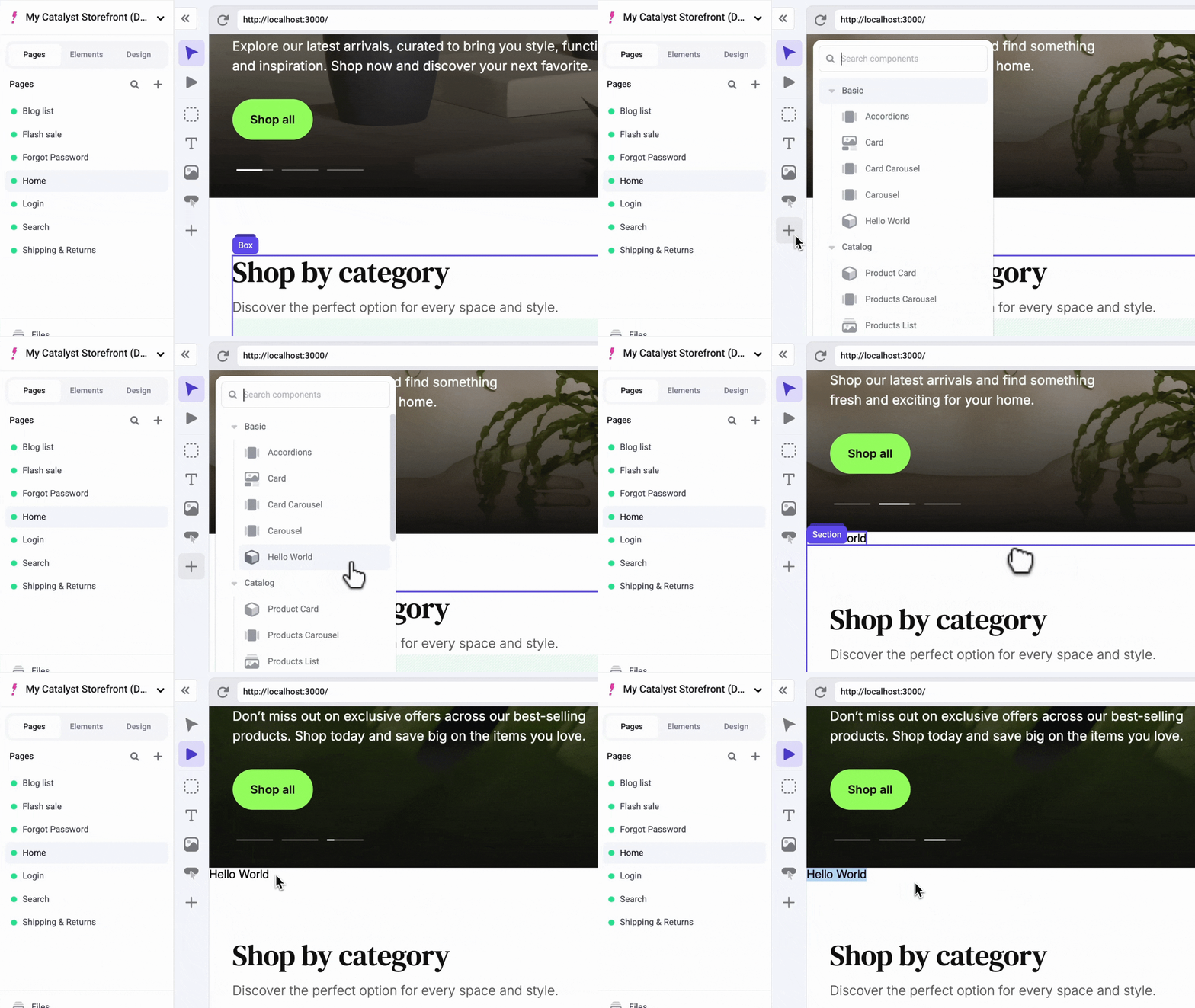
The storefront runs at `localhost:3000` by default. To see the new component, open your development Makeswift site, which is connected to your locally running code (see [Prerequisites](#prerequisites)). The component appears in the sidebar.
## Props and controls
Before turning `HelloWorld` into a product carousel, it helps to understand two concepts: props and controls.
React components take props. For example, add a `name` string prop to `components/hello-world/index.tsx`:
**`components/hello-world/index.tsx`**
```tsx {3,4} title="components/hello-world/index.tsx" showLineNumbers={false}
'use client';
export function HelloWorld({ name }: { name: string }) {
return
Hello {name}
;
}
```
Because `name` is required, TypeScript now reports in the registration file that `name` isn't defined as a Makeswift control. The `props` property of `registerComponent`'s configuration object is where you define controls. Add a `TextInput` control for the `name` prop:
**`lib/makeswift/components/hello-world/register.ts`**
```ts {1,10-15} title="lib/makeswift/components/hello-world/register.ts" showLineNumbers={false}
import { TextInput } from '@makeswift/runtime/controls';
import { runtime } from '~/lib/makeswift/runtime';
import { HelloWorld } from '~/components/hello-world';
runtime.registerComponent(HelloWorld, {
type: 'hello-world',
label: 'Basic / Hello World',
props: {
name: TextInput({
label: 'Name',
defaultValue: 'World',
}),
},
});
```
`registerComponent` uses TypeScript to map each entry in the `props` object to a prop of the React component. Every time you add a Makeswift control, make sure the registered component has a prop with the same name.
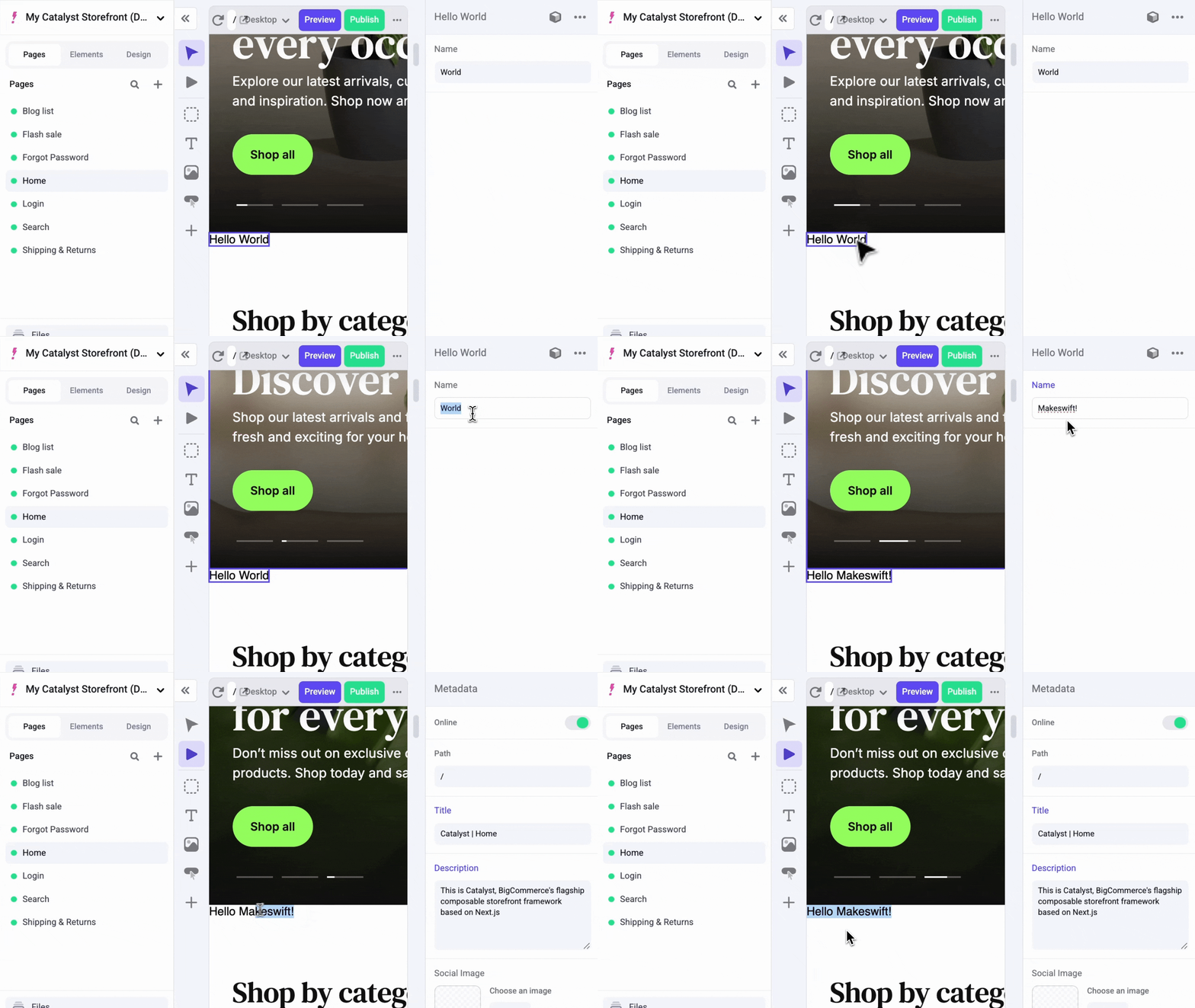
Reload the Makeswift editor, click the component, and edit the `name` prop. Makeswift users can change your site through whichever props you expose to them as controls.
## Create the `MyProductCarousel` component
Follow a similar process to create a `MyProductCarousel` component. Instead of building the carousel UI from scratch, use the [`ProductCarousel` component in VIBES](https://vibes.site/docs/soul/product-carousel), which is already included in the Catalyst source code.
Like `HelloWorld`, this component has to be a [Client Component](https://nextjs.org/docs/app/getting-started/server-and-client-components), and it also fetches products with a React hook. Registration files are imported from server code, so keep the component and its registration in separate files, the same way Catalyst's built-in `products-carousel` component does:
* `client.tsx`, marked with `'use client'`, holds the React component.
* `register.ts` imports that component and registers it with Makeswift.
Create the folder and both files:
```bash showLineNumbers={false}
mkdir lib/makeswift/components/my-product-carousel
touch lib/makeswift/components/my-product-carousel/client.tsx
touch lib/makeswift/components/my-product-carousel/register.ts
```
## Create the wrapper component
In `client.tsx`, import the `ProductCarousel` and `ProductsCarouselSkeleton` components from VIBES (`@/vibes/soul/sections/product-carousel`). Unlike `HelloWorld`, `ProductCarousel` takes a number of props, including the required `products` prop.
Create a wrapper component, `MSMyProductCarousel`, that fetches product data, shows a skeleton loader while it loads, checks the result, and passes the products to `ProductCarousel`:
**`lib/makeswift/components/my-product-carousel/client.tsx`**
```tsx title="lib/makeswift/components/my-product-carousel/client.tsx" showLineNumbers={false}
'use client';
import { ProductCarousel, ProductsCarouselSkeleton } from '@/vibes/soul/sections/product-carousel';
import { useProducts } from '../../utils/use-products';
export function MSMyProductCarousel() {
const { products, isLoading } = useProducts({
collection: 'featured',
additionalProductIds: [],
});
if (isLoading) {
return
;
}
if (products == null || products.length === 0) {
return
;
}
return
;
}
```
Then, register the wrapper in `register.ts`, the same way you registered `HelloWorld`:
**`lib/makeswift/components/my-product-carousel/register.ts`**
```ts title="lib/makeswift/components/my-product-carousel/register.ts" showLineNumbers={false}
import { runtime } from '~/lib/makeswift/runtime';
import { MSMyProductCarousel } from './client';
runtime.registerComponent(MSMyProductCarousel, {
type: 'my-product-carousel',
label: 'Catalog / My Product Carousel',
});
```
The wrapper doesn't take props yet, so `collection` and `additionalProductIds` are hard-coded. Whenever you build a component that takes props, decide which of them should be editable in Makeswift. Later steps add Makeswift controls for `collection` and `additionalProductIds` so authors can change them without editing code.
The `useProducts` hook fetches product data with a client-side request to a proxy API endpoint, `/api/products/group/${collection}`. The hook runs only in the browser, and Catalyst calls the GraphQL Storefront API server-to-server, so the browser can't call it directly; it requests data through an API route instead. If your own client-side Makeswift components need BigCommerce data, create a proxy API endpoint for that data.
Import the new registration file in `lib/makeswift/components.ts`, under the import for `hello-world`:
**`lib/makeswift/components.ts`**
```ts {3} title="lib/makeswift/components.ts" showLineNumbers={false}
// ...
import './components/hello-world/register';
import './components/my-product-carousel/register';
```
## Preview the carousel in Makeswift
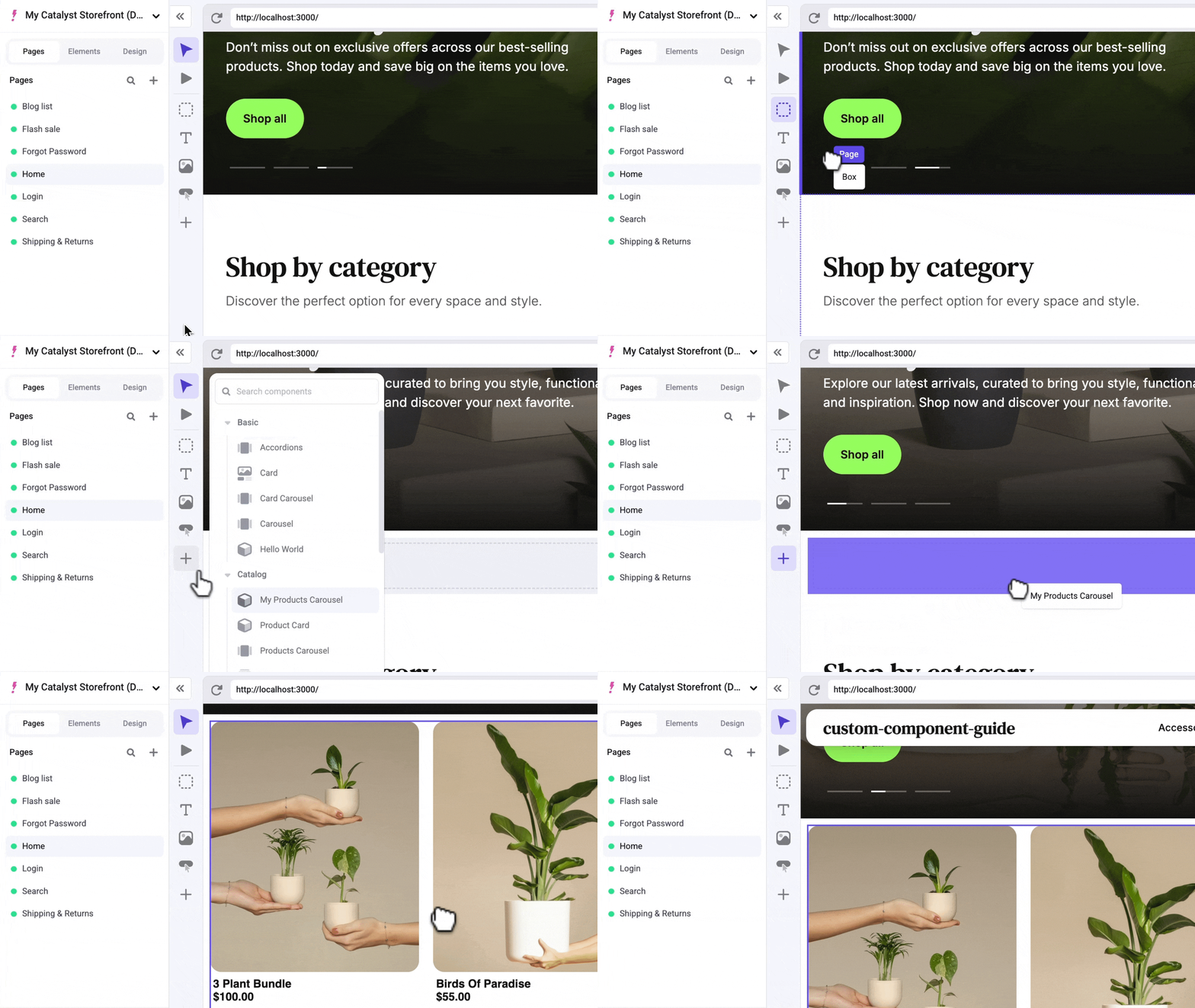
In Makeswift, drag a box above the “Shop by category” section, and then drag the `MyProductCarousel` component from the component tray into it.
> **Warning**
>
> If the carousel shows no products, the `featured`
> collection is empty. Mark some products as featured in your BigCommerce
> channel settings, or try changing the `collection` prop to `best-selling` or
> `newest`.
## Add the style control
Add the component's first Makeswift control, `Style()`. First, update the component to accept a `className` prop:
**`lib/makeswift/components/my-product-carousel/client.tsx`**
```tsx title="lib/makeswift/components/my-product-carousel/client.tsx" showLineNumbers={false}
'use client';
import { ProductCarousel, ProductsCarouselSkeleton } from '@/vibes/soul/sections/product-carousel';
import { useProducts } from '../../utils/use-products';
interface MSMyProductCarouselProps {
className: string;
}
export function MSMyProductCarousel({ className }: MSMyProductCarouselProps) {
const { products, isLoading } = useProducts({
collection: 'featured',
additionalProductIds: [],
});
if (isLoading) {
return
;
}
if (products == null || products.length === 0) {
return
;
}
return
;
}
```
The new `MSMyProductCarouselProps` interface defines the component's props, starting with `className`.
Then, add the `Style()` control for `className` in the registration file:
**`lib/makeswift/components/my-product-carousel/register.ts`**
```ts title="lib/makeswift/components/my-product-carousel/register.ts" showLineNumbers={false}
import { Style } from '@makeswift/runtime/controls';
import { runtime } from '~/lib/makeswift/runtime';
import { MSMyProductCarousel } from './client';
runtime.registerComponent(MSMyProductCarousel, {
type: 'my-product-carousel',
label: 'Catalog / My Product Carousel',
props: {
className: Style(),
},
});
```
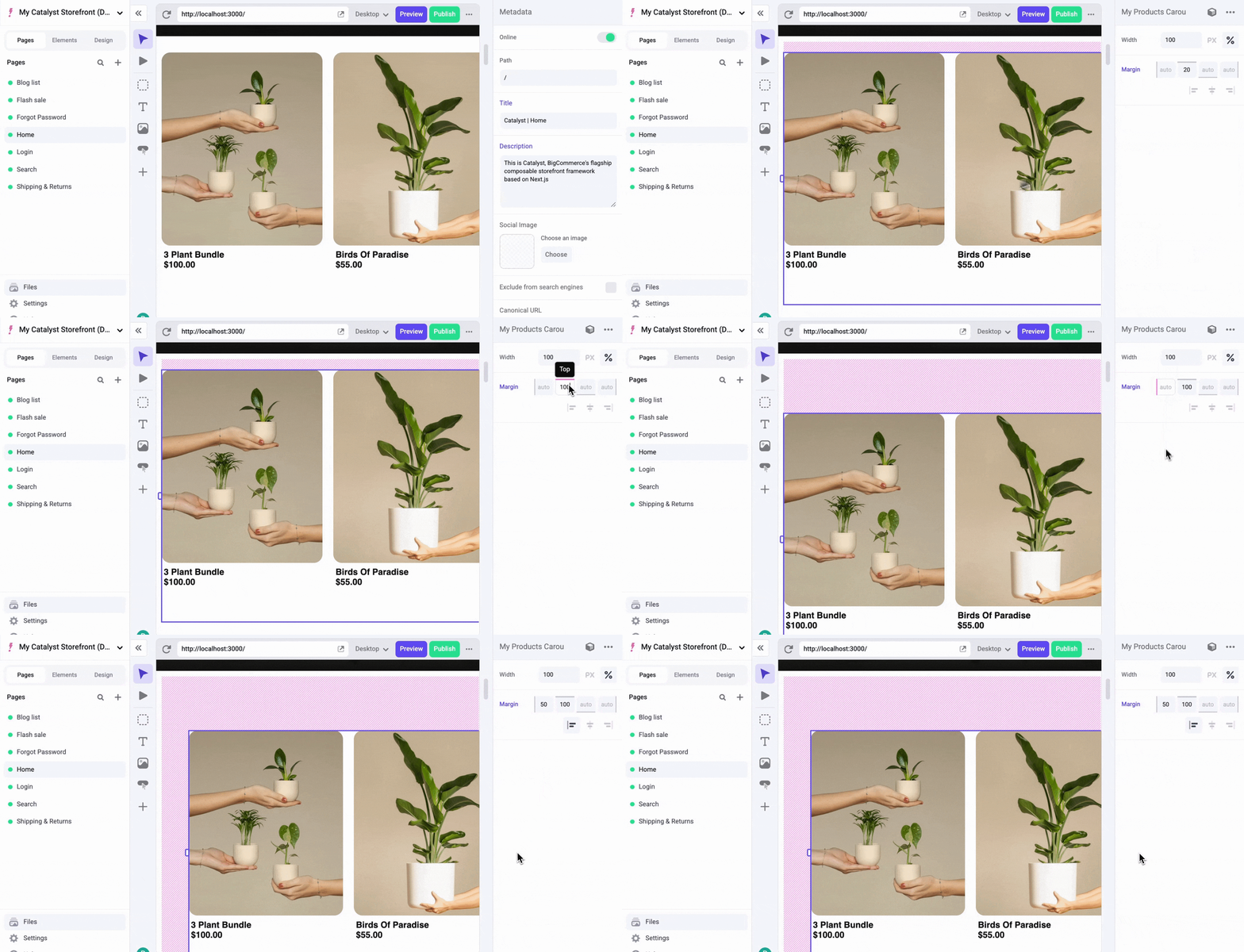
Reload the Makeswift editor, click the component, and adjust its width, height, and other style properties in the right sidebar:
## Add a collection control
Next, give authors a dropdown in the Makeswift editor to choose which `collection` the carousel displays.
Add a `collection` property to the interface, typed as a union of the valid values. Then replace the hard-coded `collection` value passed to `useProducts` with the new prop:
**`lib/makeswift/components/my-product-carousel/client.tsx`**
```tsx title="lib/makeswift/components/my-product-carousel/client.tsx" showLineNumbers={false}
'use client';
import { ProductCarousel, ProductsCarouselSkeleton } from '@/vibes/soul/sections/product-carousel';
import { useProducts } from '../../utils/use-products';
interface MSMyProductCarouselProps {
className: string;
collection: 'featured' | 'best-selling' | 'newest' | 'none';
}
export function MSMyProductCarousel({ className, collection }: MSMyProductCarouselProps) {
const { products, isLoading } = useProducts({
collection,
additionalProductIds: [],
});
if (isLoading) {
return
;
}
if (products == null || products.length === 0) {
return
;
}
return
;
}
```
Then, import the `Select()` control, and make sure each option's `value` matches a string in the `collection` union type:
**`lib/makeswift/components/my-product-carousel/register.ts`**
```ts title="lib/makeswift/components/my-product-carousel/register.ts" showLineNumbers={false}
import { Select, Style } from '@makeswift/runtime/controls';
import { runtime } from '~/lib/makeswift/runtime';
import { MSMyProductCarousel } from './client';
runtime.registerComponent(MSMyProductCarousel, {
type: 'my-product-carousel',
label: 'Catalog / My Product Carousel',
props: {
className: Style(),
collection: Select({
label: 'Product collection',
options: [
{ value: 'none', label: 'None (static only)' },
{ value: 'best-selling', label: 'Best selling' },
{ value: 'newest', label: 'Newest' },
{ value: 'featured', label: 'Featured' },
],
defaultValue: 'featured',
}),
},
});
```
## Add more product IDs
Now do the same for `additionalProductIds`. This one takes a few more steps. In the component, accept an `additionalProducts` list and map it to product IDs:
**`lib/makeswift/components/my-product-carousel/client.tsx`**
```tsx title="lib/makeswift/components/my-product-carousel/client.tsx" showLineNumbers={false}
'use client';
import { ProductCarousel, ProductsCarouselSkeleton } from '@/vibes/soul/sections/product-carousel';
import { useProducts } from '../../utils/use-products';
interface MSMyProductCarouselProps {
className: string;
collection: 'featured' | 'best-selling' | 'newest' | 'none';
additionalProducts: Array<{
entityId?: string;
}>;
}
export function MSMyProductCarousel({
className,
collection,
additionalProducts,
}: MSMyProductCarouselProps) {
const additionalProductIds = additionalProducts.map(({ entityId }) => entityId ?? '');
const { products, isLoading } = useProducts({
collection,
additionalProductIds,
});
if (isLoading) {
return
;
}
if (products == null || products.length === 0) {
return
;
}
return
;
}
```
In the registration file, compose several controls (`List()`, `Group()`, `TextInput()`, and `Combobox()`) to give authors a usable editor:
**`lib/makeswift/components/my-product-carousel/register.ts`**
```ts title="lib/makeswift/components/my-product-carousel/register.ts" showLineNumbers={false}
import { Combobox, Group, List, Select, Style, TextInput } from '@makeswift/runtime/controls';
import { runtime } from '~/lib/makeswift/runtime';
import { searchProducts } from '../../utils/search-products';
import { MSMyProductCarousel } from './client';
runtime.registerComponent(MSMyProductCarousel, {
type: 'my-product-carousel',
label: 'Catalog / My Product Carousel',
props: {
className: Style(),
collection: Select({
label: 'Product collection',
options: [
{ value: 'none', label: 'None (static only)' },
{ value: 'best-selling', label: 'Best selling' },
{ value: 'newest', label: 'Newest' },
{ value: 'featured', label: 'Featured' },
],
defaultValue: 'featured',
}),
additionalProducts: List({
label: 'Additional products',
type: Group({
label: 'Product',
props: {
title: TextInput({ label: 'Title', defaultValue: 'Product title' }),
entityId: Combobox({
label: 'Product',
async getOptions(query) {
const products = await searchProducts(query);
return products.map((product) => ({
id: product.entityId.toString(),
label: product.name,
value: product.entityId.toString(),
}));
},
}),
},
}),
getItemLabel(product) {
return product?.title || 'Product';
},
}),
},
});
```
Each control serves a different purpose. For details, see the [Makeswift controls reference](https://docs.makeswift.com/developer/reference/controls/list).
This uses a second utility function that fetches product data from a proxy API endpoint. The two serve different purposes: the React hook fetches the products the component renders, while the function in `getOptions` fetches the options shown when an author types in the combobox to add a product to the carousel.
`getItemLabel` makes the `List()` items under "Additional products” more readable. It receives each item in the list, and here returns the item's **Title**.
## Add a limit control
Next, let authors control how many products the carousel shows. Following the same pattern, add a `limit` prop to the interface and use it in the component to limit the number of products returned:
**`lib/makeswift/components/my-product-carousel/client.tsx`**
```tsx title="lib/makeswift/components/my-product-carousel/client.tsx" showLineNumbers={false}
'use client';
import { ProductCarousel, ProductsCarouselSkeleton } from '@/vibes/soul/sections/product-carousel';
import { useProducts } from '../../utils/use-products';
interface MSMyProductCarouselProps {
className: string;
collection: 'featured' | 'best-selling' | 'newest' | 'none';
limit: number;
additionalProducts: Array<{
entityId?: string;
}>;
}
export function MSMyProductCarousel({
className,
collection,
limit,
additionalProducts,
}: MSMyProductCarouselProps) {
const additionalProductIds = additionalProducts.map(({ entityId }) => entityId ?? '');
const { products, isLoading } = useProducts({
collection,
collectionLimit: limit,
additionalProductIds,
});
if (isLoading) {
return
;
}
if (products == null || products.length === 0) {
return
;
}
return
;
}
```
Then, bring in the `Number()` control from the Makeswift runtime to tell Makeswift how to provide a value for `limit`:
**`lib/makeswift/components/my-product-carousel/register.ts`**
```ts title="lib/makeswift/components/my-product-carousel/register.ts" showLineNumbers={false}
import {
Combobox,
Group,
List,
Number,
Select,
Style,
TextInput,
} from '@makeswift/runtime/controls';
import { runtime } from '~/lib/makeswift/runtime';
import { searchProducts } from '../../utils/search-products';
import { MSMyProductCarousel } from './client';
runtime.registerComponent(MSMyProductCarousel, {
type: 'my-product-carousel',
label: 'Catalog / My Product Carousel',
props: {
className: Style(),
collection: Select({
label: 'Product collection',
options: [
{ value: 'none', label: 'None (static only)' },
{ value: 'best-selling', label: 'Best selling' },
{ value: 'newest', label: 'Newest' },
{ value: 'featured', label: 'Featured' },
],
defaultValue: 'featured',
}),
limit: Number({ label: 'Max collection items', defaultValue: 12 }),
additionalProducts: List({
label: 'Additional products',
type: Group({
label: 'Product',
props: {
title: TextInput({ label: 'Title', defaultValue: 'Product title' }),
entityId: Combobox({
label: 'Product',
async getOptions(query) {
const products = await searchProducts(query);
return products.map((product) => ({
id: product.entityId.toString(),
label: product.name,
value: product.entityId.toString(),
}));
},
}),
},
}),
getItemLabel(product) {
return product?.title || 'Product';
},
}),
},
});
```
## Update the types
The VIBES `ProductCarousel` prop interface defines many props, such as `aspectRatio` and `colorScheme`, that `MSMyProductCarouselProps` doesn't include yet.
For each component you build for Makeswift, decide which of its props authors should be able to edit. Here, authors should be able to control almost every `ProductCarousel` prop, such as whether the carousel `showsButtons` or hides its overflow.
Instead of adding each prop to `MSMyProductCarouselProps` by hand, use React's [`ComponentPropsWithoutRef` utility type](https://react-typescript-cheatsheet.netlify.app/docs/reference/ComponentProps). It extracts a component's prop types without its ref-related props, giving you a type that matches the component's public interface.
Change the `MSMyProductCarouselProps` definition in `client.tsx` to use it:
**`lib/makeswift/components/my-product-carousel/client.tsx`**
```tsx {3,7-14} title="lib/makeswift/components/my-product-carousel/client.tsx" showLineNumbers={false}
'use client';
import { ComponentPropsWithoutRef } from 'react';
// ...
type MSMyProductCarouselProps = ComponentPropsWithoutRef
& {
className: string;
collection: 'featured' | 'best-selling' | 'newest' | 'none';
limit: number;
additionalProducts: Array<{
entityId?: string;
}>;
};
// ...
```
`MSMyProductCarouselProps` now accepts any prop `ProductCarousel` accepts, plus `collection` and `additionalProducts`.
TypeScript now reports `Property 'products' is missing in type …`. `ProductCarousel` requires a `products` prop, but `MSMyProductCarousel` doesn't take one, because the wrapper fetches `products` itself. Use TypeScript's `Omit` utility type to remove `products` from the type:
**`lib/makeswift/components/my-product-carousel/client.tsx`**
```tsx {3-6} title="lib/makeswift/components/my-product-carousel/client.tsx" showLineNumbers={false}
// ...
type MSMyProductCarouselProps = Omit<
ComponentPropsWithoutRef,
'products'
> & {
className: string;
collection: 'none' | 'best-selling' | 'newest' | 'featured';
limit: number;
additionalProducts: Array<{
entityId?: string;
}>;
};
// ...
```
The TypeScript errors are gone, and `MSMyProductCarousel` accepts any prop that `ProductCarousel` accepts. To confirm, remove `className` from `MSMyProductCarouselProps`: TypeScript doesn't report an error, because `className` is already a `ProductCarousel` prop and the wrapper's type extends those props.
## Additional controls
Now pass the rest of the props through to `ProductCarousel`:
**`lib/makeswift/components/my-product-carousel/client.tsx`**
```tsx title="lib/makeswift/components/my-product-carousel/client.tsx" showLineNumbers={false}
'use client';
import { ComponentPropsWithoutRef } from 'react';
import { ProductCarousel, ProductsCarouselSkeleton } from '@/vibes/soul/sections/product-carousel';
import { useProducts } from '../../utils/use-products';
type MSMyProductCarouselProps = Omit<
ComponentPropsWithoutRef,
'products'
> & {
collection: 'none' | 'best-selling' | 'newest' | 'featured';
limit: number;
additionalProducts: Array<{
entityId?: string;
}>;
};
export function MSMyProductCarousel({
className,
collection,
limit,
additionalProducts,
...props
}: MSMyProductCarouselProps) {
const additionalProductIds = additionalProducts.map(({ entityId }) => entityId ?? '');
const { products, isLoading } = useProducts({
collection,
collectionLimit: limit,
additionalProductIds,
});
if (isLoading) {
return ;
}
if (products == null || products.length === 0) {
return ;
}
return ;
}
```
Then, add controls to fill in the rest of our props:
**`lib/makeswift/components/my-product-carousel/register.ts`**
```ts title="lib/makeswift/components/my-product-carousel/register.ts" showLineNumbers={false}
import {
Checkbox,
Combobox,
Group,
List,
Number,
Select,
Style,
TextInput,
} from '@makeswift/runtime/controls';
import { runtime } from '~/lib/makeswift/runtime';
import { searchProducts } from '../../utils/search-products';
import { MSMyProductCarousel } from './client';
runtime.registerComponent(MSMyProductCarousel, {
type: 'my-product-carousel',
label: 'Catalog / My Product Carousel',
props: {
className: Style(),
collection: Select({
label: 'Product collection',
options: [
{ value: 'none', label: 'None (static only)' },
{ value: 'best-selling', label: 'Best selling' },
{ value: 'newest', label: 'Newest' },
{ value: 'featured', label: 'Featured' },
],
defaultValue: 'featured',
}),
limit: Number({ label: 'Max collection items', defaultValue: 12 }),
additionalProducts: List({
label: 'Additional products',
type: Group({
label: 'Product',
props: {
title: TextInput({ label: 'Title', defaultValue: 'Product title' }),
entityId: Combobox({
label: 'Product',
async getOptions(query) {
const products = await searchProducts(query);
return products.map((product) => ({
id: product.entityId.toString(),
label: product.name,
value: product.entityId.toString(),
}));
},
}),
},
}),
getItemLabel(product) {
return product?.title || 'Product';
},
}),
aspectRatio: Select({
label: 'Aspect ratio',
options: [
{ value: '1:1', label: 'Square' },
{ value: '5:6', label: '5:6' },
{ value: '3:4', label: '3:4' },
],
defaultValue: '5:6',
}),
colorScheme: Select({
label: 'Text color scheme',
options: [
{ value: 'light', label: 'Light' },
{ value: 'dark', label: 'Dark' },
],
defaultValue: 'light',
}),
showScrollbar: Checkbox({
label: 'Show scrollbar',
defaultValue: true,
}),
showButtons: Checkbox({
label: 'Show buttons',
defaultValue: true,
}),
hideOverflow: Checkbox({
label: 'Hide overflow',
defaultValue: true,
}),
},
});
```
All of the props are now exposed in Makeswift for authors to control.
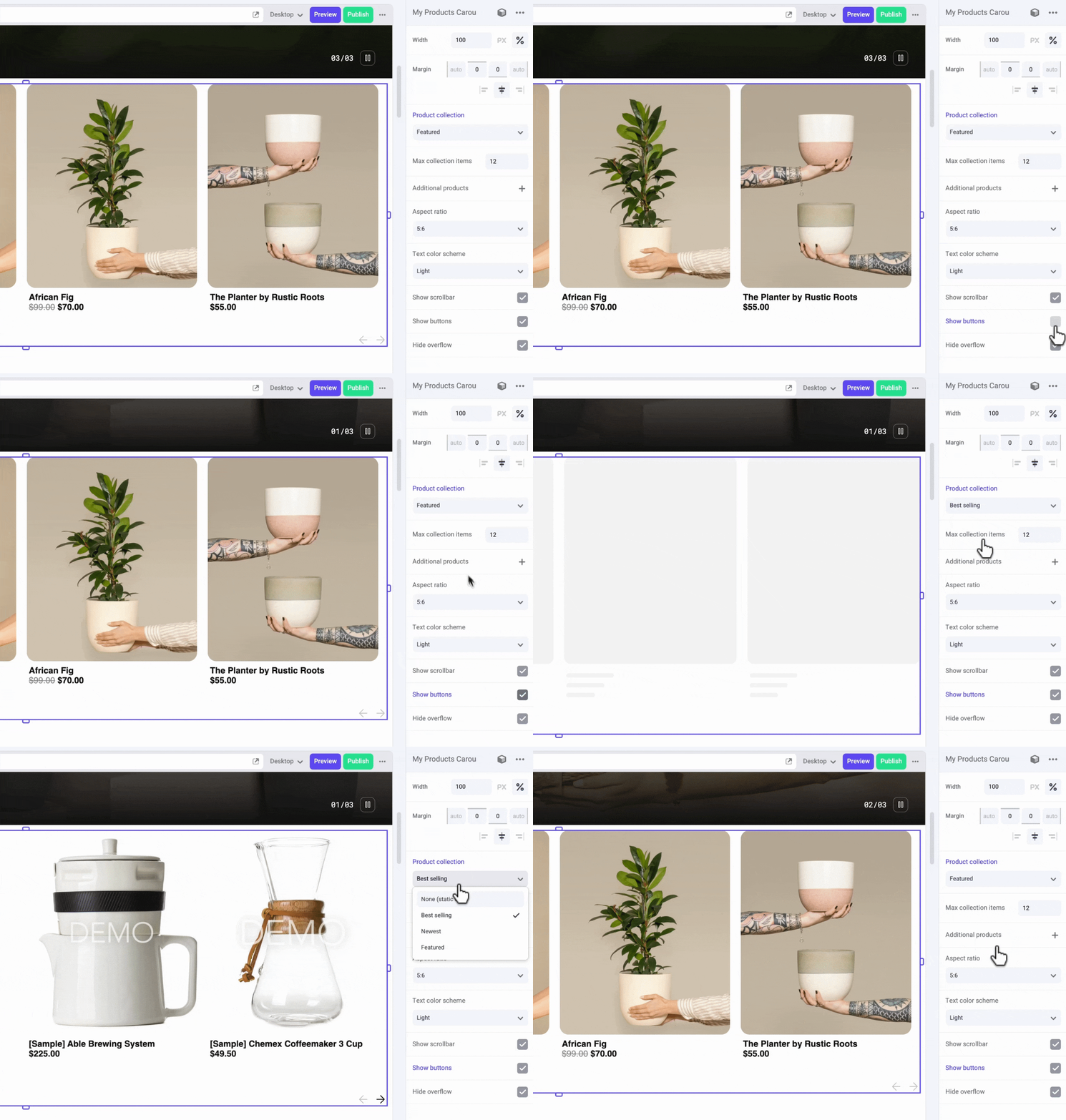
For a complete reference implementation, compare your component with Catalyst's built-in `lib/makeswift/components/products-carousel` component, which follows the same structure.
## Next steps
You've built a Catalyst component that authors can edit visually in Makeswift, that sources data from your BigCommerce catalog, and that combines VIBES UI components with Next.js primitives.
* [Show different content to different customer groups](/developer/docs/storefront/catalyst/makeswift/customer-group-component) with the Customer Group Slot.
* [Deploy your storefront](/developer/docs/storefront/catalyst/deployment/overview) so authors can use your component in production.