The perfect beach towel: thin, lightweight and highly absorbent. Crafted by Fog Linen in Japan using soft Lithuanian linen, each towel rolls up for compact stowaway. Dry off after a refreshing dip in the ocean and stretch out on it for a sun bath. The thinness ensures a quick dry so you can have it rolled back up in your bag without soaking your belongings.
\\r\\nMeasures 75 x 145 cm/29.5 x 57 in
\\r\\n100% Linen
", "fixed_cost_shipping_price": 0, "gift_wrapping_options_list": [], "gift_wrapping_options_type": "any", "gtin": "", "height": 0, "id": 77, "inventory_level": 0, "inventory_tracking": "none", "inventory_warning_level": 0, "is_condition_shown": false, "is_featured": false, "is_free_shipping": false, "is_preorder_only": false, "is_price_hidden": false, "is_visible": false, "layout_file": "product.html", "map_price": 0, "meta_description": "", "meta_keywords": [], "mpn": "", "name": "Fog Linen Chambray Towel - Beige Stripe", "open_graph_description": "", "open_graph_title": "", "open_graph_type": "product", "open_graph_use_image": true, "open_graph_use_meta_description": true, "open_graph_use_product_name": true, "option_set_display": "right", "option_set_id": 14, "order_quantity_maximum": 0, "order_quantity_minimum": 0, "page_title": "", "preorder_message": "0", "preorder_release_date": null, "price": 49, "price_hidden_label": "", "product_tax_code": "", "related_products": [ -1 ], "retail_price": 0, "reviews_count": 0, "reviews_rating_sum": 0, "sale_price": 0, "search_keywords": "", "sku": "SLCTBS", "sort_order": 0, "tax_class_id": 0, "total_sold": 4, "type": "physical", "upc": "", "view_count": 63, "warranty": "", "weight": 1, "width": 0 }, "meta": {} } ``` To retrieve a product using the V2 Products API, send a `GET` request to `/v2/products/{product_id}`. **V2 response** `GET /v2/products/{product_id}` ```json showLineNumbers={false} { "id": 77, "keyword_filter": null, "name": "Fog Linen Chambray Towel - Beige Stripe", "type": "physical", "sku": "SLCTBS", "description": "The perfect beach towel: thin, lightweight and highly absorbent. Crafted by Fog Linen in Japan using soft Lithuanian linen, each towel rolls up for compact stowaway. Dry off after a refreshing dip in the ocean and stretch out on it for a sun bath. The thinness ensures a quick dry so you can have it rolled back up in your bag without soaking your belongings.
\\r\\nMeasures 75 x 145 cm/29.5 x 57 in
\\r\\n100% Linen
", "search_keywords": "", "availability_description": "", "price": "49.0000", "cost_price": "0.0000", "retail_price": "0.0000", "sale_price": "0.0000", "calculated_price": "49.0000", "sort_order": 0, "is_visible": false, "is_featured": false, "related_products": "-1", "inventory_level": 0, "inventory_warning_level": 0, "warranty": "", "weight": "1.0000", "width": "0.0000", "height": "0.0000", "depth": "0.0000", "fixed_cost_shipping_price": "0.0000", "is_free_shipping": false, "inventory_tracking": "none", "rating_total": 0, "rating_count": 0, "total_sold": 4, "date_created": "Fri, 03 Jul 2015 17:57:10 +0000", "brand_id": 0, "view_count": 63, "page_title": "", "meta_keywords": "", "meta_description": "", "layout_file": "product.html", "is_price_hidden": false, "price_hidden_label": "", "categories": [ 23 ], "date_modified": "Fri, 24 Apr 2020 19:56:35 +0000", "event_date_field_name": "Delivery Date", "event_date_type": "none", "event_date_start": null, "event_date_end": null, "myob_asset_account": "", "myob_income_account": "", "myob_expense_account": "", "peachtree_gl_account": "", "condition": "New", "is_condition_shown": false, "preorder_release_date": "", "is_preorder_only": false, "preorder_message": "0", "order_quantity_minimum": 0, "order_quantity_maximum": 0, "open_graph_type": "product", "open_graph_title": "", "open_graph_description": "", "is_open_graph_thumbnail": true, "upc": "", "avalara_product_tax_code": "", "date_last_imported": "Tue, 11 Feb 2020 19:25:40 +0000", "option_set_id": 14, "tax_class_id": 0, "option_set_display": "right", "bin_picking_number": "", "custom_url": "/fog-linen-chambray-towel-beige-stripe/", "primary_image": { "id": 266, "zoom_url": "https://cdn11.bigcommerce.com/{store_hash}/products/77/images/266/foglinenbeigestripetowel1b.1580767715.1280.1280.jpg?c=1", "thumbnail_url": "https://cdn11.bigcommerce.com/{store_hash}/products/77/images/266/foglinenbeigestripetowel1b.1580767715.220.290.jpg?c=1", "standard_url": "https://cdn11.bigcommerce.com/{store_hash}/products/77/images/266/foglinenbeigestripetowel1b.1580767715.386.513.jpg?c=1", "tiny_url": "https://cdn11.bigcommerce.com/{store_hash}/products/77/images/266/foglinenbeigestripetowel1b.1580767715.44.58.jpg?c=1" }, "availability": "available", "brand": { "url": "https://api.bigcommerce.com/stores/{store_hash}/v2/brands/0", "resource": "/brands/0" }, "downloads": { "url": "https://api.bigcommerce.com/stores/{store_hash}/v2/products/77/downloads", "resource": "/products/77/downloads" }, "images": { "url": "https://api.bigcommerce.com/stores/{store_hash}/v2/products/77/images", "resource": "/products/77/images" }, "videos": { "url": "https://api.bigcommerce.com/stores/{store_hash}/v2/products/77/videos", "resource": "/products/77/videos" }, "skus": { "url": "https://api.bigcommerce.com/stores/{store_hash}/v2/products/77/skus", "resource": "/products/77/skus" }, "rules": { "url": "https://api.bigcommerce.com/stores/{store_hash}/v2/products/77/rules", "resource": "/products/77/rules" }, "option_set": { "url": "https://api.bigcommerce.com/stores/{store_hash}/v2/optionsets/14", "resource": "/optionsets/14" }, "options": { "url": "https://api.bigcommerce.com/stores/{store_hash}/v2/products/77/options", "resource": "/products/77/options" }, ... }, "metadata": [] } ``` ### Create a product To create a simple product using the V3 Catalog API, send a `POST` request to `/v3/catalog/products`. **V3 request** `POST /v3/catalog/products` ```json showLineNumbers={false} { "name": "BigCommerce Storage Basket", "price": "10.00", "categories": [ 23, 21 ], "weight": 4, "type": "physical" } ``` To create a simple product using the V2 Products API, in addition to the properties in the V3 example, your `POST` request must include `availability`. **V2 request** `POST /v2/products` ```json showLineNumbers={false} { "name": "BigCommerce Clay Vase", "price": "20.00", "categories": [ 23, 21 ], "weight": 5, "type": "physical", "availability": "available" } ``` ### Add a product image To add an image to the existing product using the V3 Catalog API, send a `POST` request to `/v3/catalog/products/{product_id}/images`. **V3 request** `POST /v3/catalog/products/{product_id}/images` ```json showLineNumbers={false} { "is_thumbnail": true, "sort_order": 1, "description": "Top View", "image_url": "https://upload.wikimedia.org/wikipedia/commons/7/7f/Anglel_Bless_Legendary_Hills_1_m%C4%9Bs%C3%ADc_st%C3%A1%C5%99%C3%AD.jpg" } ``` The V2 `/images` endpoint only accepts the `multipart/form-data` media type. **V2 request** `POST /v2/products/{product_id}/images` ```shell showLineNumbers={false} curl -X POST \ https://api.bigcommerce.com/stores/{store_hash}/v2/products/{product_id}/images \ -H 'Accept: application/json' \ -H 'Cache-Control: no-cache' \ -H 'Content-Type: application/json' \ -H 'Postman-Token: 841f5f9a-244b-4d2c-900f-938ac2067a4a' \ -H 'X-Auth-Token: {X-Auth-Token}' \ -H 'content-type: multipart/form-data; boundary=-WebKitFormBoundary7MA4YWxkTrZu0gW' \ -F image_file=@/Users/{user_name}/Documents/product_images/image_file.png ``` ### Add a product video To add a video to the existing product using the V3 Catalog API, send a `POST` request to `/v3/catalog/products/{product_id}/videos`. All videos must be loaded through YouTube and have a `video_id`. **V3 request** `POST /v3/catalog/products/{product_id}/videos` ```json showLineNumbers={false} { "title": "Your Video", "description": "Company Values", "sort_order": 1, "type": "youtube", "video_id": "4wZ3ZG_Wams" } ``` To add a product video using the V2 API, you must pass the full video URL in the request body. **V2 request** `POST /v2/products/{product_id}/videos` ```json showLineNumbers={false} { "url": "https://www.youtube.com/watch?v=4wZ3ZG_Wams" } ``` ### Create a product with variants and SKUs The V3 Catalog API lets you create a complex product with SKUs in one request. **V3 request** `POST /v3/catalog/products` ```json showLineNumbers={false} { "name": "BigCommerce Cutting Board", "price": "15.00", "categories": [ 23, 21 ], "weight": 4, "type": "physical", "variants": [ { "sku": "SKU-MUL", "option_values": [ { "option_display_name": "Board Color", "label": "Confetti" } ] }, { "sku": "SKU-WOOD", "option_values": [ { "option_display_name": "Board Color", "label": "Wood" } ] } ] } ``` Creating a product with variants and SKUs on V2 requires calling multiple V2 endpoints. Here is a sample V2 workflow you would have to follow to create product options and option sets. **V2 workflow** 1. Create an option (for example, Color). This will only create an option with no values added. `POST /v2/options` ```json showLineNumbers={false} { "name": "Color", "display_name": "Choose a color", "type": "CS" } ``` 2. Add option values. This will add values such as white, black, and blue. You can only create one value at a time. In this example, we will need to send three separate `POST` requests to create all colors. `POST /v2/options/{option_id}/values` ```json showLineNumbers={false} { "label": "Black", "sort_order": 1, "value": "#000000", "is_default": false } ``` 3. Create an option set. Next, you need to create an option set and add the option and values created in the previous steps to it. `POST /v2/option_sets` ```json showLineNumbers={false} { "name": "Color" } ``` 4. Add the options created in step 1 to the option set. `POST /v2/option_sets/{option_set_id}/options` ```json showLineNumbers={false} { "option_id": 37 } ``` 5. Assign the option set to the product. To assign the option set to the product, send a `PUT` request to `/v2/products/{id}` and update the `option_set_id` property. `PUT /v2/products/{id}` ```json showLineNumbers={false} { "option_set_id": 20 } ``` 6. Assign SKUs to the options on the product. First, retrieve the options associated with the option set. You will need the option's `option_value_id` to create an SKU. `/GET /v2/option_sets/{option_set_id}/options` ```json showLineNumbers={false} [ { "id": 64, "option_id": 37, "option_set_id": 20, "display_name": "Choose a color", "sort_order": 0, "is_required": false, "option": { "url": "https://api.bigcommerce.com/stores/{store_hash}/v2/options/37", "resource": "/options/37" }, "values": [ { "label": "White", "sort_order": 0, "value": "#FFFFFF", "is_default": false, "option_value_id": 108 }, { "label": "Black", "sort_order": 1, "value": "#000000", "is_default": false, "option_value_id": 109 }, { "label": "Blue", "sort_order": 2, "value": "#0000FF", "is_default": false, "option_value_id": 111 } ] } ] ``` Then, send a `GET` request to `/v2/products/{product_id}/options` to retrieve the `product_option_id`. Now that you have both `option_value_id` and `product_option_id`, you can add SKUs to the product. Each color will need a separate `POST` to create an SKU. **V2 request** `POST /v2/products/{product_id}/skus` ```json showLineNumbers={false} { "sku": "WHITE-1", "options": [ { "product_option_id": 117, "option_value_id": 108 } ] } ``` **V2 response** ```json showLineNumbers={false} [ { "id": 145, "product_id": 125, "sku": "WHITE-1", "price": null, "adjusted_price": "20.0000", "cost_price": "0.0000", "upc": "", "inventory_level": 0, "inventory_warning_level": 0, "bin_picking_number": "", "weight": null, "adjusted_weight": "5.0000", "is_purchasing_disabled": false, "purchasing_disabled_message": "", "image_file": "", "options": [ { "product_option_id": 117, "option_value_id": 108 } ] }, { "id": 146, "product_id": 125, "sku": "BLACK-2", "price": null, "adjusted_price": "20.0000", "cost_price": "0.0000", "upc": "", "inventory_level": 0, "inventory_warning_level": 0, "bin_picking_number": "", "weight": null, "adjusted_weight": "5.0000", "is_purchasing_disabled": false, "purchasing_disabled_message": "", "image_file": "", "options": [ { "product_option_id": 117, "option_value_id": 109 } ] }, { "id": 147, "product_id": 125, "sku": "BLUE-3", "price": null, "adjusted_price": "20.0000", "cost_price": "0.0000", "upc": "", "inventory_level": 0, "inventory_warning_level": 0, "bin_picking_number": "", "weight": null, "adjusted_weight": "5.0000", "is_purchasing_disabled": false, "purchasing_disabled_message": "", "image_file": "", "options": [ { "product_option_id": 117, "option_value_id": 111 } ] } ] ``` ### Create a product with variants and modifiers **V3 example** This example uses a checkbox that is created in two steps. 1. Create a modifier. `POST /v3/catalog/products/{product_id}/modifiers` ```json showLineNumbers={false} { "config": { "checkbox_label": "Check for Donation", "checked_by_default": false, "default_value": "Yes" }, "display_name": "Add a $5 Donation", "required": false, "type": "checkbox" } ``` 2. Update a modifier value. `PUT /v3/catalog/products/{product_id}/modifiers/{modifier_id}/values/{value_id}` ```json showLineNumbers={false} { "is_default": false, "adjusters": { "price": { "adjuster": "relative", "adjuster_value": 5 } } } ``` **V2 example** Modifiers are considered an option on V2. They follow the same workflow as described in [Create a product with variants and SKUs](#create-a-product-with-variants-and-skus). Assigning an SKU is optional. ### Create a product with complex rules In V3, it is best practice to either assign values directly to a variant or use adjusters on the modifier option itself. Complex rules should be reserved for rare cases where a rule condition is too complex to express. To learn more, see [Complex rules](/developer/docs/admin/catalog-and-inventory#complex-rules). **V3 example** `POST /v3/catalog/products/{product_id}/complex-rules` ```json showLineNumbers={false} { "product_id": 124, "enabled": true, "price_adjuster": { "adjuster": "relative", "adjuster_value": 10 }, "conditions": [ { "modifier_id": 118, "modifier_value_id": 113 }, { "modifier_id": 120, "modifier_value_id": 115 } ] } ``` In the following V2 example, we will add a complex rule to increase the product's price by \$5 if the checkbox is selected. > **Note** > > In V2, you cannot add a complex rule without an option. **V2 example** `POST /v2/products/{product_id}/rules` ```json showLineNumbers={false} { "price_adjuster": { "adjuster": "relative", "adjuster_value": 5 }, "conditions": [ { "product_option_id": 117, "option_value_id": 109 } ] } ``` ### Stock levels To update a product's stock levels using the V3 Catalog API, send a `PUT` request to `/v3/catalog/products/{id}`. **V3 example** `PUT /v3/catalog/products/{id}` ```json showLineNumbers={false} { "inventory_level": 100, "inventory_warning_level": 10 } ``` To update a product's stock levels using the V2 Products API, send a `PUT` request to `/v2/products/{id}`. **V2 example** `PUT /v2/products/{id}` ```json showLineNumbers={false} { "inventory_level": 15, "inventory_warning_level": 5 } ``` To update stock levels on a single variant and SKU using the V3 Catalog API, send a `PUT` request to `/v3/catalog/products/{id}/variants/{id}`. **V3 example** `PUT /v3/catalog/products/{id}/variants/{id}` ```json showLineNumbers={false} { "inventory_level": 100, "inventory_warning_level": 10 } ``` To update stock levels on a single variant and SKU using the V2 Products API, in addition to the properties in the V3 example, your `PUT` request must include `sku`. **V2 example** `PUT /v2/products/{id}/skus/{id}` ```json showLineNumbers={false} { "inventory_level": 100, "inventory_warning_level": 10, "sku": "WHITE-1" } ``` **Update stock levels on multiple variants and SKUs** In V3, you can update stock levels on multiple variants and SKUs in one call by sending a `PUT` request to `/v3/catalog/products/{id}`. When using the V2 version, you need to send a separate request for each SKU. ## Interoperability between V2 and V3 When a product option is created in V2 and assigned to a product, editing the global option using the V3 Catalog API will automatically copy the V2 global product option to a local product variant, option, or modifier. This is triggered by an `UPDATE` or a `DELETE` call to either the [Product Options](/developer/api-reference/rest/admin/catalog/product-variant-options) or [Product Modifiers](/developer/api-reference/rest/admin/catalog/product-modifiers/get-product-modifiers) endpoints. Editing the V2 global product option using the V3 Catalog API will do the following: * Change the `option_value` > `id`. Not the `option_id`. * Create a copy directly on the product. * Copy over any variants, modifiers, and option set rules. * Copy global option set rules as product rules and update the `sort_order`. These global option set rules take precedence over any existing product rules, which should mirror the behavior before we changed the product. Editing the V2 global product option using the V3 Catalog API will not: * Remove the option set from the store entirely. It will remain available in the control panel as an option set to be assigned. * Change product pricing, rules, or any other product modifiers. ### Update request to product option values In this section, we will examine the difference between the original response for a V2 product and the final response after updating one of the option values using the V3 Catalog API. The product used in this example is a t-shirt with a global option set of **Size** and **Color**. We will update the `label` property for **Size Small**, which has an `option_value` ID of 192. Make a note of the product's `option_values` IDs. These IDs will change when you update the **Size Small** option using the V3 `/options` endpoint. **V2 response** `GET https://api.bigcommerce.com/stores/{store_hash}/v3/catalog/products/{product_id}/options` ```json showLineNumbers={false} { "data": [ { "id": 242, "product_id": 201, "name": "Color", "display_name": "Color", "type": "swatch", "sort_order": 0, "option_values": [ { "id": 180, "label": "Red", "sort_order": 1, "value_data": { "colors": [ "#ff0000" ] }, "is_default": false }, { "id": 181, "label": "Green", "sort_order": 2, "value_data": { "colors": [ "#008000" ] }, "is_default": false }, { "id": 182, "label": "Blue", "sort_order": 3, "value_data": { "colors": [ "#0000ff" ] }, "is_default": false } ], "config": [] }, { "id": 243, "product_id": 201, "name": "Size", "display_name": "T-Shirt Size", "type": "rectangles", "sort_order": 1, "option_values": [ { "id": 192, "label": "Small", "sort_order": 0, "value_data": null, "is_default": false }, { "id": 193, "label": "Medium", "sort_order": 1, "value_data": null, "is_default": false }, { "id": 194, "label": "Large", "sort_order": 2, "value_data": null, "is_default": false } ], "config": [] } ], "meta": { "pagination": { "total": 2, "count": 2, "per_page": 50, "current_page": 1, "total_pages": 1, "links": { "current": "?page=1&limit=50" } } } } ``` > **Note** > > * `option_values` IDs for **Color** are 180, 181, and 182. > * `option_values` IDs for **Size** are 192, 193, and 194. #### Size and Color 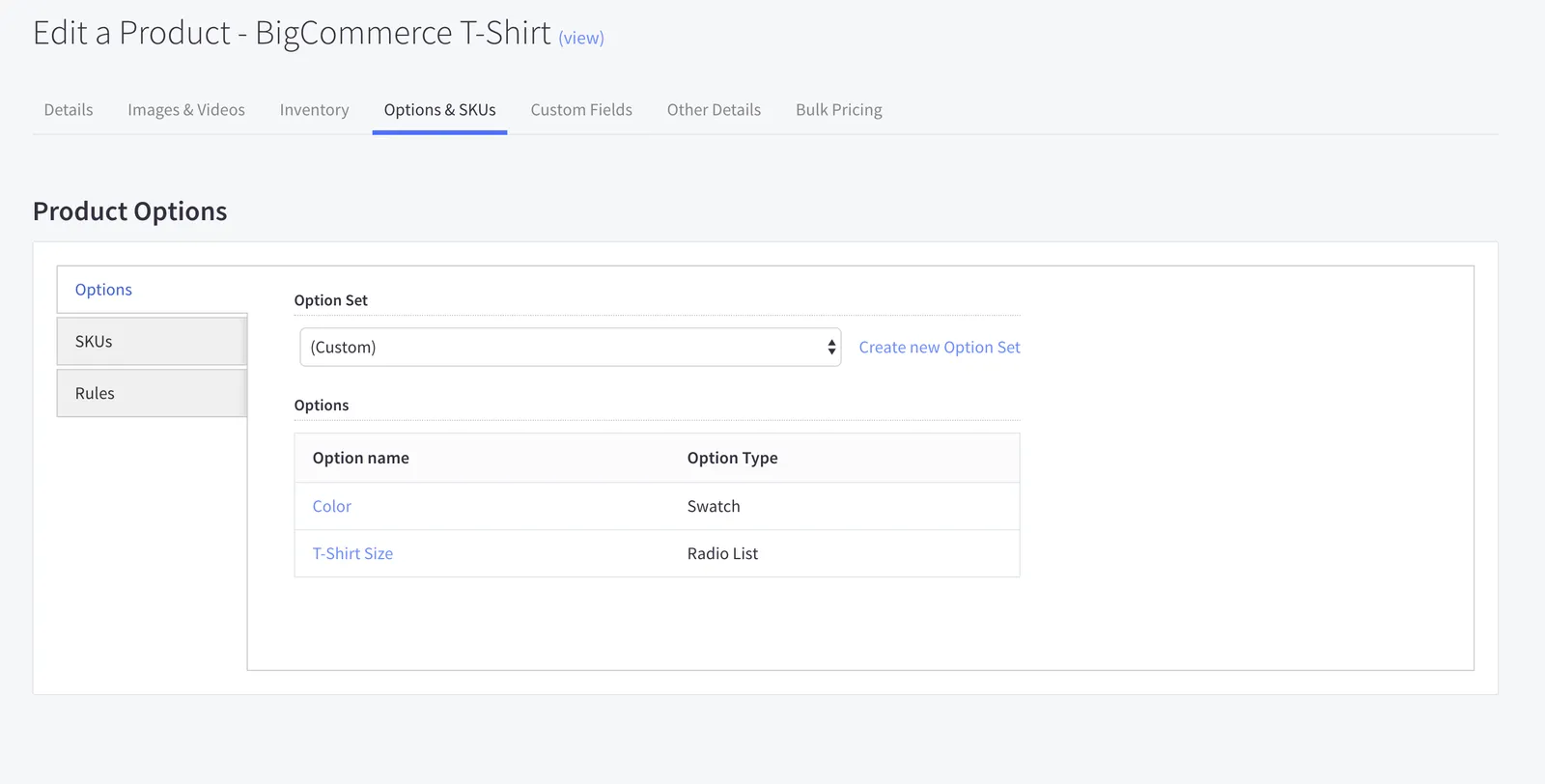 Below, **Small** is updated to **Small T-Shirt**. **V3 request** `PUT https://api.bigcommerce.com/stores/{store_hash}/v3/catalog/products/{product_id}/options/{option_id}/values/{option_value)` ```json showLineNumbers={false} { "label": "Small T-Shirt" } ``` Notice that the option value ID has changed from 192 to 214. **V3 response** ```json showLineNumbers={false} { "data": { "id": 214, "label": "Small T-Shirt", "sort_order": 0, "value_data": null, "is_default": false }, "meta": {} } ``` Even though we edited only one option value, option value IDs for all other options have also changed. The control panel will display these options as **(Custom)**. **V3 response** `GET https://api.bigcommerce.com/stores/{store_hash}/v3/catalog/products/{product_id}/options` ```json showLineNumbers={false} { "data": [ { "id": 242, "product_id": 201, "name": "Color1545071633-201", "display_name": "Color", "type": "swatch", "sort_order": 0, "option_values": [ { "id": 211, "label": "Red", "sort_order": 1, "value_data": { "colors": [ "#ff0000" ] }, "is_default": false }, { "id": 212, "label": "Green", "sort_order": 2, "value_data": { "colors": [ "#008000" ] }, "is_default": false }, { "id": 213, "label": "Blue", "sort_order": 3, "value_data": { "colors": [ "#0000ff" ] }, "is_default": false } ], "config": [] }, { "id": 243, "product_id": 201, "name": "T-Shirt-Size1545071633-201", "display_name": "T-Shirt Size", "type": "rectangles", "sort_order": 1, "option_values": [ { "id": 214, "label": "Small T-Shirt", "sort_order": 0, "value_data": null, "is_default": false }, { "id": 215, "label": "Medium", "sort_order": 1, "value_data": null, "is_default": false }, { "id": 216, "label": "Large", "sort_order": 2, "value_data": null, "is_default": false } ], "config": [] } ], "meta": { "pagination": { "total": 2, "count": 2, "per_page": 50, "current_page": 1, "total_pages": 1, "links": { "current": "?page=1&limit=50" } } } } ``` #### Size and Color  ## Related resources ### Articles * [Catalog Overview](/developer/docs/admin/catalog-and-inventory) * [Deprecations and sunsets](/developer/docs/overview/api-fundamentals/deprecations-sunsets)